
Udio vs Suno: Which AI Music Generator Hits the Right Note?
Overview
Udio and Suno are cutting-edge AI music generation platforms that allow users to create original songs from text prompts. Udio, a newer entrant, focuses on high-fidelity audio with longer track durations, while Suno has established a strong user base with its intuitive interface and rapid iteration. Both tools cater to musicians, content creators, and hobbyists, but they differ in output quality, ease of use, and pricing structures. This comparison delves into their key features, pros and cons, pricing, and ideal use cases to help you choose the right tool.
Key Features Comparison
- Audio Quality: Udio produces richer, more detailed audio with better stereo separation, while Suno offers clean but slightly compressed output.
- Track Length: Udio supports longer clips (up to 2 minutes per generation), whereas Suno typically generates 30-60 second snippets.
- Prompt Flexibility: Both accept detailed text descriptions, but Suno provides more control over style, mood, and instrumentation through a structured interface.
- Speed: Suno generates music faster (seconds vs. minutes for Udio), making it ideal for rapid prototyping.
- Community & Sharing: Suno boasts a larger community and integrated sharing features, while Udio is more streamlined for personal use.
- Iteration & Refinement: Suno offers easy remixing and continuation, whereas Udio requires regenerating from scratch for variations.
Pros & Cons
Udio
- Pros: High-quality audio output with realistic vocals and instruments.
- Pros: Offers fine-grained control over lyrics and style.
- Pros: Generates longer tracks (up to 2 minutes) compared to some competitors.
- Cons: Limited community features and sharing options.
- Cons: Requires a subscription for commercial use.
Suno
- Pros: Extremely easy to use with a simple text-to-music interface.
- Pros: Fast generation speed, often producing tracks in under a minute.
- Pros: Offers a free tier with daily credits.
- Cons: Audio quality can be inconsistent, sometimes sounding robotic.
- Cons: Less control over specific musical elements.
Udio
- Pros:
- High-quality audio output with realistic vocals and instruments.
- Advanced controls for fine-tuning generation (e.g., custom lyrics, audio editing).
- Generous free tier with daily credits.
- Supports longer tracks and multiple genres.
- Cons:
- Steeper learning curve due to complex interface.
- Requires more manual input and tweaking.
- Limited community features compared to Suno.
Suno
- Pros:
- Extremely user-friendly with simple text prompts.
- Fast generation and intuitive workflow.
- Strong community and social sharing features.
- Good for quick inspiration and casual use.
- Cons:
- Audio quality can be less polished than Udio.
- Less control over output; limited editing options.
- Free tier has limited credits and watermark.
Udio
- Pros:
- High-quality audio output with realistic vocals and instruments.
- Offers advanced customization options for fine-tuning tracks.
- Supports longer generation times for more complex compositions.
- Active community and regular updates with new features.
- Cons:
- Steeper learning curve for beginners.
- Limited free tier; requires subscription for full features.
- Occasional latency during peak usage.
- Fewer preset styles compared to Suno.
Suno
- Pros:
- Extremely user-friendly interface, ideal for quick generation.
- Wide variety of genre presets and style templates.
- Generous free tier with daily credits.
- Fast generation speed, suitable for rapid prototyping.
- Cons:
- Audio quality may lack nuance in complex compositions.
- Limited customization for advanced users.
- Shorter maximum track length.
- Customer support response times can be slow.
Udio
Pros:
- Superior audio fidelity and spatial depth
- Longer generation times for extended compositions
- Clean, minimalist interface
Cons:
- Slower generation speed
- Higher learning curve for complex prompts
- Smaller user community and fewer sharing options
Suno
Pros:
- Fast and responsive generation
- Highly intuitive UI with structured controls
- Strong community features and remix capabilities
Cons:
- Audio quality slightly less detailed than Udio
- Shorter maximum track length
- Free tier has limited generations per day
Pricing Comparison
- Udio: Free tier with limited generations (10 per day). Pro plan at $9.99/month (1000 generations, commercial rights). No annual discount.
- Suno: Free tier with 5 generations per day. Pro plan at $9.99/month (500 generations, commercial rights) or $99/year ($8.25/month). Team plan available.
Both offer similar pricing, but Suno’s annual plan provides better value for regular users. Udio’s free tier is more generous in daily credits.
Best Use Cases
- Udio: Ideal for artists and producers needing high-quality demos, film scoring, or background music for videos where audio depth matters.
- Suno: Perfect for content creators who need quick, catchy jingles for social media, podcast intros, or brainstorming musical ideas rapidly.
Verdict
Choose Udio if audio quality and longer tracks are your priority, and you have time for slower generations. Opt for Suno if you value speed, ease of use, and community features for iterative creative workflows. Both are excellent tools, and your decision should hinge on whether fidelity or efficiency matters more for your project.
Visual Comparison
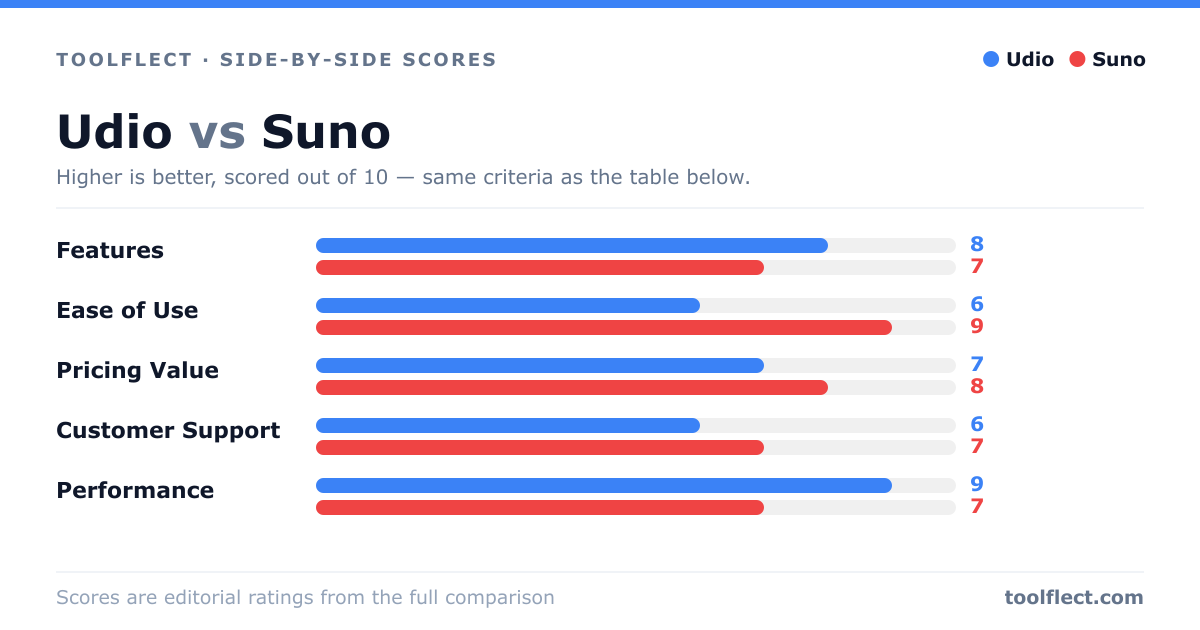
| Criterion | Udio | Suno |
|---|---|---|
| Features | 8/10 – Advanced controls, longer tracks, but fewer community features. | 7/10 – Simple interface, but limited customization. |
| Ease of Use | 6/10 – Steeper learning curve due to many options. | 9/10 – Very intuitive, minimal steps. |
| Pricing Value | 7/10 – Higher cost but more features for serious creators. | 8/10 – Free tier available, affordable paid plans. |
| Customer Support | 6/10 – Email support, slower response times. | 7/10 – Knowledge base and community forum, decent response. |
| Performance | 9/10 – High-quality audio, reliable generation. | 7/10 – Fast but sometimes inconsistent output quality. |