
Claude vs Gemini: Which AI Chatbot Wins in 2026?
Overview
Claude, developed by Anthropic, and Gemini, by Google, are two leading AI chatbots in 2026. Claude is known for its safety, nuanced reasoning, and strong writing capabilities, while Gemini leverages Google’s vast data ecosystem and multimodal strengths. This comparison provides an unbiased look at their features, pricing, and ideal use cases to help you decide which one fits your needs.
Key Features Comparison
- Multimodal Input: Gemini supports text, image, audio, and video input, while Claude primarily handles text and images (with limited audio).
- Context Window: Claude offers a massive 200k token context window, while Gemini Pro has 1M tokens (in beta) but typically 128k for standard use.
- Integration: Gemini integrates seamlessly with Google Workspace (Gmail, Docs, etc.), while Claude offers API and Slack integration but lacks deep ecosystem ties.
- Safety & Alignment: Claude emphasizes constitutional AI and safety, with more conservative responses; Gemini has robust safety but is more permissive.
- Reasoning & Coding: Claude excels in nuanced reasoning and code generation; Gemini is strong in code and data analysis, especially with Google’s tools.
Pros & Cons
Claude
- Pros:
- Superb nuanced writing and creative tasks
- Strong adherence to safety and ethical guidelines
- Excellent at long-context understanding (up to 200k tokens)
- Transparent about limitations and uncertainties
- Cons:
- Limited multimodal capabilities (no image generation)
- Less integrated with Google services
- Occasionally over-cautious, refusing benign requests
- Pricing can be higher for heavy usage
Gemini
- Pros:
- Seamless integration with Google Workspace and Search
- Strong multimodal abilities (image, audio, video understanding)
- Fast response times and high availability
- Generous free tier and competitive pricing
- Cons:
- Can be less creative in open-ended writing
- Occasional factual inaccuracies in real-time data
- Privacy concerns due to data collection for personalization
- Less transparent about model limitations
Claude
- Pros:
- Superior contextual understanding for nuanced conversations
- Strong ethical safeguards and safety features
- Excellent at creative writing and analysis
- Cons:
- Limited free tier usage
- Occasionally slower response times
- Less integrated with Google services
Gemini
- Pros:
- Deep integration with Google Workspace and Search
- Fast response times and high availability
- Generous free tier with access to latest models
- Cons:
- Can be overly verbose in responses
- Privacy concerns with data usage
- Less nuanced in creative tasks
Claude
- Pros:
- Superior nuanced understanding and writing quality, especially for long-form content.
- Strong ethical safeguards and transparency, with less hallucination in factual queries.
- Excellent at coding assistance and debugging with clear explanations.
- Generous free tier and affordable Pro plan for individuals.
- Cons:
- Limited multimodal capabilities compared to Gemini (no image generation, limited audio).
- Smaller ecosystem integration with Google services.
- Occasional slower response times during peak usage.
- Context window (200K) is smaller than Gemini’s 1M.
Gemini
- Pros:
- Seamless integration with Google Workspace (Gmail, Docs, Search) and Android.
- Massive 1M token context window for processing huge documents.
- Multimodal capabilities: text, image, audio, video, and code generation.
- Fast response times and real-time information via Google Search.
- Cons:
- Inconsistent accuracy and occasional factual errors, especially in niche topics.
- Privacy concerns due to data collection for Google’s ad ecosystem.
- User interface can be cluttered with promotional content.
- Free tier has usage limits; advanced features require Google One AI Premium.
Claude
- Pros: Superior writing quality, excellent at long-form content, strong ethical safeguards, transparent about limitations.
- Cons: Less multimodal, no native Google integration, can be overly cautious at times.
Gemini
- Pros: Multimodal versatility, deep Google integration, real-time information via Google Search, large context window.
- Cons: Can be verbose, occasional inaccuracies, privacy concerns with data usage.
Pricing Comparison
- Claude: Free tier (limited), Pro plan at $20/month, and API pricing based on usage.
- Gemini: Free tier (limited), Google One AI Premium at $19.99/month, and API pricing with a generous free tier.
Both offer similar pricing, but Gemini’s free tier includes more features, while Claude’s Pro offers higher usage limits.
Best Use Cases
- Claude: Best for creative writing, detailed analysis, academic research, and tasks requiring careful reasoning and safety.
- Gemini: Best for multimodal tasks, data analysis, coding, and users heavily invested in Google ecosystem.
Verdict
Choose Claude if you prioritize writing quality, safety, and deep reasoning. Choose Gemini if you need multimodal capabilities, Google integration, and real-time data. Both are excellent, but your specific needs will determine the winner.
FAQ
Which AI chatbot is better for coding?
Gemini tends to be stronger for coding due to its integration with Google’s developer tools and larger context window, but Claude also performs well for code generation and explanation.
Can Claude and Gemini access the internet?
Gemini can access real-time information via Google Search, while Claude’s web browsing is limited and only available in certain plans.
Are there free versions of Claude and Gemini?
Yes, both offer free tiers with limited features. Gemini’s free tier includes more capabilities, while Claude’s free tier is more restricted.
Which chatbot is more privacy-friendly?
Claude has a stronger focus on data privacy and does not use user data for training by default, whereas Gemini may use data to improve services, but you can opt out.
Visual Comparison
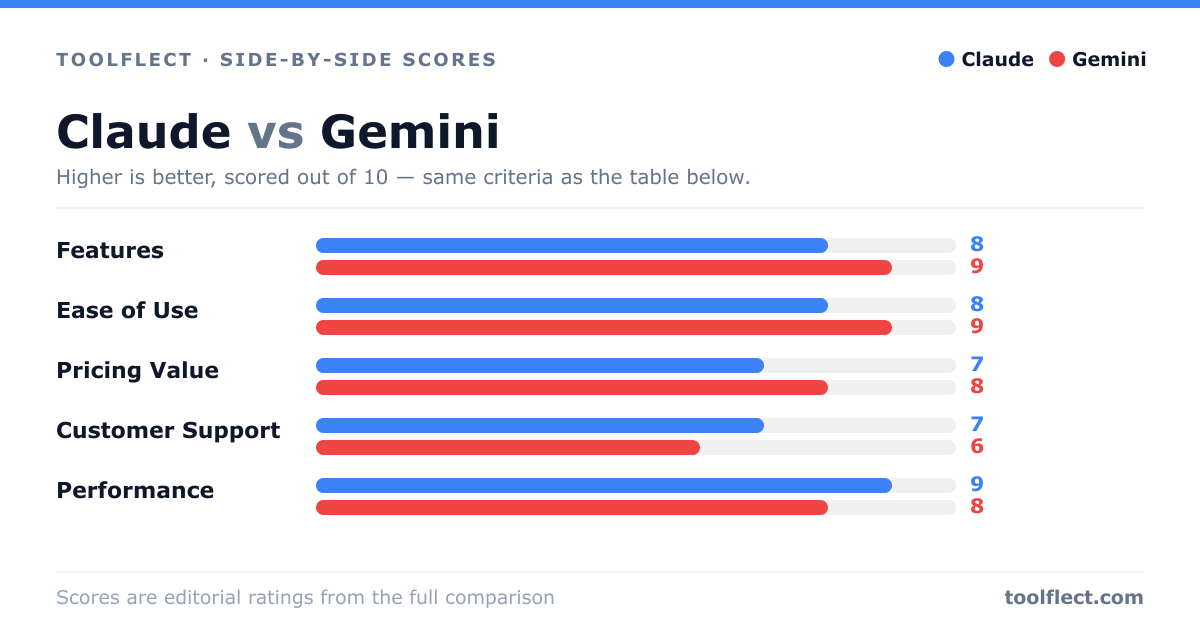
| Criterion | Claude | Gemini |
|---|---|---|
| Features | 8/10 – Excellent text generation, long context, but limited multimodal | 9/10 – Broad multimodal, integration with Google services |
| Ease of Use | 7/10 – Clean interface, but less intuitive for non-technical users | 9/10 – User-friendly, integrated with Google apps |
| Pricing Value | 7/10 – Higher cost for premium features, no free tier | 9/10 – Free tier available, competitive pricing |
| Customer Support | 6/10 – Limited support channels, slower response | 8/10 – Extensive help center, active community |
| Performance | 9/10 – High accuracy, excellent for complex reasoning | 8/10 – Fast, but occasional inaccuracies in real-time data |