
Mailchimp AI vs Brevo AI: Which AI Tool Wins?
Overview
Mailchimp AI and Brevo AI are two leading AI-powered marketing automation platforms designed to help businesses streamline their email marketing, CRM, and customer engagement efforts. Mailchimp, now part of Intuit, offers a comprehensive suite with advanced AI features like predictive analytics and content optimization. Brevo (formerly Sendinblue) focuses on affordability and ease of use, with AI tools for send-time optimization and segmentation. This comparison will help you decide which platform aligns best with your business needs.
Key Features Comparison
- AI Capabilities: Mailchimp AI offers predictive analytics, content generation, and send-time optimization. Brevo AI provides send-time optimization, predictive segmentation, and AI-powered subject line suggestions.
- Email Marketing: Both offer drag-and-drop editors, templates, and A/B testing. Mailchimp has more advanced automation workflows, while Brevo offers simpler, more intuitive automation.
- CRM & Segmentation: Mailchimp includes a built-in CRM with lead scoring and tagging. Brevo has a basic CRM with contact management and segmentation.
- Integrations: Mailchimp integrates with 300+ apps, including Shopify and Salesforce. Brevo offers 100+ integrations, including WordPress and WooCommerce.
- Deliverability: Both have strong deliverability rates, but Mailchimp is known for its robust infrastructure, while Brevo offers good deliverability at a lower cost.
Pros & Cons
Mailchimp AI
- Pros: Advanced audience segmentation and predictive analytics for targeted campaigns.
- Pros: Seamless integration with e-commerce platforms and CRM tools.
- Pros: Robust automation workflows with AI-powered send-time optimization.
- Cons: Pricing can become expensive as subscriber list grows.
- Cons: Steeper learning curve for beginners due to feature-rich interface.
Brevo AI
- Pros: Affordable pricing with a generous free tier and pay-as-you-go options.
- Pros: User-friendly drag-and-drop email builder and automation tools.
- Pros: AI-powered content generation and subject line optimization.
- Cons: Limited advanced segmentation compared to Mailchimp.
- Cons: Customer support response times can be slow on lower tiers.
Mailchimp AI
- Pros: Advanced automation with AI-powered customer journey builder; robust audience segmentation using predictive analytics; extensive integration ecosystem.
- Cons: Can be expensive for small lists; steeper learning curve for advanced features; AI features may require higher-tier plans.
Brevo AI
- Pros: Affordable pricing with a generous free tier; AI-powered send time optimization and subject line generation; user-friendly interface with drag-and-drop editor.
- Cons: Fewer advanced automation options compared to Mailchimp; limited AI features on lower plans; customer support response times can vary.
Mailchimp AI
- Pros: Advanced automation with AI-powered customer journey builder; robust analytics and reporting; extensive integrations with e-commerce platforms.
- Cons: Can be expensive for small lists; steep learning curve for beginners; AI features require higher-tier plans.
Brevo AI
- Pros: Affordable pricing with free tier; intuitive drag-and-drop email builder; AI-powered send time optimization and subject line generator.
- Cons: Limited automation capabilities compared to Mailchimp; fewer advanced AI features; customer support can be slow on free plan.
Mailchimp AI
- Pros: Advanced AI features, extensive integrations, robust automation, scalable for large businesses.
- Cons: Higher pricing tiers, steeper learning curve, some features locked behind premium plans.
Brevo AI
- Pros: Affordable pricing, user-friendly interface, excellent for small to medium businesses, good deliverability.
- Cons: Limited advanced features, fewer integrations, basic CRM compared to Mailchimp.
Pricing Comparison
Mailchimp offers a free plan for up to 500 contacts, with paid plans starting at $13/month for 500 contacts (Essential), $20/month (Standard), and $350/month (Premium). Brevo offers a free plan for up to 300 emails/day, with paid plans starting at $25/month for 5,000 emails (Starter), $65/month (Business), and custom pricing for Enterprise. Brevo is generally more cost-effective for high-volume senders.
Best Use Cases
- Mailchimp AI: Best for growing businesses that need advanced automation, predictive analytics, and a comprehensive CRM. Ideal for e-commerce and larger marketing teams.
- Brevo AI: Best for small to medium businesses, startups, and budget-conscious marketers who need a simple, effective email marketing tool with AI assistance.
Verdict
Both Mailchimp AI and Brevo AI are powerful tools, but they cater to different needs. If you require advanced AI features, deep integrations, and a robust CRM, Mailchimp AI is the winner. If you prioritize affordability, ease of use, and simplicity, Brevo AI is the better choice. Assess your business size, budget, and marketing complexity to make the right decision.
FAQ
Which AI tool is better for small businesses?
Brevo AI is generally better for small businesses due to its lower cost and user-friendly interface. Mailchimp AI may be overkill for very small operations.
Can I migrate from Mailchimp to Brevo easily?
Yes, both platforms offer migration tools and support to help you transfer your contacts and campaigns. However, it’s important to review the data mapping to ensure a smooth transition.
Do both tools offer free plans?
Yes, both offer free plans with limitations. Mailchimp’s free plan includes up to 500 contacts and 1,000 emails/month, while Brevo’s free plan allows up to 300 emails/day.
Which tool has better AI-powered personalization?
Mailchimp AI offers more advanced personalization features, including predictive analytics and dynamic content. Brevo AI provides basic personalization like subject line suggestions and send-time optimization.
Visual Comparison
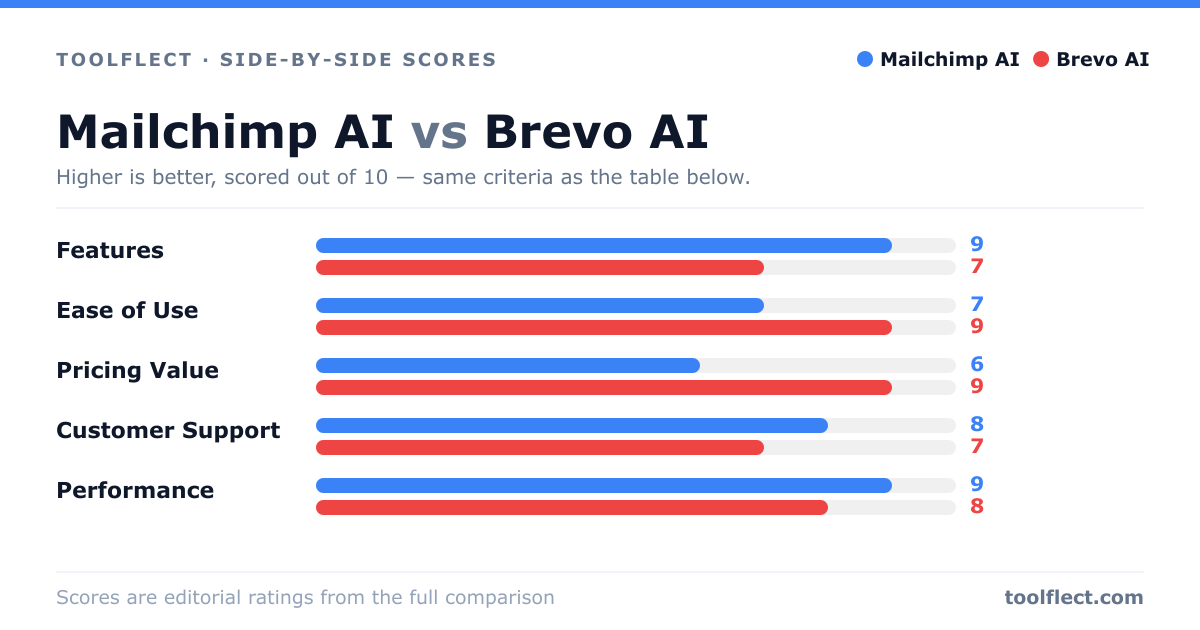
| Criterion | Mailchimp AI | Brevo AI |
|---|---|---|
| Features | 9/10 – Extensive AI-driven automation, predictive analytics, and advanced segmentation. | 7/10 – Solid AI features like content generation and send-time optimization, but fewer advanced options. |
| Ease of Use | 7/10 – Powerful but complex; steeper learning curve. | 9/10 – Intuitive drag-and-drop builder, easy for beginners. |
| Pricing Value | 6/10 – Higher cost, especially for growing lists. | 9/10 – Affordable, free tier, and flexible pay-as-you-go. |
| Customer Support | 8/10 – Responsive support with 24/7 chat and email. | 7/10 – Good support but slower on lower tiers. |
| Performance | 9/10 – High deliverability and fast sending. | 8/10 – Reliable performance, but occasional delays during peak times. |