
Roboflow vs Labelbox: Which AI Tool Wins?
Overview
Roboflow and Labelbox are two prominent platforms in the data & analytics space, specifically for computer vision and data labeling. Roboflow focuses on streamlining the entire computer vision pipeline, from data preparation to model deployment, while Labelbox excels in data labeling and annotation with enterprise-grade collaboration and workflow management. This comparison provides an unbiased look at their features, pricing, and ideal use cases to help you choose the right tool for your needs.
Key Features Comparison
- Data Labeling: Roboflow offers automated labeling tools, model-assisted labeling, and a variety of annotation types (bounding boxes, polygons, segmentation). Labelbox provides a robust labeling interface with custom workflows, QA, and collaboration features, supporting image, video, and text.
- Data Management: Roboflow provides dataset versioning, preprocessing, and augmentation. Labelbox offers data cataloging, versioning, and integration with cloud storage.
- Model Training & Deployment: Roboflow includes built-in training and deployment options (e.g., Roboflow Train, deploy to edge). Labelbox focuses on labeling and data management, but integrates with training platforms like AWS, GCP, and Azure.
- Collaboration & Workflow: Labelbox excels in team collaboration, role-based access, and workflow automation. Roboflow offers basic collaboration but is more developer-centric.
- Integrations: Both integrate with popular frameworks and tools, but Roboflow has stronger ties to computer vision libraries (OpenCV, PyTorch), while Labelbox integrates with data science platforms and cloud services.
Pros & Cons
Roboflow
- Pros:
- End-to-end platform for computer vision, from data labeling to model deployment.
- Extensive model zoo and AutoML capabilities for quick prototyping.
- Strong community and educational resources.
- Generous free tier for small projects.
- Cons:
- Limited labeling features compared to dedicated labeling tools.
- Pricing can become expensive for large-scale projects.
- Less flexible for complex custom workflows.
- Deployment options are more limited than some competitors.
Labelbox
- Pros:
- Enterprise-grade data labeling platform with advanced QA and collaboration tools.
- Excellent integration with ML pipelines and cloud services.
- Highly customizable labeling interfaces for various data types.
- Strong API and SDK for automation.
- Cons:
- Steeper learning curve for new users.
- Pricing is higher, especially for small teams.
- Focus primarily on labeling; requires additional tools for model training.
- Limited free tier.
Roboflow
- Pros:
- End-to-end platform for computer vision, from data labeling to model deployment.
- Extensive dataset management features including versioning, preprocessing, and augmentation.
- Supports a wide range of model architectures and offers one-click training.
- Strong community and educational resources.
- Cons:
- Pricing can be steep for large-scale projects.
- Limited customization for advanced users compared to code-first approaches.
- Some users report occasional performance issues with large datasets.
Labelbox
- Pros:
- Robust data labeling platform with advanced annotation tools and workflows.
- Excellent collaboration features for teams.
- Integrates well with existing ML pipelines via APIs and SDKs.
- Scalable for enterprise-level projects.
- Cons:
- Steeper learning curve for new users.
- Pricing can be high, especially for smaller teams.
- Focuses primarily on labeling, requiring separate tools for training and deployment.
Roboflow
- Pros: End-to-end platform for computer vision, from data labeling to model deployment; extensive dataset management and preprocessing tools; supports multiple model architectures and export formats; strong community and educational resources.
- Cons: Limited labeling features compared to specialized tools; pricing can be high for large-scale projects; less flexible for complex labeling workflows; customer support response times can be slow.
Labelbox
- Pros: Advanced labeling interface with AI-assisted labeling and automation; robust collaboration and project management features; flexible data labeling workflows for various data types; strong API and integrations.
- Cons: Steeper learning curve for new users; pricing may be higher for small teams; some features require enterprise plan; performance can lag with very large datasets.
Roboflow
- Pros: End-to-end platform (label, train, deploy), easy-to-use interface for beginners, strong community and tutorials, automated labeling features.
- Cons: Limited advanced labeling features for complex tasks, pricing can be high for large datasets, less customizable workflows.
Labelbox
- Pros: Enterprise-grade labeling with advanced QA and collaboration, highly customizable workflows, scalable for large teams, strong API and integrations.
- Cons: Steeper learning curve, pricing is often higher, no built-in model training, may be overkill for small projects.
Pricing Comparison
Roboflow offers a free tier with limited features, then paid plans starting at $249/month for Pro, scaling up for teams and enterprise. Labelbox also has a free tier with limited features, but paid plans are custom-quoted based on usage and team size, often starting around $5,000/year for small teams. For large-scale enterprise needs, Labelbox may be more cost-effective, but for individual developers or small startups, Roboflow’s transparent pricing is more accessible.
Best Use Cases
- Roboflow: Ideal for developers and small teams looking for an all-in-one solution to quickly build and deploy computer vision models, especially for prototyping and educational purposes.
- Labelbox: Best for enterprises and data labeling teams that need robust collaboration, complex labeling workflows, and integration with existing ML pipelines, particularly for large-scale annotation projects.
Verdict
Both Roboflow and Labelbox are powerful tools, but they serve different needs. If you want a streamlined, end-to-end computer vision platform with easy model training and deployment, Roboflow is a great choice. If you need a sophisticated data labeling platform with enterprise-level collaboration and customization, Labelbox is the way to go. Assess your project’s scale, team size, and budget to make the right decision.
FAQ
Can I use Roboflow for free?
Yes, Roboflow offers a free tier with limited features, including a certain number of images and model training. For more advanced features, paid plans are available.
Does Labelbox support video annotation?
Yes, Labelbox supports video annotation, including object tracking and classification, making it suitable for video-based projects.
Which tool is better for small startups?
Roboflow is often more suitable for small startups due to its lower starting price and ease of use, while Labelbox may be more expensive and complex.
Can I integrate these tools with my existing ML pipeline?
Both tools offer APIs and integrations. Roboflow integrates with popular frameworks like PyTorch and TensorFlow, while Labelbox integrates with cloud services like AWS and GCP, making both compatible with existing pipelines.
Visual Comparison
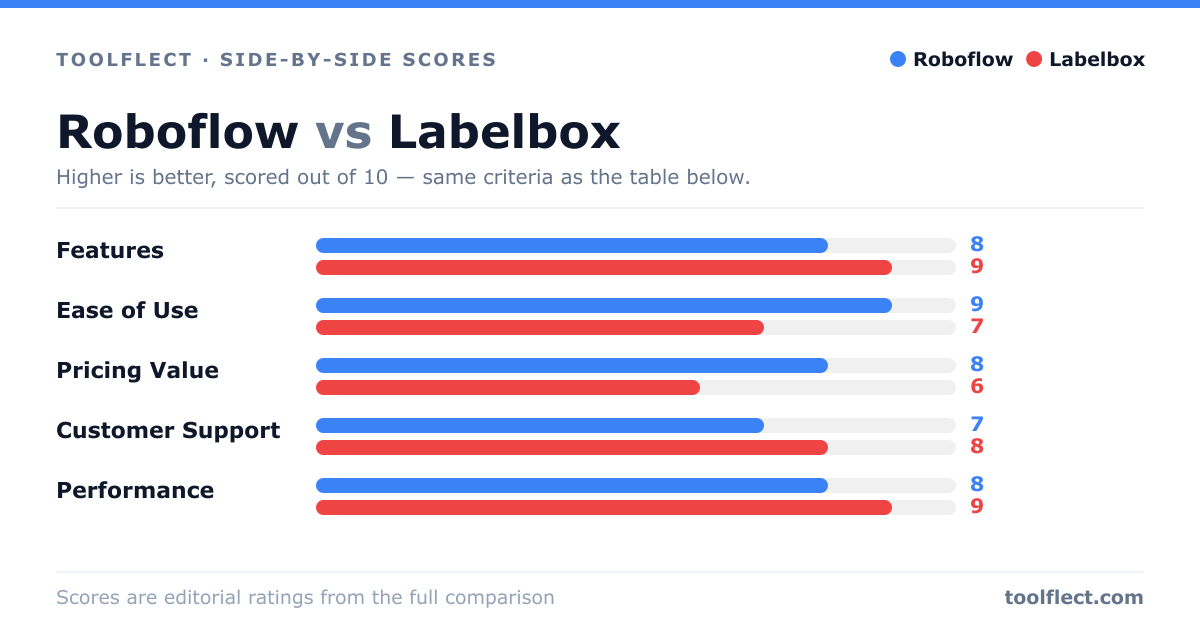
| Criterion | Roboflow | Labelbox |
|---|---|---|
| Features | 8/10 – End-to-end CV platform with AutoML and deployment | 9/10 – Advanced labeling and data management |
| Ease of Use | 9/10 – Intuitive UI, quick onboarding | 7/10 – Powerful but complex |
| Pricing Value | 8/10 – Free tier and affordable plans | 6/10 – Higher cost, enterprise-focused |
| Customer Support | 7/10 – Community and docs, slower response | 9/10 – Dedicated support and SLAs |
| Performance | 8/10 – Fast training and inference | 9/10 – Scalable and reliable for large datasets |