
Lovable vs Bolt: Which AI Coding Tool Wins?
Overview
Lovable and Bolt are both AI-powered development tools designed to accelerate coding workflows. Lovable focuses on natural language-driven code generation and full-stack app creation, while Bolt emphasizes rapid prototyping and front-end development with AI assistance. Both aim to reduce boilerplate and let developers focus on logic, but they differ in approach, target audience, and pricing.
Key Features Comparison
- Code Generation: Lovable excels at generating full-stack applications from natural language descriptions, including backend and database integration. Bolt specializes in front-end components and UI generation, with strong support for popular frameworks like React and Vue.
- Integration: Lovable offers deep integrations with GitHub, Vercel, and Supabase, making it easy to deploy and manage projects. Bolt integrates with Figma and design tools, allowing designers to convert mockups into code.
- Collaboration: Lovable provides real-time collaboration features for teams, including shared workspaces and version control. Bolt focuses more on individual developer experience, though it supports basic sharing.
- Customization: Lovable allows extensive customization through plugins and API access. Bolt offers a more streamlined, opinionated workflow with fewer customization options.
- Learning Curve: Lovable has a steeper learning curve due to its broader feature set, while Bolt is more intuitive for front-end developers familiar with modern JS frameworks.
Pros & Cons
Lovable
- Pros:
- Intuitive visual builder for rapid prototyping
- Strong focus on UI/UX with pre-built components
- Real-time collaboration features
- Good for non-technical users
- Cons:
- Limited customization for complex logic
- Can become expensive at scale
- Less suitable for large-scale enterprise projects
Bolt
- Pros:
- Powerful AI code generation for full-stack apps
- Excellent for developers with deep integration
- Supports multiple frameworks and languages
- Scalable for production-grade applications
- Cons:
- Steeper learning curve for beginners
- Requires coding knowledge to fully utilize
- Pricing may be higher for advanced features
Lovable
- Pros: Intuitive visual builder for rapid prototyping; strong focus on front-end design; good for non-developers.
- Cons: Limited backend customization; less suitable for complex logic; smaller community.
Bolt
- Pros: Full-stack development capabilities; excellent for scalable applications; robust API integration.
- Cons: Steeper learning curve; more expensive for advanced features; requires coding knowledge.
Lovable
- Pros:
- Intuitive visual builder with drag-and-drop components, ideal for non-coders.
- Strong focus on design and UI, producing polished interfaces quickly.
- Real-time collaboration features for team projects.
- Generous free tier with basic features.
- Cons:
- Limited customization for complex logic and backend integrations.
- Performance can lag with large projects.
- Pricing scales up quickly for advanced features.
- Less suitable for production-grade applications.
Bolt
- Pros:
- Powerful AI code generation with support for multiple languages.
- Excellent for rapid prototyping and full-stack development.
- Integrates well with existing codebases and version control.
- Flexible pricing with pay-as-you-go options.
- Cons:
- Steeper learning curve for beginners.
- Generated code may require manual refactoring for best practices.
- UI customization is less visual and more code-centric.
- Customer support response times can be slow.
Lovable
- Pros: Full-stack capabilities, strong backend support, excellent for rapid prototyping of complete apps, good for non-technical founders.
- Cons: Can generate bloated code, requires careful prompting, pricing may be high for individual developers.
Bolt
- Pros: Excellent for UI/UX-focused development, fast and lightweight, great Figma integration, lower learning curve.
- Cons: Limited to front-end, less suitable for full-stack projects, fewer integrations with backend services.
Pricing Comparison
Lovable offers a free tier with limited credits, then paid plans starting at $20/month for individuals and custom pricing for teams. Bolt also has a free tier, with Pro plans starting at $15/month, and enterprise options. Both offer annual discounts. For heavy usage, Lovable can become more expensive, but it provides more comprehensive features.
Best Use Cases
- Lovable: Best for startups and entrepreneurs who need to build a full MVP quickly without deep coding knowledge. Also great for full-stack developers who want to speed up boilerplate code.
- Bolt: Ideal for front-end developers and designers who want to turn designs into code rapidly. Also useful for creating interactive prototypes and UI components.
Verdict
Both tools are powerful, but they serve different needs. If you need a full-stack AI assistant that can handle everything from database to UI, Lovable is the winner. If your focus is on front-end development and design-to-code workflows, Bolt is more efficient and cost-effective. Choose based on your project scope and team’s expertise.
Visual Comparison
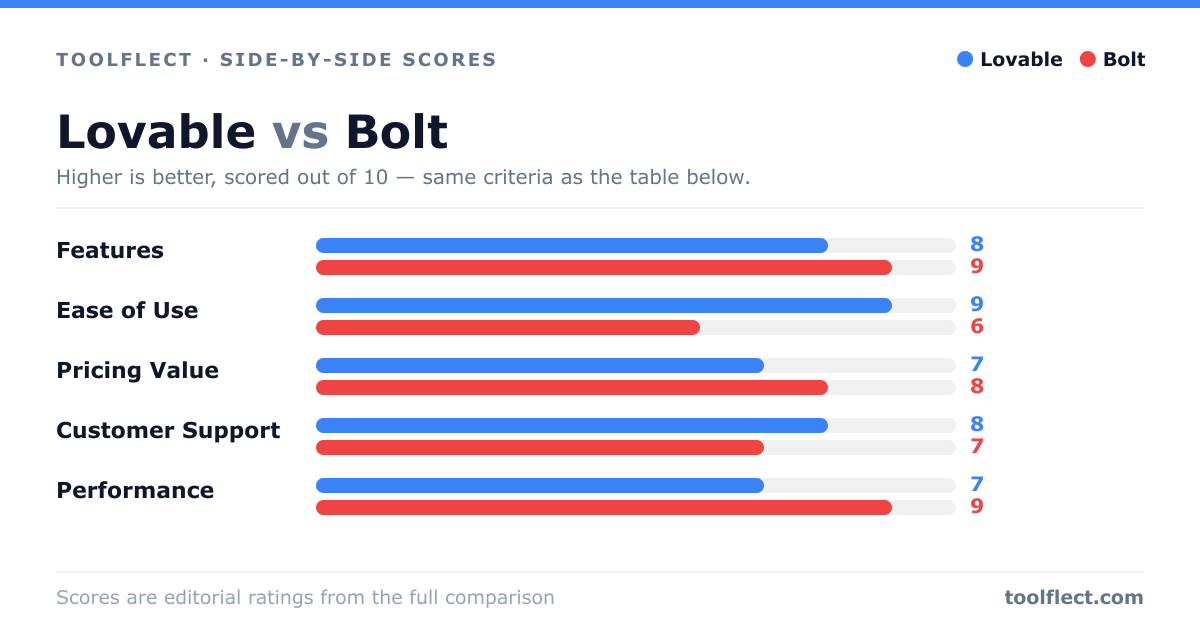
| Criterion | Lovable | Bolt |
|---|---|---|
| Features | 8/10 – Visual builder, pre-built components, real-time collaboration | 9/10 – AI code generation, multi-framework support, full-stack capabilities |
| Ease of Use | 9/10 – Very intuitive, minimal learning curve | 6/10 – Requires coding knowledge, steeper learning curve |
| Pricing Value | 7/10 – Good for small projects, but can get pricey | 8/10 – Competitive pricing for features offered |
| Customer Support | 8/10 – Responsive support, community forum | 7/10 – Good support but slower response times |
| Performance | 7/10 – Good for prototypes, may lag on large apps | 9/10 – High performance, optimized for production |