
Synthesia Studio vs Colossyan: Which AI Video Tool Wins?
Overview
Synthesia Studio and Colossyan are two leading AI video creation platforms that enable users to generate professional videos with AI avatars and voiceovers. Synthesia is known for its extensive avatar library and multilingual support, while Colossyan focuses on simplicity and collaboration for corporate training and communications. This comparison will help you decide which tool fits your needs.
Key Features Comparison
- Avatar Variety: Synthesia offers over 140 diverse AI avatars, while Colossyan provides a smaller but customizable set.
- Languages: Synthesia supports 120+ languages; Colossyan supports 70+.
- Video Editing: Synthesia has a timeline-based editor with advanced controls; Colossyan offers a simple drag-and-drop editor.
- Collaboration: Colossyan excels with real-time collaboration and review tools; Synthesia has basic sharing options.
- Integrations: Synthesia integrates with popular tools like PowerPoint and LMS; Colossyan offers API and Zapier.
- Custom Avatars: Both allow custom avatars, but Synthesia’s process is more refined.
Pros & Cons
Synthesia Studio
- Pros: Extensive library of 140+ diverse AI avatars; supports 120+ languages and accents; robust customization with custom avatars and templates; good for corporate training and marketing videos.
- Cons: Pricing can be high for small businesses; limited video editing features compared to traditional editors; avatars can sometimes look less realistic in close-ups; no free plan, only a limited free trial.
Colossyan
- Pros: User-friendly interface with quick video generation; offers realistic AI avatars and voiceovers; includes collaboration tools for teams; flexible pricing with a free plan for basic use.
- Cons: Smaller avatar library compared to Synthesia; fewer language options (around 70); advanced features like custom avatars require higher tiers; video editing capabilities are basic.
Synthesia Studio
- Pros: Extensive library of 140+ diverse AI avatars, supports 120+ languages, and offers customizable templates for quick video creation.
- Pros: High-quality output with realistic lip-syncing and natural gestures, suitable for professional use.
- Pros: User-friendly interface with drag-and-drop editing, making it accessible for non-technical users.
- Cons: Pricing can be steep for small businesses or individual creators, with the cheapest plan starting at $29/month.
- Cons: Limited customization for advanced video editing, such as complex animations or special effects.
Colossyan
- Pros: Focus on workplace learning and training videos, with features like interactive quizzes and branching scenarios.
- Pros: Offers a free plan with limited features, making it easy to test before committing.
- Pros: Simple and intuitive interface, designed for quick video creation without a steep learning curve.
- Cons: Smaller avatar library compared to Synthesia, with fewer language options (around 70).
- Cons: Video quality may not be as polished as Synthesia, especially for complex scenes.
Synthesia Studio
- Pros:
- Extensive library of 140+ diverse AI avatars and 120+ languages/dialects.
- Advanced customization with custom avatars, backgrounds, and video templates.
- Robust editing suite including screen recording, voiceover, and interactive elements.
- Strong enterprise features with SSO, API access, and team collaboration.
- Cons:
- Higher pricing tiers, especially for custom avatars and advanced features.
- Steeper learning curve for beginners due to feature richness.
- Avatar lip-syncing can occasionally be less accurate with complex scripts.
Colossyan
- Pros:
- User-friendly interface with quick video creation from scripts.
- Realistic AI avatars with natural facial expressions and gestures.
- Affordable pricing plans, including a free tier with watermarked videos.
- Fast rendering and easy collaboration for teams.
- Cons:
- Smaller avatar library compared to Synthesia (around 50+ avatars).
- Limited customization options for avatars and templates.
- Fewer advanced features like screen recording or interactive elements.
Synthesia Studio
- Pros: Huge avatar library, excellent language support, robust editing features, good for scalable video production.
- Cons: Steeper learning curve, higher price point, occasional avatar realism issues.
Colossyan
- Pros: User-friendly interface, strong collaboration features, affordable for small teams, quick video creation.
- Cons: Fewer avatars and languages, less advanced editing, limited customization.
Pricing Comparison
Synthesia offers tiered pricing starting at $29/month (billed annually) for the Starter plan, with Enterprise options. Colossyan starts at $27/month (billed annually) for the Starter plan, with Pro and Enterprise tiers. Both offer free trials. For large-scale production, Synthesia may be more cost-effective; for small teams, Colossyan is budget-friendly.
Best Use Cases
- Synthesia Studio: Ideal for enterprises needing multilingual training videos, marketing content, and high-volume production.
- Colossyan: Perfect for small to medium teams, corporate communications, quick explainer videos, and collaborative projects.
Verdict
Both tools are excellent, but the choice depends on your priorities. If you need extensive language support and advanced editing, choose Synthesia. If you value simplicity and collaboration, choose Colossyan. For most users, Synthesia offers more power, while Colossyan offers ease of use.
Visual Comparison
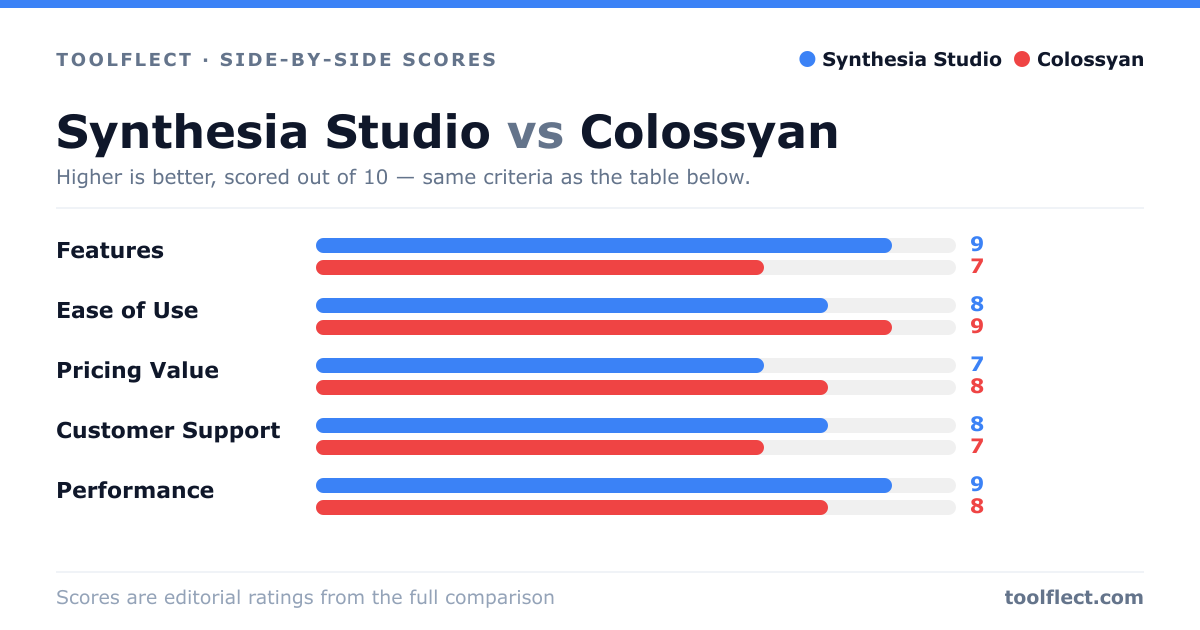
| Criterion | Synthesia Studio | Colossyan |
|---|---|---|
| Features | 9/10 – Extensive avatar library, 120+ languages, custom avatars, templates | 7/10 – Good avatar selection, 70+ languages, collaboration tools |
| Ease of Use | 8/10 – Intuitive editor, but steeper learning curve for advanced features | 9/10 – Very user-friendly, quick video creation with simple workflow |
| Pricing Value | 7/10 – Higher cost, but feature-rich; good for enterprises | 8/10 – More affordable, free plan available, good for small teams |
| Customer Support | 8/10 – Responsive support, extensive help center and tutorials | 7/10 – Support available, but slower response times on free plan |
| Performance | 9/10 – Fast rendering, high-quality output, reliable | 8/10 – Quick generation, decent quality, occasional glitches |