
Microsoft Copilot vs Cortana: Which AI Assistant Wins?
Overview
Microsoft Copilot and Cortana are both AI assistants from Microsoft, but they serve different purposes and are built on different technologies. Cortana, introduced in 2014, was Microsoft’s voice assistant integrated into Windows, while Copilot, launched in 2023, is an AI-powered productivity tool integrated into Microsoft 365 and Windows. This article provides an unbiased comparison to help you decide which one suits your needs.
Key Features Comparison
- Integration: Copilot is deeply integrated into Microsoft 365 apps (Word, Excel, PowerPoint, Outlook) and Windows, while Cortana was primarily a system-level assistant with limited app integration.
- Capabilities: Copilot leverages GPT-4 for natural language understanding, generating content, summarizing emails, and creating presentations. Cortana focuses on voice commands, reminders, and basic queries.
- Context Awareness: Copilot can access and analyze your documents, emails, and calendar to provide contextual assistance. Cortana has limited context awareness, mostly based on device settings and basic user data.
- Availability: Copilot is available on Windows, web, and mobile apps, while Cortana was deprecated for consumers and is now only available in some enterprise settings.
- Language Support: Both support multiple languages, but Copilot has broader language support due to its cloud-based AI.
Pros & Cons
Microsoft Copilot
- Pros:
- Deep integration with Microsoft 365 apps (Word, Excel, Teams) for seamless productivity.
- Leverages GPT-4 for advanced natural language understanding and generation.
- Supports multimodal inputs (text, images, code) and can generate code, documents, and more.
- Available across multiple platforms (Windows, web, mobile) with consistent experience.
- Cons:
- Requires Microsoft 365 subscription for full functionality; free tier is limited.
- May raise privacy concerns due to data processing in the cloud.
- Can be overkill for simple tasks that basic assistants handle.
- Occasional inaccuracies or hallucinations in responses.
Cortana
- Pros:
- Lightweight and integrated into Windows 10/11 for quick system commands.
- Good for setting reminders, alarms, and simple queries.
- Free to use with no subscription required.
- Voice activation and hands-free operation on supported devices.
- Cons:
- Limited functionality compared to modern AI assistants; lacks deep learning capabilities.
- Poor third-party app integration; mostly limited to Microsoft services.
- Being deprecated; Microsoft has shifted focus to Copilot.
- Inconsistent performance and outdated knowledge base.
Microsoft Copilot
- Pros:
- Deep integration with Microsoft 365 apps (Word, Excel, Teams) enhances productivity.
- Leverages GPT-4 for advanced natural language understanding and generation.
- Available across multiple platforms (Windows, web, mobile).
- Continuously updated with new features and improvements.
- Cons:
- Requires a Microsoft 365 subscription for full functionality.
- Limited to Microsoft ecosystem; less useful for non-Microsoft users.
- Potential privacy concerns due to data processing in the cloud.
- Can be overkill for simple tasks that basic assistants handle.
Cortana
- Pros:
- Lightweight and integrated into Windows 10/11 for quick system commands.
- Free to use with no subscription required.
- Basic reminders and calendar integration work well.
- Voice activation with “Hey Cortana” is convenient.
- Cons:
- Limited functionality compared to modern AI assistants.
- Discontinued on mobile and standalone devices.
- Poor third-party app integration.
- Less accurate in understanding complex queries.
Microsoft Copilot
- Pros:
- Deep integration with Microsoft 365 apps (Word, Excel, Outlook) enhances productivity.
- Leverages GPT-4 for advanced reasoning and code generation.
- Available on multiple platforms (Windows, web, mobile).
- Free tier with optional Pro subscription for advanced features.
- Cons:
- Requires Microsoft account and may have limited functionality on non-Microsoft platforms.
- Occasional inaccuracies or hallucinations in responses.
- Privacy concerns due to data processing in the cloud.
- Some features are locked behind the Pro subscription.
Cortana
- Pros:
- Lightweight and integrated into Windows 10/11 for quick tasks.
- Voice commands for reminders, alarms, and basic queries.
- Integration with Microsoft To Do and Calendar.
- No additional cost as it’s built into Windows.
- Cons:
- Limited functionality compared to modern AI assistants.
- Discontinued on mobile and standalone apps.
- Lacks advanced AI capabilities like natural language understanding.
- Not available on non-Microsoft platforms.
Microsoft Copilot
- Pros: Advanced AI capabilities, seamless integration with Microsoft 365, boosts productivity, continuously updated.
- Cons: Requires a Microsoft 365 subscription for full features, may have privacy concerns due to data access, not available on all platforms.
Cortana
- Pros: Lightweight, voice-activated, works offline for basic tasks, no subscription required.
- Cons: Limited functionality, outdated, not actively developed, poor integration with modern apps.
Pricing Comparison
Microsoft Copilot is available for free with limited features, but the full experience requires a Microsoft 365 subscription (starting at $6.99/month for personal). Cortana is free but is being phased out; it offers no premium tier. For enterprise use, Copilot for Microsoft 365 is priced at $30/user/month.
Best Use Cases
- Microsoft Copilot: Best for professionals, students, and businesses that rely on Microsoft 365 for document creation, data analysis, and email management. Ideal for generating reports, drafting emails, and creating presentations.
- Cortana: Suitable for basic voice commands like setting reminders, checking the weather, or controlling system settings. Not recommended for complex tasks.
Verdict
Microsoft Copilot is the clear winner for anyone looking for a powerful AI assistant that enhances productivity. Cortana, while once innovative, is now obsolete and lacks the advanced capabilities of Copilot. If you are a Microsoft 365 user, Copilot is a must-have. If you only need simple voice commands, Cortana might suffice, but it’s not a long-term solution.
Visual Comparison
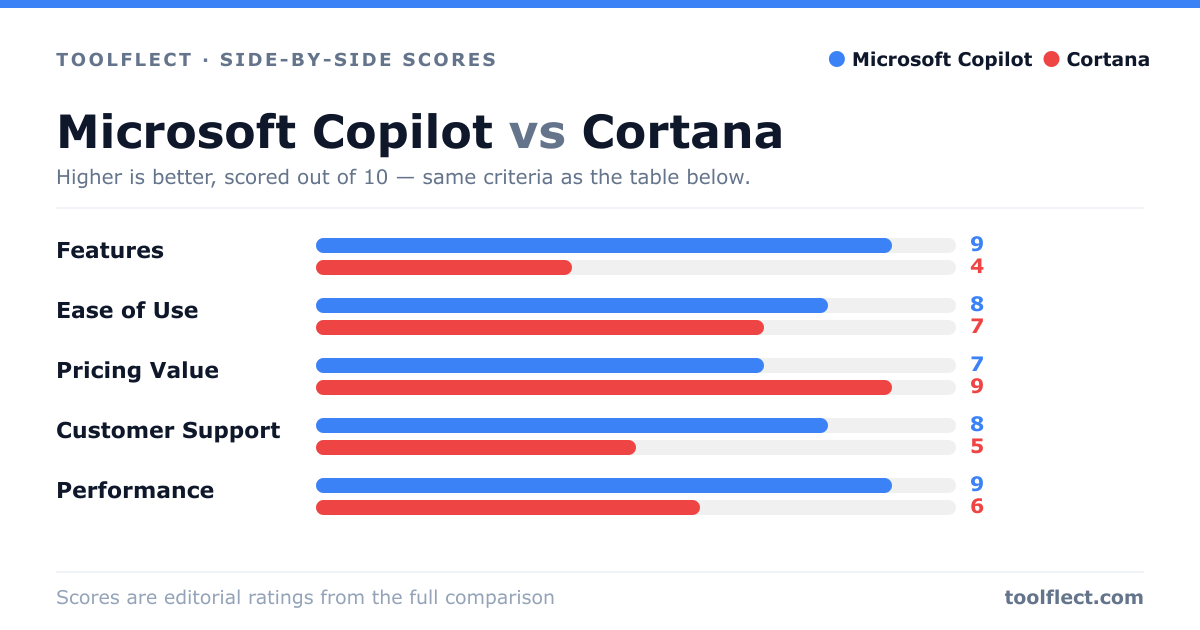
| Criterion | Microsoft Copilot | Cortana |
|---|---|---|
| Features | 9/10 – Advanced AI, integrates with Office, code generation, multimodal. | 4/10 – Basic commands, reminders, limited to Microsoft ecosystem. |
| Ease of Use | 8/10 – Intuitive UI, but can be complex for new users. | 7/10 – Simple and straightforward, but less capable. |
| Pricing Value | 7/10 – Free tier available, but full features require subscription. | 9/10 – Completely free, but you get what you pay for. |
| Customer Support | 8/10 – Extensive documentation, community, and support channels. | 5/10 – Limited support, as product is being phased out. |
| Performance | 9/10 – Fast, accurate, and reliable with GPT-4. | 6/10 – Adequate for basic tasks, but often slow and less accurate. |