
Wordware vs Dust: Which AI Agent Platform Reigns Supreme?
Overview
Wordware and Dust are both powerful platforms for building AI agents, but they cater to slightly different audiences. Wordware focuses on no-code AI agent creation, allowing users to build complex workflows without programming. Dust, on the other hand, is tailored for developers and teams who need customizable, multi-step AI assistants that integrate with existing tools. Both platforms offer unique strengths, and this comparison will help you decide which fits your needs.
Key Features Comparison
- No-Code Builder: Wordware offers a drag-and-drop interface for building AI agents; Dust requires some coding knowledge for advanced customizations.
- Integrations: Dust supports deep integrations with Slack, Notion, and other productivity tools; Wordware integrates with common APIs but has fewer native connectors.
- Customization: Dust provides fine-grained control over agent behavior and memory; Wordware simplifies customization with templates.
- Deployment: Wordware agents can be deployed via API or web embed; Dust offers SDKs and embedding options for SaaS products.
- Collaboration: Dust has team workspaces and version control; Wordware supports sharing but lacks advanced collaboration features.
Pros & Cons
Wordware
- Pros:
- Natural language interface for building AI agents, lowering the barrier for non-programmers.
- Fast iteration with real-time collaboration and versioning.
- Strong integration with popular LLMs and APIs.
- Good for rapid prototyping and small to medium complexity tasks.
- Cons:
- Limited customization for advanced users compared to code-based platforms.
- May not scale well for very large, complex enterprise workflows.
- Pricing can become expensive at higher usage tiers.
- Smaller community and fewer third-party integrations than more established platforms.
Dust
- Pros:
- Developer-friendly with a code-first approach, offering flexibility and control.
- Robust framework for building complex, production-grade AI agents.
- Excellent support for custom models and fine-tuning.
- Strong versioning and testing capabilities.
- Cons:
- Steeper learning curve; requires programming knowledge.
- Less accessible to non-technical users.
- Setup and configuration can be time-consuming.
- Pricing may be higher for teams needing extensive compute resources.
Wordware
- Pros: Intuitive visual builder for AI workflows; strong integration with enterprise tools; good for rapid prototyping.
- Cons: Limited customization for advanced users; pricing can be high for small teams.
Dust
- Pros: Flexible and powerful for complex AI agents; excellent developer experience; open-source friendly.
- Cons: Steeper learning curve; less polished UI; requires more technical expertise.
Wordware
- Pros: Intuitive visual builder for AI agents, no-code friendly, strong collaboration features for teams.
- Pros: Supports multiple AI models and easy integration with APIs.
- Cons: Limited advanced customization for complex workflows.
- Cons: Pricing can be high for small teams or individual developers.
Dust
- Pros: Powerful developer-focused platform with extensive API and SDK support.
- Pros: Highly customizable and scalable for enterprise-level applications.
- Cons: Steeper learning curve due to technical complexity.
- Cons: Documentation could be more comprehensive for beginners.
Wordware
Pros: Easy to use for non-developers, fast setup, visual workflow builder, good for prototyping.
Cons: Limited customization, fewer integrations, less scalable for enterprise needs.
Dust
Pros: Highly customizable, strong developer tools, robust integrations, suitable for production.
Cons: Steeper learning curve, requires coding skills, higher complexity for simple tasks.
Pricing Comparison
Wordware offers a free tier with limited actions and paid plans starting at $20/month for teams. Dust also has a free tier with basic features, and premium plans start at $25/month per user, with enterprise options. Overall, Wordware is slightly more affordable for individuals and small teams, while Dust provides better value for larger teams needing advanced features.
Best Use Cases
- Wordware: Quick prototyping, customer support bots, internal automation for non-technical teams.
- Dust: Complex multi-step assistants, integration-heavy workflows, developer-driven AI features in SaaS products.
Verdict
Choose Wordware if you’re a non-technical user or need rapid prototyping. Choose Dust if you’re a developer or team building sophisticated AI assistants that require deep integrations and customization. Both are excellent tools, but the best choice depends on your technical expertise and project requirements.
Visual Comparison
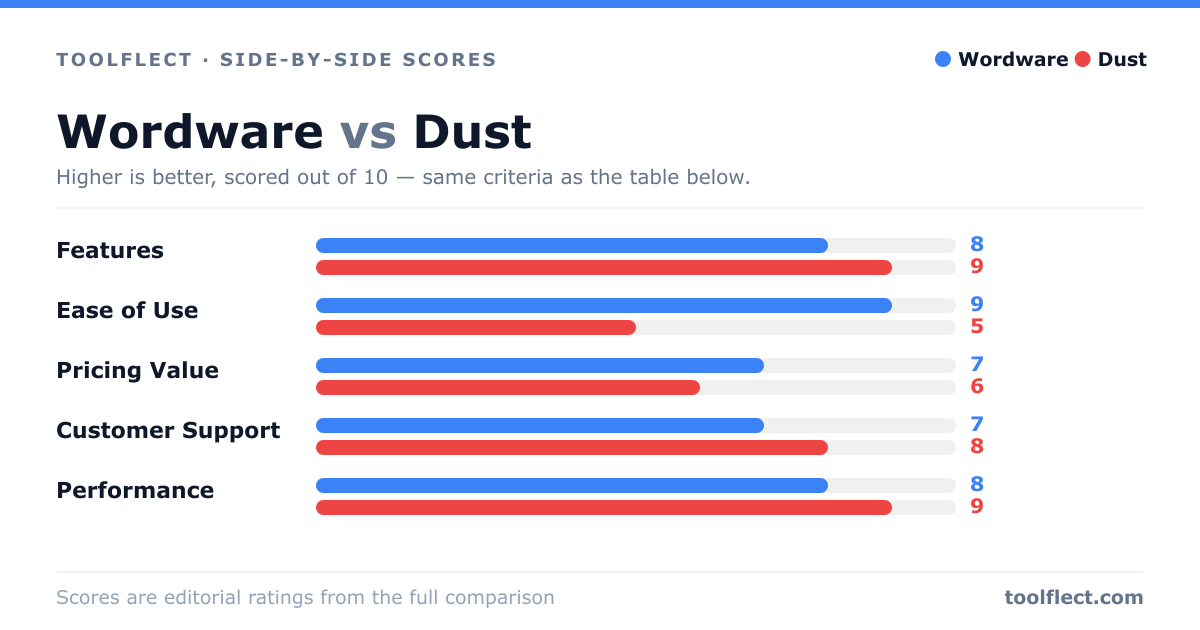
| Criterion | Wordware | Dust |
|---|---|---|
| Features | 8/10 – Natural language building, real-time collaboration, integrations | 9/10 – Code-first, custom models, advanced testing |
| Ease of Use | 9/10 – Very intuitive, no coding required | 5/10 – Requires coding skills, steeper learning curve |
| Pricing Value | 7/10 – Competitive for small teams, but can scale up | 6/10 – Higher cost for advanced features |
| Customer Support | 7/10 – Responsive, but limited documentation | 8/10 – Good support, active community |
| Performance | 8/10 – Fast for typical use cases | 9/10 – High performance for complex tasks |