
Quillbot vs Wordtune: Which AI Writing Assistant Wins?
Overview
Quillbot and Wordtune are two popular AI-powered writing assistants designed to help users improve their writing. While both offer paraphrasing and rewriting capabilities, they target slightly different audiences and have unique strengths. Quillbot is known for its robust grammar checking and multiple writing modes, making it a favorite among students and academic writers. Wordtune excels in rewriting sentences with tone and style adjustments, appealing to professionals and content creators who want a more natural and human-like output. This article provides an unbiased comparison to help you decide which tool fits your needs best.
Key Features Comparison
- Paraphrasing: Quillbot offers multiple modes (Standard, Fluency, Creative, etc.) with customizable synonyms. Wordtune provides rewrite options that alter tone and length, but with fewer mode choices.
- Grammar & Spelling: Quillbot has a built-in grammar checker that provides comprehensive corrections. Wordtune focuses more on sentence rewriting and lacks a dedicated grammar checker.
- Tone & Style: Wordtune allows users to change the tone (formal, casual, confident, etc.) and adjust the length of rewrites. Quillbot’s tone adjustment is indirect via mode selection.
- Integrations: Wordtune integrates seamlessly with Chrome across websites, and offers browser extensions, Microsoft Word, and web app. Quillbot has a Chrome extension and integrates with Google Docs, but fewer third-party apps.
- Summarizer: Quillbot includes a text summarizer tool, which Wordtune lacks.
- Plagiarism Checker: Quillbot offers a plagiarism checker in its premium plans. Wordtune does not have this feature.
- User Interface: Wordtune’s interface is minimal and intuitive, with a focus on inline suggestions. Quillbot’s interface is more traditional, with a dedicated editor and multiple tool tabs.
Pros & Cons
QuillBot
- Pros: Excellent paraphrasing with multiple modes; integrates with Chrome, Word, and more; affordable premium plans.
- Cons: Free version has word limits; grammar checker less advanced than dedicated tools; occasional awkward phrasing.
Wordtune
- Pros: AI understands context well; offers tone adjustments; useful rewrite suggestions; browser extension works across sites.
- Cons: Limited free tier; pricing higher than some competitors; no dedicated grammar checker.
Quillbot
- Pros: Excellent paraphrasing with multiple modes; integrates with browsers and Microsoft Word; free version is generous.
- Cons: Grammar checker is less advanced than dedicated tools; premium plans can be pricey; some modes require a subscription.
Wordtune
- Pros: AI-powered rewriting with tone adjustments; seamless integration with Chrome and Word; good for social media and email.
- Cons: Limited free version; paraphrasing can sometimes alter meaning; no dedicated grammar checker.
QuillBot
- Pros: Excellent paraphrasing with multiple modes; integrated grammar checker; browser extensions and integrations.
- Cons: Free version limited word count; some paraphrased outputs may require editing; no real-time collaborative editing.
Wordtune
- Pros: AI-powered rewriting with tone adjustment; seamless integration with Word and browser; good for social media and email.
- Cons: Limited free version; can be expensive for premium; sometimes suggestions are off-context.
Quillbot
- Pros: Extensive paraphrasing modes, grammar checker, summarizer, plagiarism checker, affordable pricing, browser extension for Chrome and Edge.
- Cons: Rewrites can sometimes be too verbose or unnatural, occasional inaccuracies in meaning, limited integration with third-party apps.
Wordtune
- Pros: Focus on natural-sounding rewrites, tone adjustment, easy inline editing, strong Chrome integration across websites, user-friendly interface.
- Cons: No grammar checker or summarizer, higher price for premium plans, fewer writing modes, heavier reliance on browser extension.
Pricing Comparison
Quillbot offers a free tier with limited words per day (125 words) and limited features. Premium plans start at $4.17 per month (billed annually) and include unlimited words, all paraphrasing modes, grammar checks, and plagiarism detection. Wordtune also has a free tier with 10 rewrites per day. Premium plans start at $6.99 per month (billed annually) and include unlimited rewrites, tone adjustments, and better integration. Wordtune’s premium offers no grammar checker, so for a full writing suite, Quillbot provides better value.
Best Use Cases
- Students & Academics: Quillbot is ideal for paraphrasing research, avoiding plagiarism, and summarizing lengthy articles. Its grammar checker helps polish academic papers.
- Content Writers & Bloggers: Wordtune excels in rephrasing sentences for better flow and engagement, making it great for content creation, social media posts, and email writing.
- Non-native English Speakers: Both tools help improve writing, but Wordtune’s natural phrasing is particularly useful for learning idiomatic expressions.
- Business Professionals: Wordtune’s tone adjustment is valuable for tailoring messages to different audiences. Quillbot’s plagiarism checker is useful for creating original business documents.
Verdict
There is no clear winner; the choice depends on your specific needs. If you need an all-in-one writing assistant with grammar checking, summarizing, and plagiarism detection, Quillbot is the better choice, especially for budget-conscious users. If you prioritize natural sentence rewriting, tone adjustment, and seamless integration into your daily web browsing, Wordtune is a strong contender. We recommend trying both free versions to see which suits your workflow best.
Visual Comparison
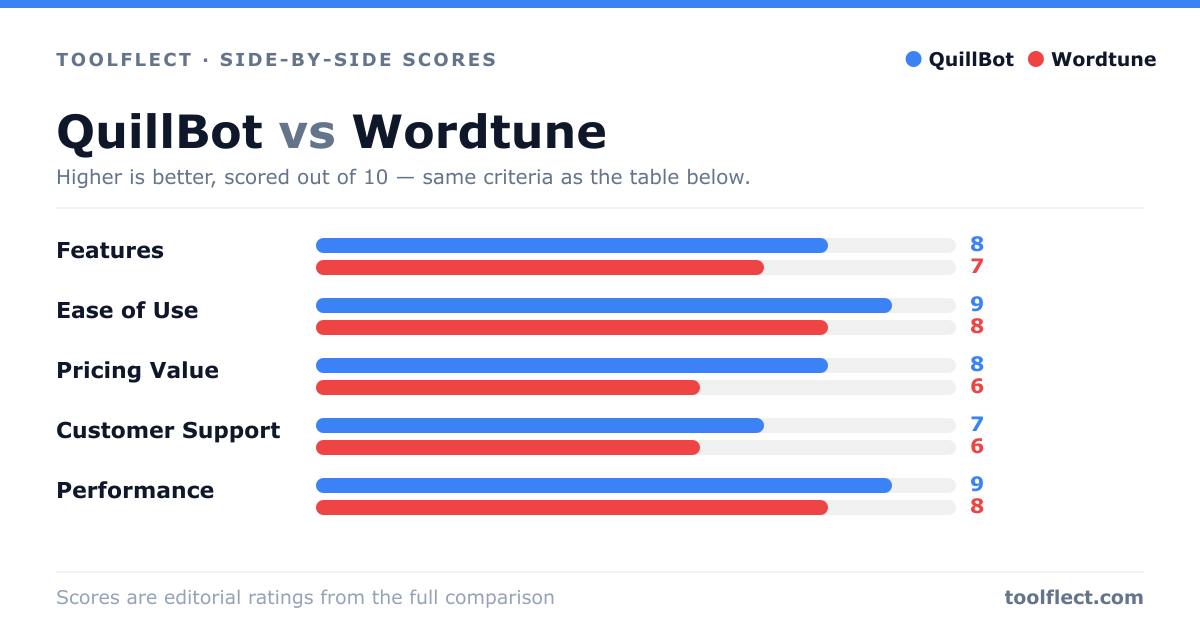
| Criterion | QuillBot | Wordtune |
|---|---|---|
| Features | 8/10 – Paraphrasing, grammar, summarizer | 7/10 – Rewriting, tone, extension |
| Ease of Use | 9/10 – Simple interface, quick access | 8/10 – Clean UI, but less intuitive |
| Pricing Value | 8/10 – Affordable plans, free tier | 6/10 – Higher cost, limited free |
| Customer Support | 7/10 – Email, knowledge base | 6/10 – Email, limited resources |
| Performance | 9/10 – Fast, accurate | 8/10 – Good, but occasional lag |