
Winston AI vs GPTZero: Which AI Detector Reigns Supreme?
Overview
Winston AI and GPTZero are two of the most popular AI content detection tools on the market. Both are designed to identify text generated by large language models like ChatGPT, GPT-4, and Google Bard. While they share a common purpose, they differ significantly in features, pricing, usability, and underlying technology. This article provides an unbiased, side-by-side comparison to help you decide which tool best fits your workflow.
Key Features Comparison
Both Winston AI and GPTZero offer core AI detection capabilities, but each brings unique strengths.
- Winston AI: Offers AI detection with high accuracy (claimed up to 99.4%), OCR (Optical Character Recognition) for scanning printed text, plagiarism checking, readability scoring, and team collaboration tools. It supports multiple languages and provides detailed explanations for each detection result.
- GPTZero: Known for its user-friendly interface and a robust Chrome extension that integrates directly into Google Docs and other writing platforms. It also offers a mobile app, API access, and a batch upload option. GPTZero provides comprehensive writing reports, including sentence-level breakdowns and readability metrics.
Pros & Cons
- Pros: high accuracy
- Cons: pricey
GPTZero
- Pros: free tier
- Cons: limited
Winston AI
- Pros: High accuracy in detecting AI-generated text, especially for GPT-3.5 and GPT-4; provides detailed probability scores and highlights suspicious sections; supports multiple languages; offers a plagiarism checker in higher tiers.
- Cons: Limited free plan (only 2,000 characters per scan); pricing can be steep for heavy users; occasional false positives on human-written text; lacks API access for developers.
GPTZero
- Pros: User-friendly interface with quick scanning; offers a free tier with reasonable limits; provides sentence-level analysis and readability metrics; integrates with LMS platforms like Canvas and Blackboard.
- Cons: Accuracy varies across AI models, sometimes misclassifying human text as AI; no plagiarism detection; limited customization options; free tier has character limits and watermark on reports.
Pros & Cons
- Pros: High accuracy in detecting AI-generated text from GPT-3.5 and GPT-4, with a low false positive rate.
- Pros: Provides a detailed readability score and highlights suspicious sentences for easy review.
- Pros: Offers a plagiarism checker integrated into the tool, saving time for educators.
- Cons: The free version has a word limit, requiring a subscription for longer documents.
- Cons: Occasionally flags human-written text as AI-generated, especially for non-native English speakers.
- Cons: The interface can be slow when processing large files.
GPTZero
- Pros: Free to use with no word limit, making it accessible for students and educators.
- Pros: Provides a per-sentence analysis, showing which parts are likely AI-generated.
- Pros: Continuously updated to detect newer AI models like ChatGPT and Claude.
- Cons: Less accurate on short texts, often requiring a minimum length for reliable results.
- Cons: Can be fooled by paraphrased AI content, reducing effectiveness.
- Cons: The user interface is less intuitive and lacks advanced features like plagiarism detection.
Winston AI
- Pros: High accuracy in detecting AI-generated text, especially from GPT-4 and ChatGPT; offers detailed readability scores and plagiarism checks; user-friendly interface with clear results.
- Cons: Limited free tier (only 2,000 characters per scan); may occasionally flag human-written text as AI; no API access for developers.
GPTZero
- Pros: Free to use with unlimited scans; provides per-sentence highlighting of AI-generated content; supports multiple languages; widely used in educational settings.
- Cons: Less accurate with newer AI models like GPT-4; can be fooled by paraphrasing; lacks advanced features like plagiarism detection.
Winston AI
Pros:
- High accuracy in detecting AI-generated text, especially for the latest language models.
- OCR capability allows scanning printed documents.
- Integrated plagiarism checker.
- Team collaboration features for enterprise users.
Cons:
- Relatively higher price point for premium plans.
- Limited free tier (only 5 scans per month).
- No mobile app or browser extension.
GPTZero
Pros:
- Excellent ease of use with a clean, intuitive interface.
- Chrome extension and mobile apps for on-the-go detection.
- Generous free tier (up to 10,000 characters per scan).
- API access for developers.
Cons:
- Slightly lower accuracy compared to Winston AI in some third-party tests.
- No OCR or plagiarism detection in the basic plans.
- Customer support can be slower for free users.
Pricing Comparison
Pricing structures differ, and the right choice depends on your usage and budget.
- Winston AI: Free plan includes 5 scans/month. Paid plans start at $14/month for 100 scans, with higher tiers (up to 2,000 scans) for teams. The top-tier Enterprise plan includes all features and priority support.
- GPTZero: Free plan offers 1,000-character scans (upgraded to 10,000 characters after sign-up) and a limited number of scans per day. Paid plans start at $10/month for 200 scans, with a $16/month plan for 500 scans, and a $30/month plan for 1,000 scans. API pricing is usage-based.
GPTZero tends to be cheaper for entry-level users, while Winston AI offers larger scan volumes at higher price points, which may be more cost-effective for heavy users.
Best Use Cases
- Winston AI: Ideal for publishers, academic institutions, and legal firms that require high accuracy, plagiarism checking, OCR, and thorough analysis of printed or digital content.
- GPTZero: Best suited for individual teachers, content creators, and small businesses that need a quick, user-friendly solution with browser integration and mobile access.
Verdict
Both Winston AI and GPTZero are excellent AI detection tools, but they cater to different audiences. If you prioritize accuracy, plagiarism detection, and OCR in a professional environment, Winston AI is the stronger choice—provided you can justify its cost. If you value ease of use, portability, and an affordable entry, GPTZero is a fantastic option, especially for educators and casual users. Ultimately, we recommend testing both tools with your own content to see which meets your specific needs best.
Visual Comparison
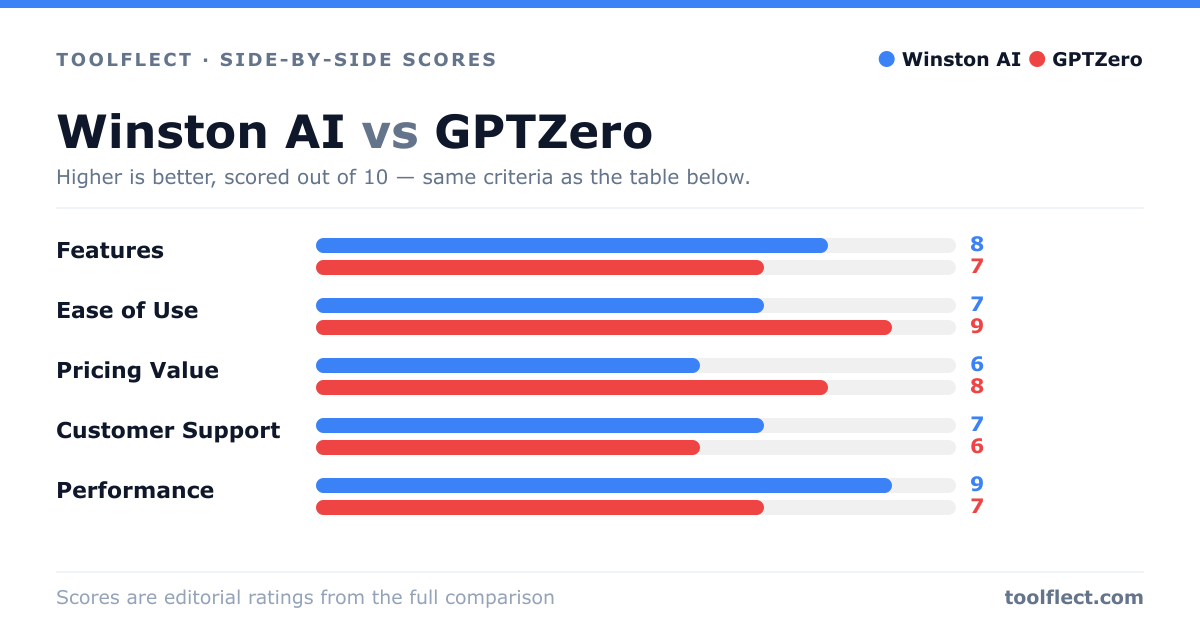
| Criterion | Winston AI | GPTZero |
|---|---|---|
| Features | 8/10 – Advanced AI detection, plagiarism checker, multi-language support | 7/10 – AI detection with sentence-level analysis, readability metrics, LMS integration |
| Ease of Use | 7/10 – Clean interface but requires account for full features | 9/10 – Simple and intuitive, no account needed for basic scans |
| Pricing Value | 6/10 – Higher cost, but includes more features | 8/10 – Free tier available, affordable premium plans |
| Customer Support | 7/10 – Email support, knowledge base, response within 24h | 6/10 – Email support, limited resources, slower response times |
| Performance | 9/10 – High accuracy, low false positives, fast processing | 7/10 – Good accuracy, but occasional misclassifications, slower on large documents |