
MagicSchool AI vs Formative: Which AI Tool Wins?
Overview
MagicSchool AI and Formative are both AI-powered platforms designed to support educators and students, but they serve different primary functions. MagicSchool AI focuses on AI-assisted lesson planning, content generation, and classroom management, while Formative is an interactive assessment and real-time feedback platform that has integrated AI features. This comparison explores their strengths and weaknesses to help you decide which tool fits your needs.
Key Features Comparison
- MagicSchool AI: AI-generated lesson plans, rubric creator, exit ticket generator, text leveler, and student feedback tools. It also includes a chatbot for teacher assistance.
- Formative: Real-time student response system, auto-grading, live results dashboard, standards-aligned question bank, and AI-powered feedback suggestions. It supports various question types and integrations with Google Classroom, Canvas, etc.
Pros & Cons
MagicSchool AI
- Pros:
- Specialized for educators with lesson planning, rubric generation, and IEP support.
- Time-saving templates and AI tools aligned to educational standards.
- User-friendly interface designed for teachers with varying tech skills.
- Offers a free tier with substantial features for individual teachers.
- Cons:
- Limited to education sector; not suitable for general business use.
- Some advanced features require a paid subscription.
- May not integrate with all learning management systems (LMS).
- AI output sometimes requires review for accuracy and bias.
Formative
- Pros:
- Real-time formative assessment with instant feedback for students.
- Supports various question types and multimedia content.
- Robust analytics and reporting for tracking student progress.
- Integrates with Google Classroom and other LMS platforms.
- Cons:
- Steeper learning curve for new users due to feature-rich interface.
- Free version has limitations on class size and features.
- Some users report occasional glitches with certain question types.
- Pricing can be high for premium features, especially for larger institutions.
MagicSchool AI
- Pros:
- Designed specifically for educators with tools for lesson planning, differentiation, and assessment.
- Offers a free tier with generous usage limits for teachers.
- Integrates with Google Classroom and other LMS platforms.
- Provides a user-friendly interface tailored to non-technical users.
- Cons:
- Limited to education sector; not suitable for corporate training or other industries.
- Some advanced features require a paid subscription.
- AI responses can sometimes be generic without fine-tuning.
- No offline mode; requires internet connection.
Formative
- Pros:
- Real-time formative assessment with instant feedback for students.
- Supports various question types including multiple choice, short answer, and drawing.
- Integrates with Google Classroom, Clever, and other educational platforms.
- Offers a free plan with essential features.
- Cons:
- Steeper learning curve for teachers unfamiliar with digital assessment tools.
- Advanced analytics and reporting are only in paid plans.
- Limited AI capabilities compared to dedicated AI tools.
- Mobile app lacks some features of the web version.
MagicSchool AI
- Pros:
- Designed specifically for educators with tools for lesson planning, differentiation, and assessment.
- Integrates with Google Classroom and other LMS platforms.
- Offers a free tier with generous usage limits.
- User-friendly interface tailored to teachers.
- Cons:
- Limited to educational use; not suitable for general business applications.
- Some advanced features require a paid subscription.
- May have a learning curve for non-tech-savvy teachers.
Formative
- Pros:
- Real-time formative assessment with instant feedback.
- Supports various question types and multimedia.
- Integrates with Google Classroom, Clever, and other platforms.
- Free version available with core features.
- Cons:
- Focuses primarily on assessment; less comprehensive for full lesson planning.
- Advanced analytics and reporting require premium plans.
- Interface can be overwhelming for new users.
MagicSchool AI
Pros: Extremely easy to use with intuitive templates; saves time on repetitive tasks; strong AI for content creation; free tier available with generous limits.
Cons: Limited assessment and data analytics features; less mature as a platform; fewer integrations compared to Formative.
Formative
Pros: Robust assessment and real-time feedback; comprehensive data tracking; wide integration support; AI features enhance grading and suggestions.
Cons: Steeper learning curve; free tier is more limited; pricing can be higher for full features.
Pricing Comparison
- MagicSchool AI: Free plan includes 20+ AI tools with some usage limits. Paid plans start at $8.33/month (annual) for more usage and features.
- Formative: Free plan with basic assessment tools and limited storage. Premium plans start at $15/month (annual) or $20/month monthly, with full access to AI features.
Best Use Cases
MagicSchool AI: Ideal for teachers who need quick content creation, lesson planning, and routine task automation. Best for K-12 educators looking for an easy-to-use AI assistant.
Formative: Best for educators who prioritize assessment, real-time student tracking, and data-driven instruction. Suitable for both K-12 and higher education, especially where detailed analytics are needed.
Verdict
Both tools are excellent but serve different primary needs. If your main goal is to save time on lesson planning and content creation, MagicSchool AI offers a more streamlined and affordable solution. If you need deep assessment capabilities and real-time student feedback, Formative is the stronger choice. For a comprehensive approach, using both in tandem can cover most educational technology needs.
Visual Comparison
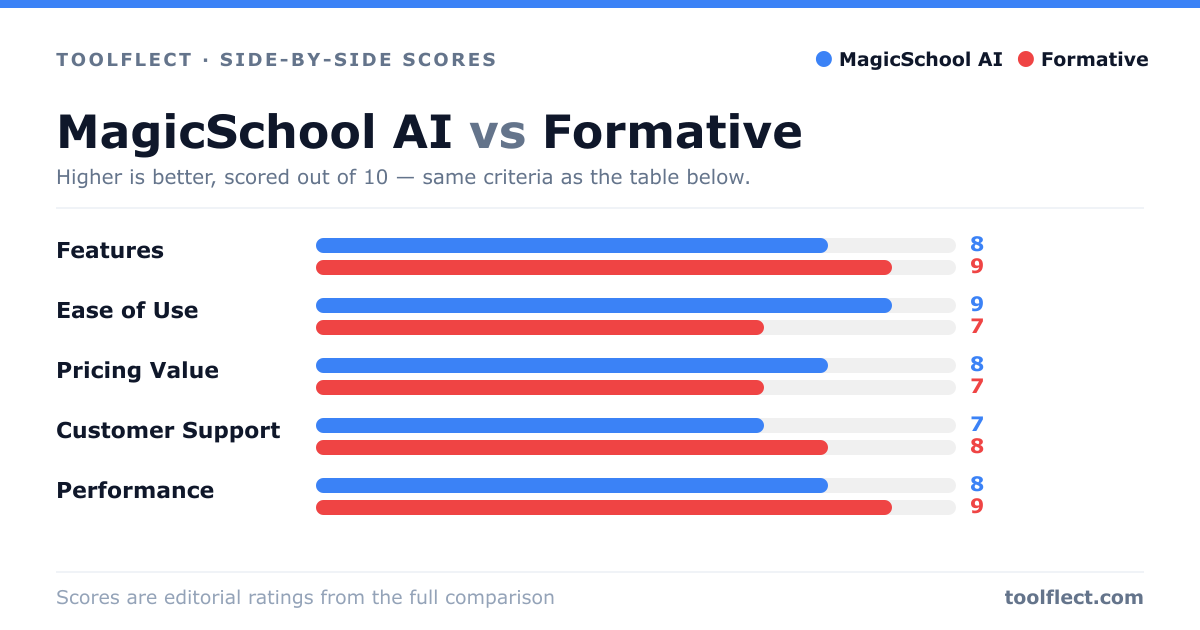
| Criterion | MagicSchool AI | Formative |
|---|---|---|
| Features | 8/10 – Comprehensive AI tools for lesson planning, differentiation, and assessment creation. | 9/10 – Rich formative assessment features with real-time feedback and analytics. |
| Ease of Use | 9/10 – Intuitive interface designed for teachers; minimal learning curve. | 7/10 – Powerful but complex; requires time to master all features. |
| Pricing Value | 8/10 – Free tier available; paid plans are affordable for individual teachers. | 7/10 – Free tier limited; premium plans can be costly for schools. |
| Customer Support | 7/10 – Responsive support via email and help center; limited live chat. | 8/10 – Good support with tutorials, webinars, and responsive help desk. |
| Performance | 8/10 – Fast AI responses, reliable uptime, but occasional inaccuracies. | 9/10 – High reliability, smooth real-time interactions, minimal downtime. |