
Pigment vs Mosaic: Which Business Planning Tool Wins?
Overview
Pigment is a modern business planning platform designed for finance, sales, and HR teams to model complex scenarios, forecast, and make better decisions. It is known for its flexible data modeling and strong integration capabilities. Mosaic is an agile financial planning and analysis (FP&A) platform that focuses on real-time insights and automation, helping fast-moving companies streamline budgeting, forecasting, and reporting. Both tools aim to replace spreadsheets and traditional legacy systems, but they have distinct strengths and ideal use cases.
Key Features Comparison
- Data Modeling: Pigment offers advanced, spreadsheet-like modeling with no pre-defined limitations, allowing users to create complex relationships and calculations. Mosaic provides a strong modeling engine but emphasizes ease of use with pre-built templates and a simpler approach to data manipulation.
- Integration: Both support native integrations with major ERP, CRM, and data warehouses. However, Pigment has a broader connector library and a rich API, while Mosaic focuses on deep integrations with financial systems such as NetSuite, Salesforce, and Workday.
- Ease of Use: Mosaic is often considered more user-friendly due to its shorter learning curve and intuitive visual interface. Pigment, while powerful, has a steeper learning curve for non-technical users.
- Collaboration: Both enable real-time collaboration, but Pigment offers more granular permission controls and versioning, making it suitable for larger enterprises with multiple departments.
- Reporting & Visualization: Mosaic excels at providing interactive dashboards and drill-down capabilities, while Pigment offers greater flexibility in building custom reports and linking them to operational plans.
Pros & Cons
Pigment
- Pros: Real-time collaboration with multi-user editing and comments; powerful modeling engine for complex business scenarios; integrates with major data sources like Snowflake and Salesforce; customizable dashboards and reports.
- Cons: Steeper learning curve for non-technical users; pricing can be high for small teams; limited offline functionality; occasional performance lag with very large datasets.
Mosaic
- Pros: User-friendly interface with drag-and-drop functionality; strong financial planning features (FP&A); excellent for scenario planning and what-if analysis; good integration with ERP systems like NetSuite.
- Cons: Less flexible for non-financial use cases; limited customization options for dashboards; customer support response times can be slow; some advanced features require higher-tier plans.
Pigment
- Pros: Powerful modeling engine for complex financial and operational planning; Real-time collaboration with granular permissions; Strong integration with major data sources (e.g., Snowflake, NetSuite).
- Cons: Steeper learning curve for non-technical users; Higher cost for enterprise-scale deployments; Limited pre-built templates compared to Mosaic.
Mosaic
- Pros: User-friendly interface with drag-and-drop planning; Fast deployment and intuitive for finance teams; Excellent for FP&A with strong scenario analysis and driver-based planning.
- Cons: Less flexible for complex, multi-dimensional modeling; Limited data integration options; Pricing may be high for small businesses.
Pigment
- Pros:
- Powerful modeling engine for complex business scenarios
- Real-time collaboration with version history
- Integrates with major data sources (Snowflake, etc.)
- Interactive dashboards for dynamic presentations
- Cons:
- Steep learning curve for non-technical users
- Higher price point for small teams
- Limited pre-built templates compared to Mosaic
Mosaic
- Pros:
- User-friendly interface with drag-and-drop simplicity
- Excellent for agile planning with quick scenario adjustments
- Strong financial planning features (FP&A)
- Good value for mid-sized businesses
- Cons:
- Less flexible for complex, multi-dimensional modeling
- Integration options are more limited
- Reporting capabilities are less advanced
Pigment Pros
- Highly flexible and scalable modeling.
- Excellent for complex scenario analysis and multi-dimensional planning.
- Strong security and permission settings.
- Supports cross-functional planning across finance, sales, and HR.
Pigment Cons
- Steeper learning curve for new users.
- User interface can feel less intuitive compared to competitors.
- Pricing is on the higher end, especially for smaller companies.
Mosaic Pros
- Rapid deployment and quick time-to-value.
- Real-time data connectivity and automated workflows.
- Great user experience with drag-and-drop interface.
- Tailored for modern finance teams in high-growth companies.
Mosaic Cons
- Modeling capabilities are less granular for very complex use cases.
- Fewer integration options than Pigment for niche platforms.
- Customization options are more limited.
Pricing Comparison
Both Pigment and Mosaic do not publicly disclose fixed pricing; they offer custom quotes based on company size, number of users, and required features. Generally, Pigment is considered slightly more expensive because it targets large enterprises with complex needs. Mosaic positions itself as more affordable for mid-sized and high-growth companies, offering clearer value for those that want to avoid heavy IT involvement. It is advisable to request a demo and custom pricing from both vendors to compare based on your specific requirements.
Best Use Cases
- Pigment: Best for large enterprises that need a powerful, flexible planning solution to handle intricate modeling, cross-departmental collaboration, and extensive scenario planning. Ideal for companies with dedicated finance modeling teams.
- Mosaic: Best for fast-growing startups and mid-market companies that need quick insights, automated FP&A processes, and a user-friendly interface. Suitable for teams that want to move away from spreadsheets with minimal training.
Verdict
The choice between Pigment and Mosaic ultimately depends on your organization’s complexity, budget, and technical appetite. If you require deep modeling capabilities and have a team that can leverage advanced features, Pigment is a robust choice. If you prioritize ease of use, speed of deployment, and modern dashboards, Mosaic is a compelling alternative. Both tools are leaders in the FP&A space, and either will significantly improve your planning and analysis workflows.
Visual Comparison
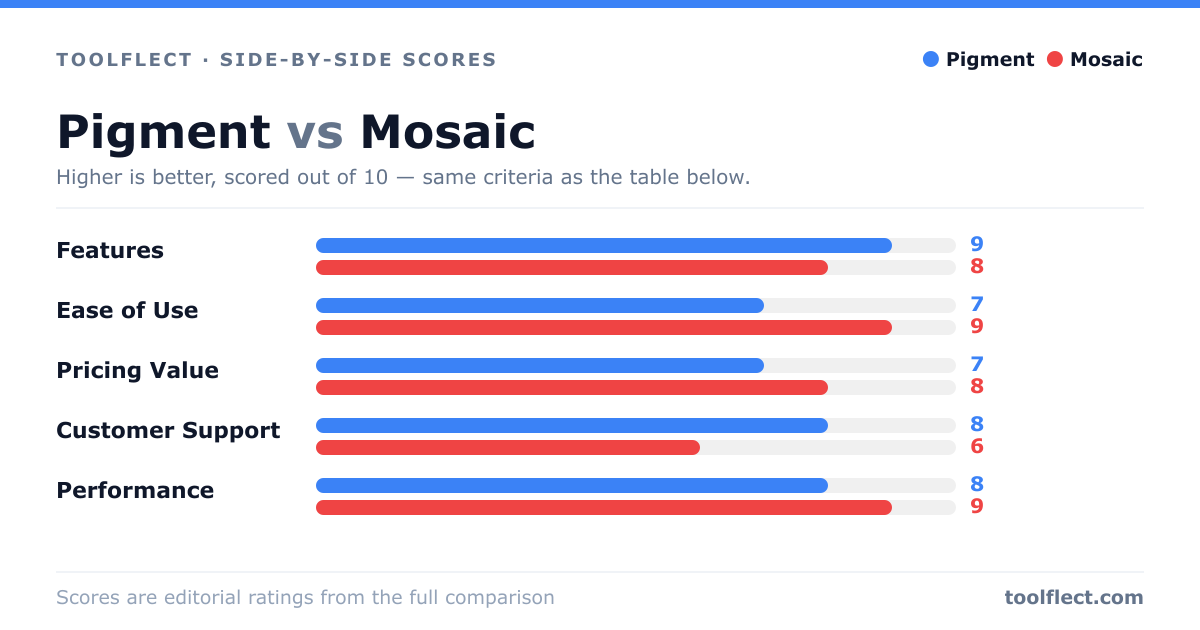
| Criterion | Pigment | Mosaic |
|---|---|---|
| Features | 9/10 – Extensive modeling and integration options | 8/10 – Strong FP&A focus, but less flexible |
| Ease of Use | 7/10 – Powerful but requires training | 9/10 – Intuitive and easy to adopt |
| Pricing Value | 7/10 – Premium pricing, good for enterprise | 8/10 – Competitive pricing for SMBs |
| Customer Support | 8/10 – Responsive and knowledgeable | 6/10 – Slower response times |
| Performance | 8/10 – Handles large data, but can lag | 9/10 – Fast and reliable |