
Rev AI vs Trint: Which AI Transcription Tool Wins?
Overview
Rev AI and Trint are two leading AI-powered transcription services. Rev AI is known for its high-accuracy API, ideal for developers integrating speech-to-text. Trint offers an all-in-one platform with editing, collaboration, and search features, catering to journalists, researchers, and content creators.
Key Features Comparison
- Accuracy: Rev AI claims 99%+ accuracy with human-reviewed options. Trint uses AI with manual editing tools for refinement.
- API vs Platform: Rev AI provides robust APIs for custom integrations. Trint is a web-based platform with built-in editor, speaker identification, and export options.
- Languages: Rev AI supports 15+ languages. Trint supports 30+ languages.
- Collaboration: Rev AI lacks collaboration features. Trint offers real-time team collaboration, comments, and sharing.
- Security: Both offer SOC 2 compliance and encryption.
Pros & Cons
Rev AI
- Pros: High accuracy (up to 95%+ with human review), fast turnaround (as quick as 5 minutes for automated), supports multiple languages and file formats, offers both automated and human transcription services.
- Cons: Automated transcription can be less accurate for heavy accents or poor audio, human transcription is more expensive, no free tier (only trial with limited minutes), pricing can be confusing with add-ons.
Trint
- Pros: Interactive editor that combines transcription with audio/video playback, real-time collaboration features, supports 30+ languages, offers a free trial with 30 minutes, user-friendly interface.
- Cons: Automated transcription accuracy may vary, no human transcription option, pricing is subscription-based and can be costly for heavy users, export options are limited in lower tiers.
Rev AI
- Pros:
- High accuracy (up to 95% with human review)
- Fast turnaround (as quick as 5 minutes for automated)
- Supports multiple languages and file formats
- Offers both automated and human transcription options
- Cons:
- Automated transcription can be less accurate with heavy accents or technical jargon
- Human transcription is more expensive
- No free tier; only a limited trial
Trint
- Pros:
- Interactive editor with real-time editing and collaboration
- Built-in translation and captioning features
- User-friendly interface with powerful search and organization
- Offers a free trial with limited minutes
- Cons:
- Automated transcription accuracy may vary, especially with poor audio quality
- Pricing can be higher for heavy users
- Limited language support compared to some competitors
Rev AI
- Pros: High accuracy (up to 99%) with human review option; fast turnaround for automated transcription; supports multiple languages and file formats; offers API for integration.
- Cons: Automated transcription may require editing for technical jargon; pricing can be higher for human transcription; no free tier, only trial credit; customer support limited to email/ticket.
Trint
- Pros: Interactive editor with real-time collaboration; automatic speaker identification; integrates with popular tools (e.g., Dropbox, Google Drive); offers a free trial with limited minutes.
- Cons: Accuracy may be lower for heavy accents or poor audio; pricing is subscription-based, can be costly for occasional users; no pay-as-you-go option; export options limited in lower tiers.
Rev AI
Pros: Highest accuracy, fast processing, developer-friendly API, pay-as-you-go pricing, human transcription add-on.
Cons: No built-in editor, limited collaboration, no mobile app, less suitable for non-technical users.
Trint
Pros: User-friendly interface, powerful editor with timestamps, collaboration tools, mobile app, supports many export formats.
Cons: Slightly lower base accuracy, more expensive for high volumes, API less feature-rich.
Pricing Comparison
Rev AI: Pay-as-you-go at $0.25/min (automated) or $1.50/min (human). No monthly fees. Custom plans for high volume.
Trint: Starter at $48/month (7 hours), Business at $60/month (10 hours), Enterprise custom. Automated only, no human option.
Best Use Cases
- Rev AI: Developers building transcription features, large-scale batch processing, apps needing real-time speech-to-text.
- Trint: Journalists, podcasters, researchers who need editing and collaboration, non-tech teams, individual content creators.
Verdict
Choose Rev AI if you need high-accuracy API integration and are comfortable with coding. Choose Trint if you want an all-in-one platform for editing and collaboration without technical hassle.
Visual Comparison
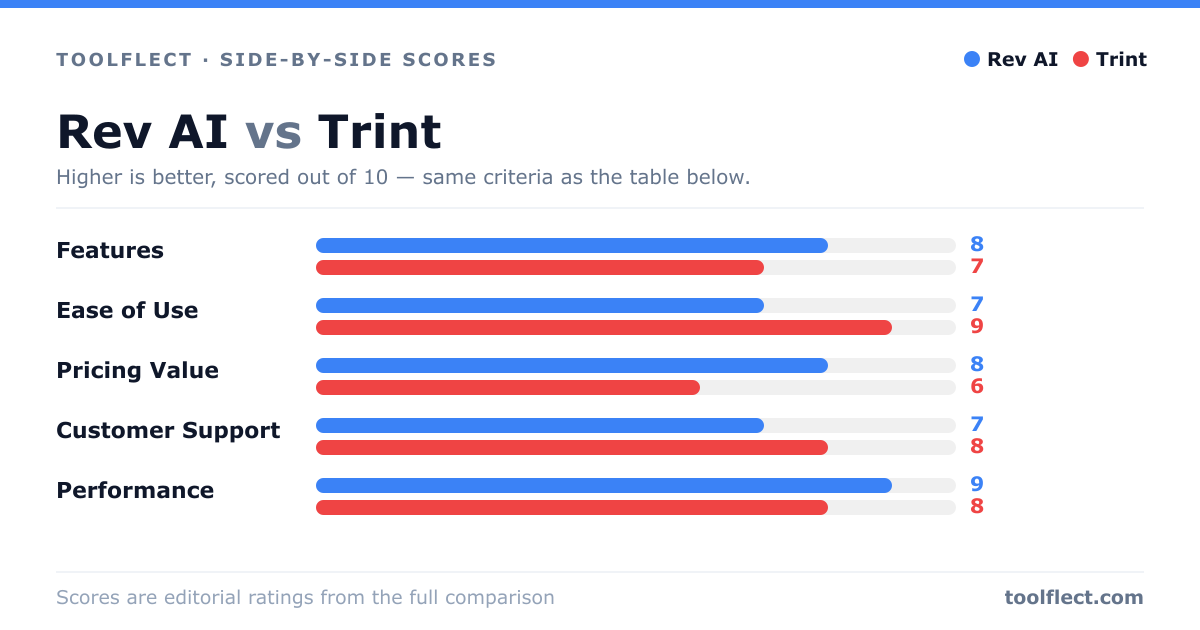
| Criterion | Rev AI | Trint |
|---|---|---|
| Features | 8/10 – Automated and human transcription, multiple formats, API access | 7/10 – Automated transcription, interactive editor, collaboration tools |
| Ease of Use | 7/10 – Simple upload, but interface is basic | 9/10 – Intuitive editor, easy navigation |
| Pricing Value | 8/10 – Pay-as-you-go, competitive for automated, human transcription costs more | 6/10 – Subscription required, can be expensive for occasional use |
| Customer Support | 7/10 – Email and chat support, response time varies | 8/10 – Helpful support, live chat and email, knowledge base |
| Performance | 9/10 – Fast turnaround, high accuracy for clear audio | 8/10 – Good accuracy, but may struggle with poor audio |