
Stable Diffusion vs Leonardo.ai: Which AI Image Generator Wins?
Overview
Stable Diffusion is an open-source text-to-image model developed by Stability AI, known for its flexibility and community-driven ecosystem. Leonardo.ai is a cloud-based AI image generation platform that offers a user-friendly interface and curated tools. Both excel in generating high-quality images but cater to different user preferences.
Key Features Comparison
- Model Access: Stable Diffusion provides open-source models you can run locally or via APIs; Leonardo.ai offers proprietary models with a web interface.
- Customization: Stable Diffusion allows fine-tuning and custom checkpoints; Leonardo.ai provides preset styles and advanced controls like image-to-image, outpainting, and real-time generation.
- User Interface: Stable Diffusion requires technical setup (e.g., Python, Gradio); Leonardo.ai has an intuitive drag-and-drop interface suitable for beginners.
- Community & Support: Stable Diffusion has a large open-source community and forums; Leonardo.ai offers official documentation, tutorials, and customer support.
- Integration: Stable Diffusion integrates with various tools via API; Leonardo.ai offers a built-in asset library and team collaboration features.
Pros & Cons
Stable Diffusion
- Pros: Open-source and free to use; highly customizable with community models and extensions; runs locally for privacy and unlimited generations.
- Cons: Requires technical setup and a powerful GPU; user interface can be intimidating for beginners; results vary depending on model and prompt engineering.
Leonardo.ai
- Pros: User-friendly web interface with intuitive tools; offers a generous free tier with daily credits; includes advanced features like AI Canvas and real-time generation.
- Cons: Not open-source; limited control over underlying models; credits can run out quickly for heavy usage.
Stable Diffusion
- Pros: Open-source and free to use, with a large community and extensive customization options.
- Pros: Can run locally on your own hardware, giving you full control and privacy.
- Pros: Highly flexible with many models and fine-tuning options for specific styles.
- Cons: Requires technical knowledge to set up and use effectively.
- Cons: Can be resource-intensive, requiring a powerful GPU for fast generation.
Leonardo.ai
- Pros: User-friendly interface with a low learning curve, suitable for beginners.
- Pros: Offers a free tier with daily credits, making it accessible for testing.
- Pros: Provides a variety of pre-trained models and tools for quick results.
- Cons: Limited customization compared to open-source alternatives.
- Cons: Free tier has usage limits; advanced features require a subscription.
Stable Diffusion
- Pros: Open-source and free to use, offering full control and customization.
- Pros: Large community and extensive model support for diverse styles.
- Pros: Can run locally, ensuring privacy and offline capability.
- Cons: Requires technical setup and a powerful GPU for optimal performance.
- Cons: Steeper learning curve for beginners.
Leonardo.ai
- Pros: User-friendly interface with intuitive tools for quick generation.
- Pros: Offers a free tier with daily credits, making it accessible.
- Pros: Includes advanced features like AI Canvas and real-time generation.
- Cons: Limited customization compared to open-source alternatives.
- Cons: Free tier has usage limits; subscription required for full access.
Stable Diffusion
Pros:
- Free and open-source
- Highly customizable (fine-tuning, LoRAs, embeddings)
- Offline capability and privacy
- Large community with extensive resources
Cons:
- Steep learning curve for setup
- Requires powerful hardware for local use
- No official customer support
Leonardo.ai
Pros:
- User-friendly web interface
- Intuitive controls for beginners
- Generous free tier with daily credits
- Regular updates and new features
Cons:
- Limited customization compared to Stable Diffusion
- Dependent on internet connection
- Free tier has usage limits
Pricing Comparison
Stable Diffusion is free to use locally; cloud services like DreamStudio offer pay-per-generation (starting at $0.002 per image) and subscription plans. Leonardo.ai offers a free tier (150 tokens/day) and paid plans: Apprentice ($10/month, 2500 tokens), Artisan ($30/month, 8500 tokens), and Maestro ($60/month, 18000 tokens). Both provide value, but Stable Diffusion can be cheaper at scale if you have hardware.
Best Use Cases
- Stable Diffusion: Best for developers, researchers, and advanced users who need full control, customization, and offline capabilities. Ideal for batch processing, fine-tuning models, and integrating into existing workflows.
- Leonardo.ai: Best for designers, marketers, and hobbyists who want quick, high-quality results without technical hassle. Great for social media content, concept art, and rapid prototyping.
Verdict
Choose Stable Diffusion if you prioritize customization, privacy, and cost savings at scale. Choose Leonardo.ai if you value ease of use, fast results, and a polished interface. Both are powerful tools; the right choice depends on your technical comfort and specific needs.
Visual Comparison
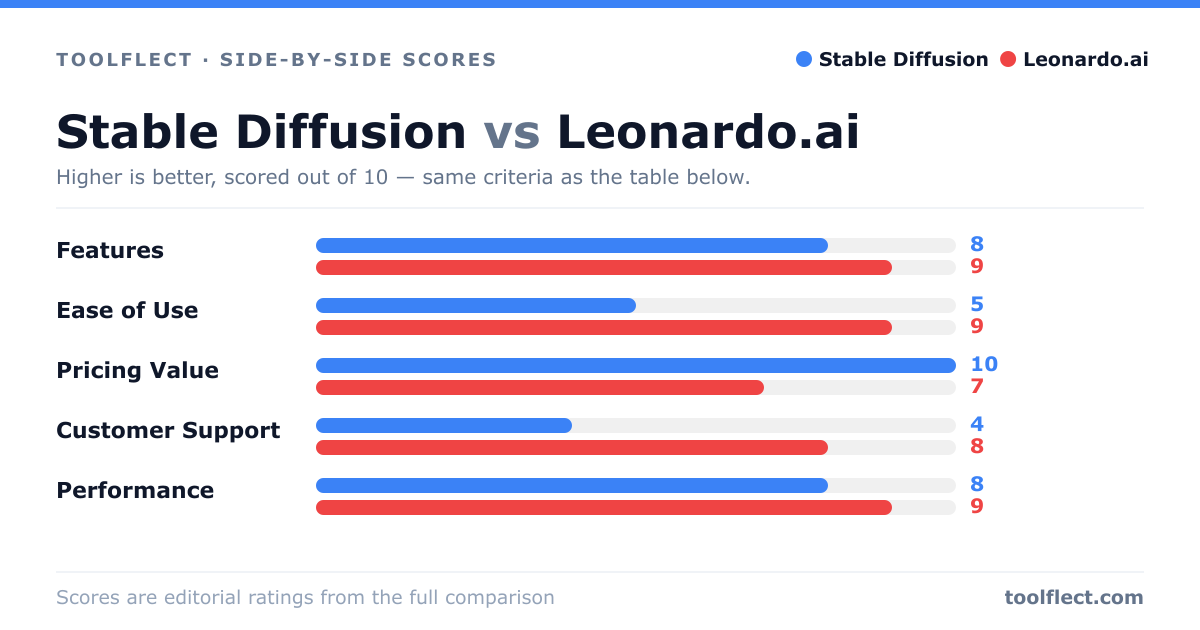
| Criterion | Stable Diffusion | Leonardo.ai |
|---|---|---|
| Features | 8/10 – Extensive customization, but requires manual setup. | 9/10 – Rich feature set out-of-the-box, including AI Canvas and community models. |
| Ease of Use | 5/10 – Steep learning curve; requires technical knowledge. | 9/10 – Intuitive interface, suitable for beginners. |
| Pricing Value | 10/10 – Free and open-source; no usage limits. | 7/10 – Free tier available, but paid plans needed for heavy use. |
| Customer Support | 4/10 – Community-driven support; no official helpdesk. | 8/10 – Responsive support and extensive documentation. |
| Performance | 8/10 – Fast on high-end GPUs; slower on consumer hardware. | 9/10 – Optimized cloud performance; consistent speed. |