
Chroma vs Weaviate: Which Vector Database Powers Your AI Apps?
Overview
Chroma is an open-source, lightweight embedded vector database designed for rapid prototyping and small-scale AI applications. It emphasizes simplicity, with a Python-first API and minimal setup. Ideal for developers who need a quick vector store without managing infrastructure.
Weaviate is a scalable, cloud-native vector database that supports hybrid search (vector + keyword), GraphQL, CRUD operations, and multi-tenancy. It offers both open-source and managed cloud tiers, making it suitable for production workloads and enterprise use cases.
Key Features Comparison
- Embedding Management: Chroma supports multiple embedding models and automatic embedding generation. Weaviate integrates with various models and allows custom vectors.
- Search Types: Chroma provides basic similarity search (cosine, Euclidean). Weaviate offers vector, keyword, and hybrid search with advanced filtering.
- Scalability: Chroma is embedded and runs in-process; scaling requires manual sharding. Weaviate is distributed, with automatic sharding, replication, and horizontal scaling.
- Integrations: Chroma has tight integration with LangChain and LlamaIndex. Weaviate offers LangChain, Spark, K8s, and many client libraries (Python, Java, Go, etc.).
- Data Management: Chroma supports basic CRUD. Weaviate provides full CRUD, object metadata, reference properties, and graph-like traversals.
Pros & Cons
Chroma
- Pros: Lightweight and easy to embed in Python apps; simple API for quick prototyping; supports multiple distance functions; open-source with active community.
- Cons: Limited scalability for very large datasets; fewer built-in features compared to Weaviate; less mature ecosystem; requires more manual management for production.
Weaviate
- Pros: Highly scalable with distributed architecture; built-in modules for vectorization and hybrid search; strong support for GraphQL and REST APIs; robust security and multi-tenancy features.
- Cons: Steeper learning curve due to complexity; heavier resource footprint; some features require enterprise edition; setup and maintenance can be more involved.
Chroma
- Pros: Lightweight and easy to embed in Python apps; simple API for quick prototyping; supports in-memory and persistent storage; good for small to medium datasets.
- Cons: Lacks advanced filtering and hybrid search capabilities; limited scalability for large-scale production; fewer built-in integrations compared to Weaviate.
Weaviate
- Pros: Robust vector search with hybrid (BM25 + vector) and generative search; built-in modules for vectorization and re-ranking; strong scalability and distributed deployment; rich filtering and aggregation.
- Cons: Steeper learning curve and more complex setup; higher resource consumption; requires more configuration for optimal performance.
Chroma
- Pros:
- Lightweight and easy to set up, ideal for prototyping and small to medium projects.
- Built-in embedding management and simple API for quick integration.
- Open-source with a permissive license, allowing customization.
- Fast in-memory operations for low-latency queries.
- Cons:
- Limited scalability compared to enterprise-grade solutions; not designed for massive distributed workloads.
- Fewer advanced features like hybrid search or multi-tenancy out of the box.
- Smaller community and ecosystem, leading to fewer third-party integrations.
- Performance can degrade with very large datasets if not properly indexed.
Weaviate
- Pros:
- Scalable and distributed, suitable for production-grade applications.
- Supports hybrid search (vector + keyword) and multiple vectorization modules.
- Built-in modules for AI-powered search, including generative search and question answering.
- Strong data persistence and replication for high availability.
- Cons:
- More complex setup and configuration, requiring more time to learn.
- Higher resource consumption due to its distributed nature.
- Some advanced features are only available in the enterprise version.
- Steeper learning curve for beginners.
Chroma
Pros:
- Extremely easy to set up and use.
- Lightweight and fast for small datasets.
- Free and open-source (Apache 2.0).
- Active community and simple documentation.
Cons:
- Limited scalability for large-scale production.
- No built-in hybrid search or advanced filtering.
- Fewer integrations and tooling compared to Weaviate.
- Lacks multi-tenancy and fine-grained access control.
Weaviate
Pros:
- Highly scalable and production-ready.
- Supports hybrid search, GraphQL, and rich filtering.
- Multi-tenancy and enterprise features (authentication, backups).
- Managed cloud option with free sandbox tier.
Cons:
- Steeper learning curve due to configurable options.
- Heavier resource footprint than Chroma.
- Cloud pricing can become expensive at scale.
- Less suitable for rapid prototyping or very small projects.
Pricing Comparison
Chroma: Fully open-source and free to self-host. No paid tiers, but users must manage their own infrastructure.
Weaviate: Open-source (BSD-3-Clause) for self-hosted. Cloud options: free sandbox (up to 1GB vector memory, limited features), pay-as-you-go for production clusters with subscription pricing. Costs vary based on storage, compute, and egress.
Best Use Cases
- Chroma: Quick prototypes, personal projects, small-scale chatbots, document retrieval for notebooks, educational use, and when simplicity is paramount.
- Weaviate: Enterprise applications, e-commerce search, large-scale RAG systems, hybrid search requirements, multi-tenant SaaS products, and production deployments needing high availability.
Verdict
Choose Chroma if you value simplicity, low overhead, and rapid development for small-to-medium projects. It’s perfect for experiments and lightweight applications. Opt for Weaviate when you need robust scalability, advanced search capabilities, and enterprise-grade features for large-scale production environments. Both are excellent tools—decide based on your scale and complexity needs.
Visual Comparison
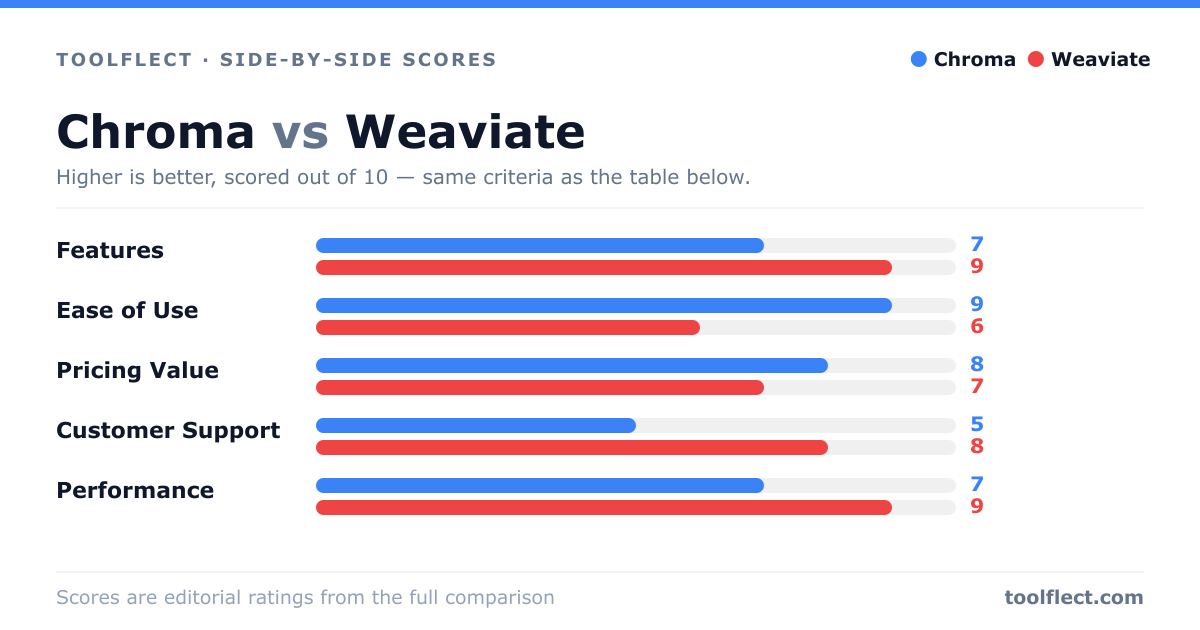
| Criterion | Chroma | Weaviate |
|---|---|---|
| Features | 7/10 – Core vector search, metadata filtering, but limited advanced features. | 9/10 – Rich feature set including hybrid search, modules, and built-in vectorization. |
| Ease of Use | 9/10 – Very simple setup and intuitive API for developers. | 6/10 – More complex configuration and learning curve. |
| Pricing Value | 8/10 – Free and open-source, low cost to run. | 7/10 – Open-source core, but enterprise features cost extra. |
| Customer Support | 5/10 – Community support only, no official enterprise support. | 8/10 – Professional support options and active community. |
| Performance | 7/10 – Good for small to medium datasets, degrades with scale. | 9/10 – Excellent performance at scale with distributed architecture. |