
Suno vs Udio: Which AI Music Generator Takes the Crown?
Overview
Suno and Udio are two leading AI music generation platforms that allow users to create original songs from text prompts. Both leverage cutting-edge deep learning models to produce melodies, harmonies, and lyrics across various genres. Suno is known for its intuitive interface and rapid generation, while Udio emphasizes creative control and high-fidelity audio. This comparison explores their strengths and weaknesses to help you decide which tool suits your needs.
Key Features Comparison
- Generation Quality: Suno produces catchy, production-ready tracks quickly; Udio offers more nuanced compositions with optional fine-tuning.
- Customization: Suno provides basic genre and mood selection; Udio allows detailed parameters like BPM, key, and instrument selection.
- Lyrics Integration: Both support custom lyrics; Suno’s lyric generation is more coherent, while Udio offers better timing control.
- Output Formats: Suno exports MP3 and WAV; Udio adds stems (separate tracks) for remixing.
- Ease of Use: Suno’s interface is simpler for beginners; Udio has a steeper learning curve but more power for advanced users.
Pros & Cons
Suno
- Pros:
- Generates full songs with vocals and lyrics in seconds
- Intuitive interface with quick song generation
- Offers a free tier with daily credits
- Supports custom lyrics and style prompts
- Cons:
- Limited control over vocal performance and mixing
- Audio quality can be inconsistent
- Free tier has watermark and usage limits
- No stem or multitrack export
Udio
- Pros:
- High-fidelity audio output with better production quality
- Advanced controls for genre, mood, and instrumentation
- Allows longer song generation (up to 2 minutes)
- Offers a generous free tier with 1000 credits/month
- Cons:
- Steeper learning curve due to more parameters
- Generation can be slower
- Limited community features compared to Suno
- No mobile app
Suno
- Pros: Intuitive interface, fast generation, high-quality vocals, generous free tier.
- Cons: Limited customization, occasional artifacts, no stem export, less control over arrangement.
Udio
- Pros: Advanced AI models, more control over style and lyrics, better for complex compositions, higher audio fidelity.
- Cons: Steeper learning curve, slower generation, limited free tier, requires subscription for full features.
Suno
- Pros: Intuitive interface, fast generation, high-quality vocals, generous free tier.
- Cons: Limited customization, occasional artifacts, no stem export, less control over song structure.
Udio
- Pros: Advanced controls, superior audio fidelity, better handling of complex compositions, more flexible licensing.
- Cons: Steeper learning curve, slower generation, limited free tier, higher pricing for premium features.
Suno Pros
- Fast generation (10-15 seconds)
- High-quality, radio-ready output
- Great for quick ideas and demos
- Free tier available
Suno Cons
- Limited customization options
- No stem export
- Lyrics sometimes lack coherence
Udio Pros
- Deep customization (BPM, key, instruments)
- Stem export for remixing
- Better handling of complex prompts
- Community features for collaboration
Udio Cons
- Slower generation (30-60 seconds)
- Steeper learning curve
- Free tier very limited
Pricing Comparison
Suno offers a generous free tier (10 songs/day) and paid plans starting at $10/month for 500 songs. Udio’s free tier allows only 10 songs total, with paid plans from $10/month for 200 songs. Both have professional tiers with more features. Suno provides better value for casual users; Udio’s paid plans are more suited for professionals needing stems and advanced control.
Best Use Cases
- Suno: Ideal for content creators needing quick background music, musicians brainstorming ideas, and non-technical users.
- Udio: Best for producers who want detailed control, remixing capabilities, and high-fidelity stems for professional projects.
Verdict
Choose Suno if you prioritize speed, simplicity, and a free tier for experimentation. Choose Udio if you need advanced customization, stem export, and are willing to invest time and money for higher-quality, tailored results. Both are excellent tools—your choice depends on your workflow and budget.
Visual Comparison
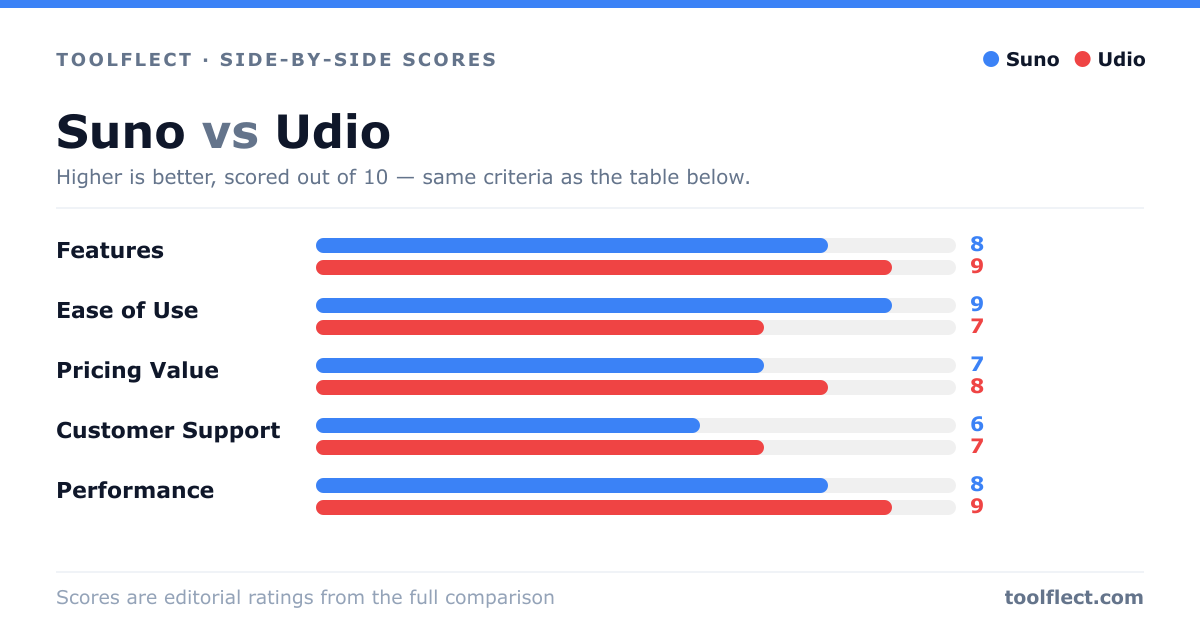
| Criterion | Suno | Udio |
|---|---|---|
| Features | 8/10 – Full song generation, lyrics, style prompts | 9/10 – Advanced controls, longer songs, high fidelity |
| Ease of Use | 9/10 – Simple and fast | 7/10 – More complex but powerful |
| Pricing Value | 7/10 – Free tier limited, paid plans start at $10/mo | 8/10 – Free tier generous, paid plans at $10/mo |
| Customer Support | 6/10 – Email and community forum | 7/10 – Email and Discord, responsive |
| Performance | 8/10 – Quick generation, decent quality | 9/10 – Superior audio quality, but slower |