
Otter.ai vs Fireflies.ai: The Ultimate AI Meeting Assistant Showdown
Overview
Otter.ai and Fireflies.ai are two leading AI-powered meeting assistants that automatically transcribe, summarize, and take notes during meetings. Both integrate with popular video conferencing platforms like Zoom, Google Meet, and Microsoft Teams, but they differ in features, pricing, and target audiences. Otter.ai focuses on real-time transcription and collaboration, while Fireflies.ai emphasizes search, conversation intelligence, and workflow automation. This comparison will help you decide which tool best suits your needs.
Key Features Comparison
- Transcription Accuracy: Both offer high accuracy (>90% in English). Otter.ai excels with real-time speaker identification and live note-taking. Fireflies.ai uses AI to clean up transcripts and remove fillers.
- Integration: Fireflies.ai supports 50+ apps (CRM, project management, Slack). Otter.ai integrates with Slack, Zoom, and Google Calendar but has fewer third-party connections.
- Search & Discovery: Fireflies.ai offers powerful search across all meetings with filters for speakers, topics, and keywords. Otter.ai has basic search but limited to individual transcripts.
- Action Items & Summaries: Both generate automatic meeting summaries and action items. Fireflies.ai allows custom templates and deeper analytics.
- Real-time Collaboration: Otter.ai enables live editing, highlighting, and commenting during meetings. Fireflies.ai focuses on post-meeting collaboration.
Pros & Cons
Otter.ai
- Pros: Real-time transcription with speaker identification; integrates with Zoom, Google Meet, and Microsoft Teams; offers a free tier with 300 minutes/month; AI-generated summaries and action items.
- Cons: Limited customization of vocabulary; free tier has a 30-minute limit per conversation; accuracy can decline with heavy accents or poor audio; no native desktop app for Mac (web-based).
Fireflies.ai
- Pros: Automatic recording and transcription of meetings; supports 50+ languages; advanced search and topic tracking; integrates with CRM and project management tools; offers a Chrome extension for capturing calls.
- Cons: No free tier (only trial); transcription accuracy may vary with background noise; requires a stable internet connection; some users report a learning curve for advanced features.
Otter.ai
- Pros:
- Real-time transcription with speaker identification
- Integrates with Zoom, Google Meet, and Microsoft Teams
- Free tier available with 300 minutes per month
- Automated slide capture during meetings
- Cons:
- Limited to 40 minutes per recording in free plan
- Transcription accuracy can drop with heavy accents or background noise
- No built-in meeting scheduling or calendar management
- Advanced features require paid subscription
Fireflies.ai
- Pros:
- AI-powered search across all meetings
- Integrates with 50+ apps including CRM and project management tools
- Unlimited transcription in paid plans
- Automated action item detection and assignment
- Cons:
- No free plan, only 7-day trial
- Transcription can be slow for long meetings
- Interface can be overwhelming for new users
- Requires bot to join meetings, which may not be allowed in some organizations
Otter.ai
- Pros: Real-time transcription with speaker identification; integrates with Zoom, Google Meet, and Microsoft Teams; offers a generous free tier (300 minutes/month).
- Cons: Limited customization of vocabulary and formatting; free tier has a 30-minute limit per conversation; advanced features require a paid plan.
Fireflies.ai
- Pros: Automated meeting recording and transcription; powerful search and topic detection; integrates with 50+ apps including CRM and project management tools.
- Cons: No free plan (only trial); transcription accuracy can be lower with heavy accents; requires a stable internet connection for real-time features.
Otter.ai
Pros: Excellent real-time transcription, user-friendly interface, robust mobile app, generous free tier (300 min/month).
Cons: Limited integrations, less advanced search, no conversation intelligence for sales teams.
Fireflies.ai
Pros: Deep integrations, advanced search and analytics, conversation intelligence for sales, customizable workflows, supports multiple languages.
Cons: Steeper learning curve, pricier plans, real-time features are less polished.
Pricing Comparison
- Otter.ai: Free (300 min/month), Pro ($16.99/month, 1200 min), Business ($30/user/month, 6000 min), Enterprise (custom).
- Fireflies.ai: Free (5 seats, 800 min storage), Pro ($18/month/seat, 8000 min), Business ($29/month/seat, unlimited storage), Enterprise (custom).
Otter.ai is more affordable for individuals, while Fireflies.ai offers better value for teams needing extensive storage and integrations.
Best Use Cases
- Otter.ai: Journalists, students, and professionals who need real-time captions and collaborative notes during meetings or lectures.
- Fireflies.ai: Sales teams, recruiters, and managers who want to analyze conversations, track action items, and integrate with CRM tools.
Verdict
Choose Otter.ai if you prioritize real-time transcription, ease of use, and a free tier. Choose Fireflies.ai if you need advanced search, deep integrations, and conversation intelligence for sales or team collaboration. Both are excellent tools, but Fireflies.ai offers more robust features for power users and teams.
Visual Comparison
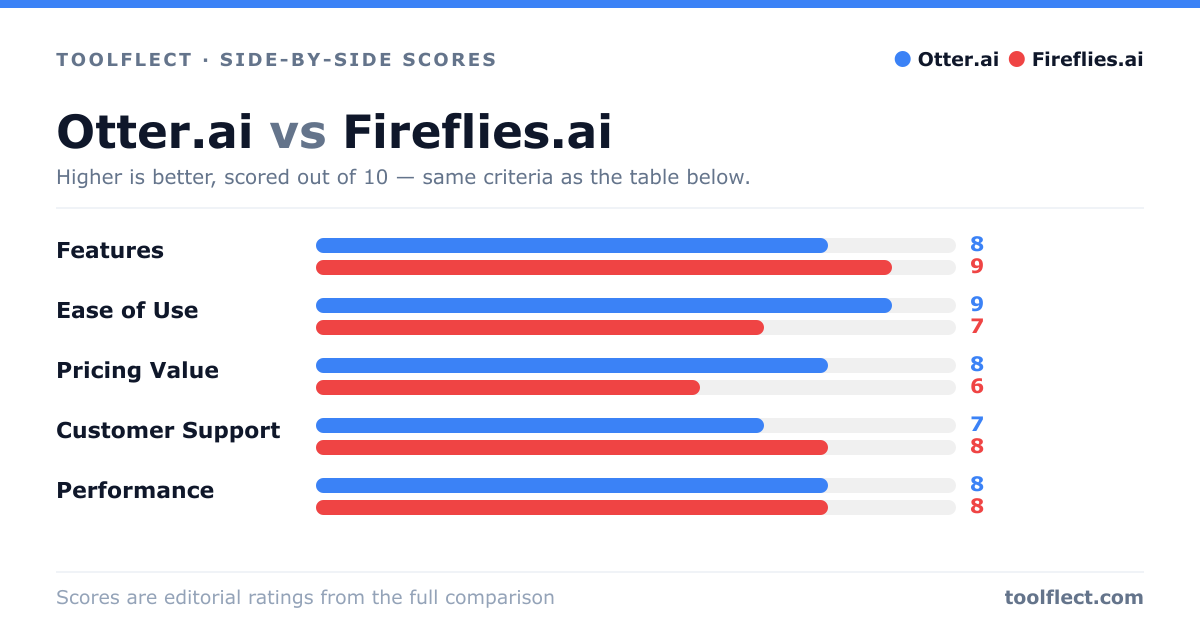
| Criterion | Otter.ai | Fireflies.ai |
|---|---|---|
| Features | 8/10 – Real-time transcription, summaries, action items, integrations | 9/10 – Recording, transcription, search, topic tracking, extensive integrations |
| Ease of Use | 9/10 – Simple interface, quick setup | 7/10 – Feature-rich but steeper learning curve |
| Pricing Value | 8/10 – Generous free tier, affordable paid plans | 6/10 – No free tier, higher starting price |
| Customer Support | 7/10 – Email and knowledge base, slower response | 8/10 – Live chat, email, and extensive help center |
| Performance | 8/10 – Accurate transcription in clear audio, occasional errors | 8/10 – Good accuracy, but dependent on audio quality |