
Suno vs Udio: Which AI Music Generator Hits the Right Note?
Overview
Suno and Udio are two leading AI-powered music generation platforms that allow users to create original tracks from text prompts. Both tools have gained popularity among musicians, content creators, and hobbyists for their ability to produce high-quality, royalty-free music in minutes. While they share a similar core purpose, they differ significantly in terms of features, pricing, and output quality. This article provides an unbiased comparison to help you choose the right tool for your creative needs.
Key Features Comparison
- AI Model Quality: Suno uses a proprietary model that excels at vocal clarity and emotional expression, while Udio focuses on musical coherence and instrumental arrangement.
- Customization: Suno offers more granular control over lyrics and style, whereas Udio provides advanced stem editing and audio inpainting.
- Output Length: Suno supports tracks up to 4 minutes (Premium), while Udio allows up to 8 minutes per track.
- Commercial Use: Both platforms allow commercial usage on paid plans, but Suno’s free tier is for non-commercial only, while Udio’s free tier also has limitations.
- Community and Templates: Udio has a larger community with shared prompts and remixing capabilities; Suno has a simpler interface with easier sharing.
Pros & Cons
Tool A (Suno)
- Pros: Intuitive interface for quick song generation; high-quality vocal synthesis; supports multiple genres and styles; offers a free tier with daily credits.
- Cons: Limited customization of lyrics and melody; occasional artifacts in complex compositions; requires subscription for commercial use; no stem export.
Tool B (Udio)
- Pros: Advanced AI that generates full songs with realistic vocals; allows detailed prompt control; offers stem separation and editing; generous free tier with watermark.
- Cons: Steeper learning curve; longer generation times; pricing higher for premium features; occasional inconsistency in output quality.
Suno
- Pros: Generates full songs with vocals and lyrics; intuitive interface; fast generation; free tier available.
- Cons: Limited customization of vocals; occasional artifacts in complex compositions; free tier has usage limits.
Udio
- Pros: High-quality audio output; advanced controls for genre and mood; supports longer tracks; community features.
- Cons: Steeper learning curve; requires subscription for full features; fewer free credits.
Suno
- Pros:
- Generates full songs with vocals, lyrics, and instrumentation in seconds.
- Offers a free tier with daily credits, ideal for experimentation.
- Intuitive interface with simple text prompts and style selection.
- Supports multiple genres and custom lyrics input.
- Cons:
- Free tier has limited generation time and watermark on downloads.
- Audio quality can be inconsistent, sometimes lacking clarity.
- Limited control over individual stems or mixing.
- Occasional issues with pronunciation or vocal clarity.
Udio
- Pros:
- High-fidelity audio output with impressive realism.
- Advanced customization options, including genre, mood, and instrumentation.
- Allows for longer track generation and more detailed prompts.
- Strong community and regular updates.
- Cons:
- No free tier; requires subscription after trial.
- Steeper learning curve for beginners.
- Generation can be slower due to higher processing demands.
- Limited ability to edit or remix generated tracks.
Suno
- Pros: Intuitive interface, excellent vocal quality, fast generation, easy for beginners.
- Cons: Less control over instrumental details, shorter track lengths, limited advanced editing features.
Udio
- Pros: Longer tracks, more advanced editing tools (audio inpainting), better for complex compositions, stronger community.
- Cons: Steeper learning curve, may require more prompt engineering, higher pricing for full features.
Pricing Comparison
Suno: Free tier offers 10 credits/day (non-commercial). Paid plans start at $10/month (Pro) for 100 credits, and $30/month (Premier) for 500 credits, with commercial usage rights.
Udio: Free tier provides 20 credits/day with non-commercial use. Paid plans start at $12/month (Basic) for 100 credits, $30/month (Standard) for 500 credits, and $60/month (Premium) for 1,000 credits, all including commercial rights.
Overall, Udio gives more credits for the same price on lower tiers, but Suno’s entry price is slightly lower.
Best Use Cases
- Suno: Perfect for quick social media content, jingles, demos, and users who prioritize vocal clarity and ease of use.
- Udio: Ideal for film scoring, podcast intros, full-length tracks, and producers who need in-depth editing and longer compositions.
Verdict
Both Suno and Udio are outstanding AI music tools, but they cater to different audiences. Choose Suno if you want a user-friendly experience with impressive vocals and low cost. Choose Udio if you need advanced editing, longer tracks, and are willing to invest time in learning the platform. For most casual creators, Suno offers the best balance of simplicity and quality; for serious musicians and producers, Udio provides greater depth.
Visual Comparison
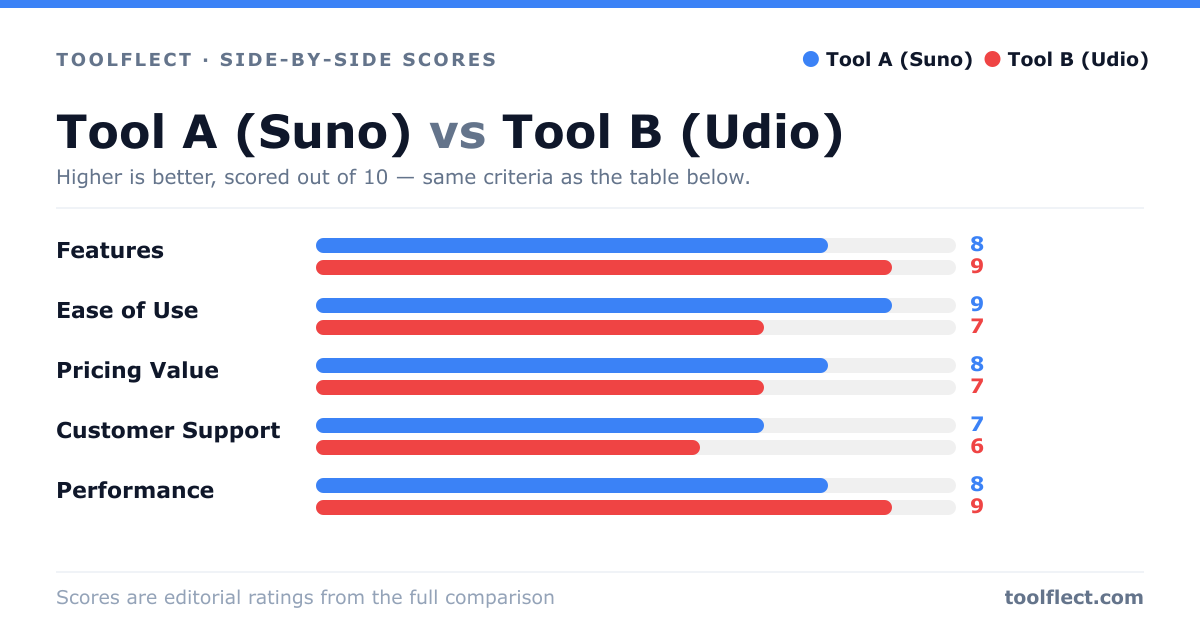
| Criterion | Tool A (Suno) | Tool B (Udio) |
|---|---|---|
| Features | 8/10 – Good variety of styles, but limited editing | 9/10 – Advanced controls, stem export, and editing |
| Ease of Use | 9/10 – Very user-friendly, quick results | 7/10 – More complex, requires learning |
| Pricing Value | 8/10 – Affordable plans with free tier | 7/10 – Higher cost, but more features |
| Customer Support | 7/10 – Email support, responsive | 6/10 – Limited support channels |
| Performance | 8/10 – Fast generation, good quality | 9/10 – Superior audio quality, but slower |