
Mubert vs Soundraw: Which AI Music Tool Wins?
Overview
Mubert and Soundraw are two popular AI music generation platforms that allow users to create unique, royalty-free music tracks. Mubert focuses on real-time, generative music streams, while Soundraw offers a more hands-on approach with customizable loops and melodies. This comparison will help you decide which tool fits your needs best.
Key Features Comparison
- Mubert: Real-time generative music, AI DJ, mobile apps, API access, and a vast library of user-generated samples.
- Soundraw: Customizable music generation with controls for mood, genre, and length; stem separation; and a simple editor for tweaking individual elements.
Pros & Cons
Mubert
- Pros:
- Generates royalty-free music in real-time using AI
- Offers a wide range of genres and moods
- Simple and intuitive interface
- Free plan available with attribution
- Cons:
- Limited customization options for individual tracks
- Audio quality may vary depending on the generated track
- No stem separation or multitrack export
- Customer support is not very responsive
Soundraw
- Pros:
- Allows fine-grained control over music generation (e.g., mood, genre, tempo)
- High-quality audio output with professional mastering
- Offers a generous free trial with watermark
- Provides stem separation for remixing
- Cons:
- Pricing is higher compared to Mubert
- Learning curve for advanced features
- No real-time generation; requires processing time
- Customer support is available but limited on weekends
Mubert
- Pros:
- Generates unlimited royalty-free music for commercial use.
- Offers a wide range of genres and moods, with real-time generation.
- Simple interface, suitable for beginners and quick projects.
- Provides a free plan with attribution.
- Cons:
- Limited control over the final output; cannot edit individual tracks.
- Audio quality may vary; sometimes sounds less polished than human-composed music.
- No stem separation or multi-track export.
- Pricing for commercial use can be higher than competitors for full rights.
Soundraw
- Pros:
- Allows customization of music by adjusting mood, genre, and length.
- Offers a ‘Pro’ mode with more granular control over song structure.
- High-quality output with a more professional sound.
- Clear licensing terms with royalty-free usage.
- Cons:
- No free plan; only a free trial with limited downloads.
- Customization options can be overwhelming for beginners.
- Requires a subscription for commercial use, which may be costly.
- Limited to the styles predefined by the AI; cannot generate truly unique genres.
Mubert
- Pros:
- Real-time AI music generation with a vast library of royalty-free tracks
- Simple interface suitable for quick content creation
- Offers a free tier with limited features
- Good for generating background music for videos and streams
- Cons:
- Limited customization options compared to Soundraw
- Audio quality can be inconsistent
- No stem or track separation features
- Pricing can be higher for advanced features
Soundraw
- Pros:
- Advanced customization with mood, genre, and length controls
- High-quality, royalty-free music with a focus on originality
- User-friendly interface with a visual timeline for editing
- Offers a free trial and flexible subscription plans
- Cons:
- Learning curve for beginners due to advanced features
- Limited free tier compared to Mubert
- No real-time generation; requires processing time
- Customer support can be slow to respond
Mubert
- Pros: Endless unique streams, great for background music, easy to use, free tier available.
- Cons: Less control over the final output, tracks can be repetitive, no stem downloads on lower tiers.
Soundraw
- Pros: High degree of customization, high-quality output, clear pricing, and commercial license included.
- Cons: Steeper learning curve, limited free version, requires more time to craft a track.
Pricing Comparison
- Mubert: Free plan with attribution, Pro at $11.99/month (annual), and Business at $39.99/month (annual).
- Soundraw: Free plan with limited downloads, Personal at $16.99/month (annual), and Commercial at $29.99/month (annual).
Best Use Cases
- Mubert: Live streams, podcasts, background music for videos, and quick inspiration.
- Soundraw: Content creators needing specific moods, video game soundtracks, and projects requiring precise control.
Verdict
Choose Mubert if you want effortless, real-time generative music with a free tier. Choose Soundraw if you need detailed customization and are willing to invest time in crafting your tracks. Both are excellent, but your choice depends on your workflow and creative control needs.
FAQ
Can I use Mubert or Soundraw music commercially?
Yes, both offer commercial licenses with their paid plans. Mubert’s Business plan and Soundraw’s Commercial plan allow commercial use.
Which tool is better for live streaming?
Mubert is better for live streaming because it generates music in real-time and can adapt to the vibe, making it ideal for continuous background music.
Do both tools offer royalty-free music?
Yes, both Mubert and Soundraw provide royalty-free music, meaning you can use the tracks without paying additional royalties.
Can I edit the generated music?
Soundraw offers more editing capabilities, allowing you to adjust individual elements. Mubert provides limited editing, mainly by changing the mood or genre.
Visual Comparison
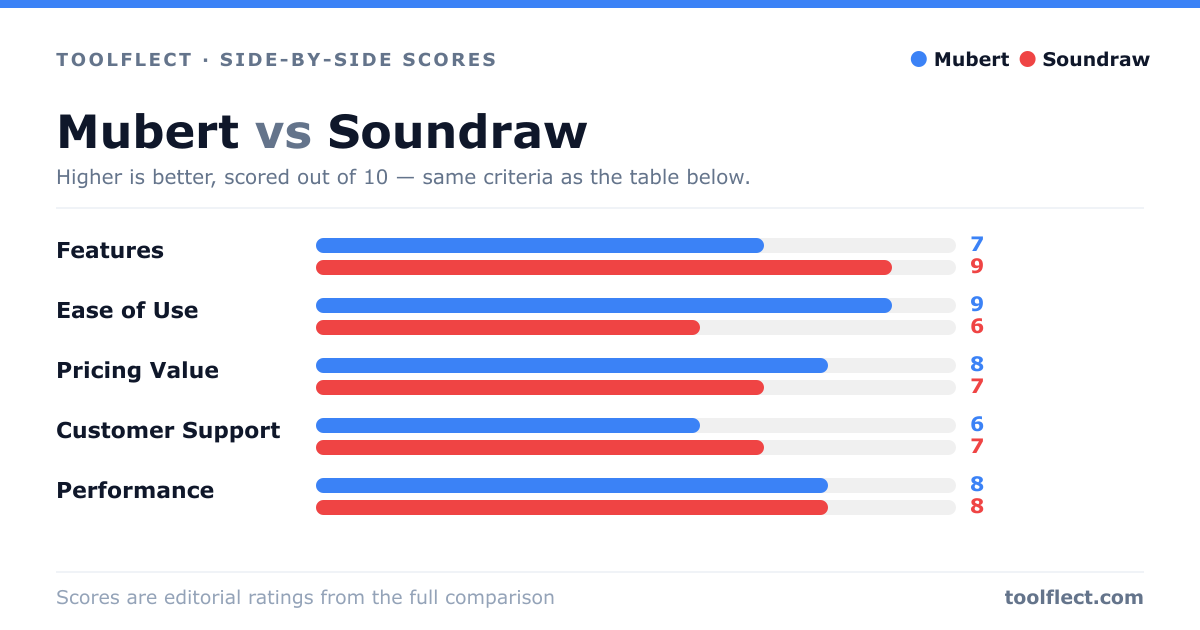
| Criterion | Mubert | Soundraw |
|---|---|---|
| Features | 7/10 – Real-time generation, many genres, but limited customization | 9/10 – Advanced controls, stem separation, high-quality output |
| Ease of Use | 9/10 – Very simple and quick to generate | 7/10 – More complex due to many options |
| Pricing Value | 8/10 – Free plan available, affordable subscriptions | 6/10 – Higher cost, but offers more features |
| Customer Support | 5/10 – Slow response times | 7/10 – Responsive but limited hours |
| Performance | 8/10 – Fast generation, good quality for most uses | 9/10 – Excellent audio quality, but slower processing |