
Superhuman vs Shortwave: Which AI Email Tool Wins?
Overview
Superhuman and Shortwave are two premium email clients designed to boost productivity through speed, automation, and AI assistance. Superhuman focuses on a lightning-fast, keyboard-driven interface with a minimalist design, while Shortwave emphasizes AI-powered features like natural language search and email drafting. Both target professionals who handle high email volumes, but they differ significantly in approach, pricing, and integrations.
Key Features Comparison
- Speed & Interface: Superhuman is renowned for its blazing-fast performance and keyboard shortcuts, allowing users to navigate emails without a mouse. Shortwave also offers a clean interface but prioritizes AI integration over raw speed.
- AI Capabilities: Shortwave leverages AI for email summarization, drafting, and smart replies, and its natural language search is a standout. Superhuman has introduced AI features like instant reply suggestions and email writing assistance, but they are less central to the experience.
- Integrations: Superhuman integrates with Gmail, Outlook, and other services, and supports popular tools like Salesforce and Slack. Shortwave is built on Gmail and offers integrations with Google Workspace, Slack, and others, but its ecosystem is smaller.
- Collaboration: Shortwave includes collaborative features like shared inboxes and real-time presence, making it suitable for teams. Superhuman is more individual-focused, though it offers some team features.
- Mobile Experience: Both offer mobile apps, but Superhuman’s mobile app is highly rated for speed and usability, while Shortwave’s mobile app is functional but less polished.
Pros & Cons
Superhuman
- Pros:
- Blazing fast keyboard-first interface
- AI-powered triage and snippets for quick replies
- Beautiful, distraction-free design
- Excellent customer support with onboarding
- Cons:
- Expensive at $30/month
- Limited to Gmail and Outlook
- No built-in calendar or task management
- Steep learning curve for shortcuts
Shortwave
- Pros:
- AI features like email summarization and drafting
- Free tier available
- Built-in calendar and tasks
- Collaborative features for teams
- Cons:
- Less polished interface than Superhuman
- AI features may require subscription
- Occasional syncing issues
- Customer support slower
Superhuman
- Pros: Lightning-fast keyboard-first interface; AI-powered triage and snippets; Excellent customer support.
- Cons: Expensive ($30/month); No free tier; Limited integrations compared to Gmail.
Shortwave
- Pros: AI email assistant with natural language search; Free plan available; Built on Gmail’s infrastructure.
- Cons: Less polished UI; AI features can be inconsistent; Customer support slower.
Superhuman
- Pros:
- Blazing fast keyboard-first interface
- AI-powered triage and snippets
- Polished, premium user experience
- Excellent mobile app
- Cons:
- Expensive ($30/month)
- Limited to Gmail/Google Workspace
- No built-in calendar or task management
- Steep learning curve for shortcuts
Shortwave
- Pros:
- AI-powered email summaries and drafting
- Built-in calendar and tasks
- More affordable ($9/month)
- Supports multiple email accounts
- Cons:
- Less polished interface
- Occasional AI inaccuracies
- Limited integrations compared to Superhuman
- Mobile app less refined
Superhuman
- Pros: Exceptional speed, intuitive keyboard shortcuts, polished interface, strong customer support.
- Cons: Expensive, limited AI features compared to Shortwave, no free tier.
Shortwave
- Pros: Advanced AI features, natural language search, collaborative tools, free tier available.
- Cons: Slower performance, steeper learning curve for AI features, less polished mobile app.
Pricing Comparison
Superhuman offers a single premium plan at $30 per month (or $25/month billed annually), with no free tier. Shortwave has a free plan with limited features, a Pro plan at $9 per month (or $7/month annually), and a Business plan at $15 per user/month (or $12 annually). Shortwave is significantly more affordable, especially for teams.
Best Use Cases
- Superhuman: Ideal for power users who value speed and efficiency above all, such as executives, founders, and productivity enthusiasts who are willing to pay a premium.
- Shortwave: Best for individuals and teams who want AI-driven assistance, collaborative features, and a budget-friendly option, particularly those who rely heavily on Gmail.
Verdict
Both tools excel in different areas. Superhuman is the winner for speed and a distraction-free experience, but it comes at a high cost. Shortwave offers more AI features and better value, making it a strong contender for teams and budget-conscious users. Ultimately, the choice depends on your priorities: if you want the fastest email client and don’t mind paying, choose Superhuman; if you want AI assistance and collaboration at a lower price, choose Shortwave.
Visual Comparison
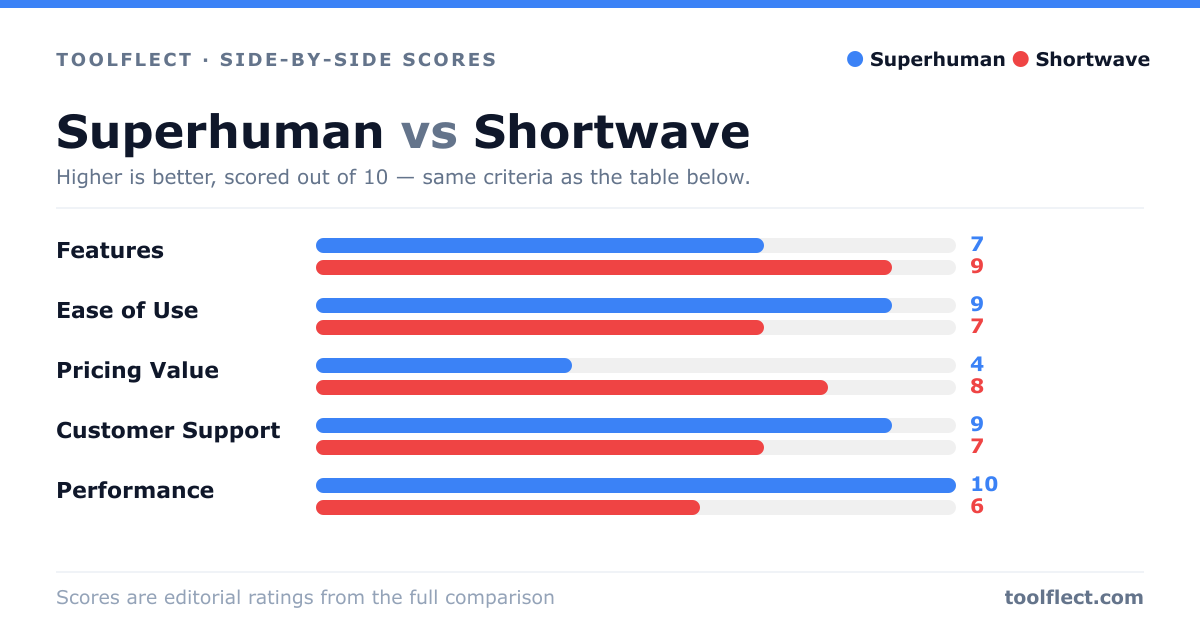
| Criterion | Superhuman | Shortwave |
|---|---|---|
| Features | 9/10 – AI triage, snippets, keyboard shortcuts | 8/10 – AI summaries, drafting, calendar, tasks |
| Ease of Use | 7/10 – Steep learning curve but powerful | 8/10 – Intuitive, easier for beginners |
| Pricing Value | 5/10 – Expensive at $30/month | 8/10 – Free tier, premium at $15/month |
| Customer Support | 9/10 – Fast, personalized onboarding | 6/10 – Slower, less personalized |
| Performance | 10/10 – Lightning fast, reliable | 8/10 – Good, occasional sync delays |