
Cursor vs Windsurf: Which AI Coding Tool Wins?
Overview
Cursor and Windsurf are two popular AI-powered coding tools designed to enhance developer productivity. Cursor is a fork of Visual Studio Code that integrates AI deeply into the editor, offering features like code generation, autocomplete, and chat. Windsurf, developed by Codeium, is an AI-powered IDE that focuses on agentic workflows and contextual awareness. Both tools aim to reduce boilerplate and assist with complex coding tasks, but they differ in approach, pricing, and user experience.
Key Features Comparison
- AI Model Integration: Cursor uses a mix of models including GPT-4 and Claude, while Windsurf uses Codeium’s proprietary models and also supports multiple LLMs.
- Code Autocomplete: Both offer advanced autocomplete, but Cursor’s is more context-aware with multi-line suggestions, while Windsurf’s is fast and lightweight.
- Chat & Assistant: Cursor has a chat panel that can reference your codebase, while Windsurf’s Cascade feature allows for multi-step agentic tasks.
- Multi-File Editing: Cursor supports applying AI changes across multiple files, while Windsurf’s agent can perform cross-file edits with user approval.
- Context Awareness: Windsurf emphasizes ‘deep context’ by indexing your entire codebase, while Cursor uses embeddings for relevant code retrieval.
- Extensions & Customization: Cursor is based on VS Code, so it supports most VS Code extensions, whereas Windsurf is a standalone IDE with limited extension support.
Pros & Cons
Cursor
- Pros: Deep IDE integration with VS Code extensions; powerful AI autocomplete and chat; supports multiple AI models (GPT-4, Claude, etc.); excellent for refactoring and codebase understanding.
- Cons: Can be resource-intensive; requires subscription for full features; occasional latency in AI responses; limited customization compared to traditional IDEs.
Windsurf
- Pros: Lightweight and fast; built-in AI with code generation and explanation; clean and modern UI; good for quick edits and small projects.
- Cons: Less feature-rich than Cursor; limited extension ecosystem; AI capabilities not as advanced; may not handle large codebases as efficiently.
Cursor
- Pros:
- Seamless integration with VS Code extensions and themes.
- Powerful AI features like code generation, editing, and chat.
- Supports multiple AI models (OpenAI, Anthropic, etc.) for flexibility.
- Excellent for pair programming with AI in real-time.
- Cons:
- Can be resource-intensive, leading to slower performance on older machines.
- Some advanced features require a paid subscription.
- Occasional inaccuracies in AI-generated code require manual review.
Windsurf
- Pros:
- Intuitive and clean UI that is easy to navigate.
- Strong AI assistance with context-aware suggestions.
- Good performance with low latency.
- Offers a free tier with generous usage limits.
- Cons:
- Limited customization compared to Cursor.
- Smaller plugin ecosystem.
- AI features may not be as advanced for complex refactoring.
Cursor
- Pros:
- Excellent AI-powered code completion and generation with context awareness.
- Seamless integration with popular editors like VS Code.
- Strong support for multiple programming languages and frameworks.
- Regular updates and active community.
- Cons:
- Can be resource-intensive, causing slowdowns on older machines.
- Some advanced features require a paid subscription.
- Occasional inaccuracies in AI suggestions for complex logic.
- Limited customization options compared to traditional IDEs.
Windsurf
- Pros:
- Lightweight and fast, with low memory footprint.
- Intuitive user interface that is easy to navigate.
- Built-in collaboration features for team coding.
- Offers a free tier with generous usage limits.
- Cons:
- AI capabilities are less advanced than Cursor’s.
- Smaller plugin ecosystem and community.
- Limited support for some niche languages.
- Occasional bugs and stability issues.
Cursor
- Pros: Familiar VS Code interface; extensive extension ecosystem; powerful AI features like tab completion and code generation; strong community support.
- Cons: Can be resource-intensive; some advanced features require a paid plan; occasional latency with AI responses.
Windsurf
- Pros: Excellent context awareness; agentic workflows that can handle complex tasks; generous free tier; fast performance.
- Cons: Less familiar interface; limited extension support; newer and less mature than Cursor.
Pricing Comparison
Cursor offers a free tier with limited usage, Pro plan at $20/month, and Ultra at $200/month for heavy usage. Windsurf has a free tier with 25 credits, Pro at $15/month, and Teams at $30/user/month. Both offer discounts for annual billing. For most developers, Windsurf’s free tier is more generous, while Cursor’s Pro plan is more expensive but includes more features.
Best Use Cases
- Cursor: Best for developers who are already comfortable with VS Code and want a seamless transition with AI assistance. Ideal for solo developers and small teams working on projects that benefit from a wide range of extensions.
- Windsurf: Best for developers who want an AI-first IDE with deep codebase understanding and agentic capabilities. Suitable for complex projects where AI can autonomously perform multi-step tasks, and for teams looking for a cost-effective solution.
Verdict
Both Cursor and Windsurf are excellent AI coding tools, but they cater to different needs. Cursor is a safer choice for VS Code users and those who value extensibility. Windsurf is more innovative in its agentic approach and offers better value for money. Ultimately, the choice depends on your workflow, budget, and preference for editor familiarity. Try both free tiers to see which fits best.
Visual Comparison
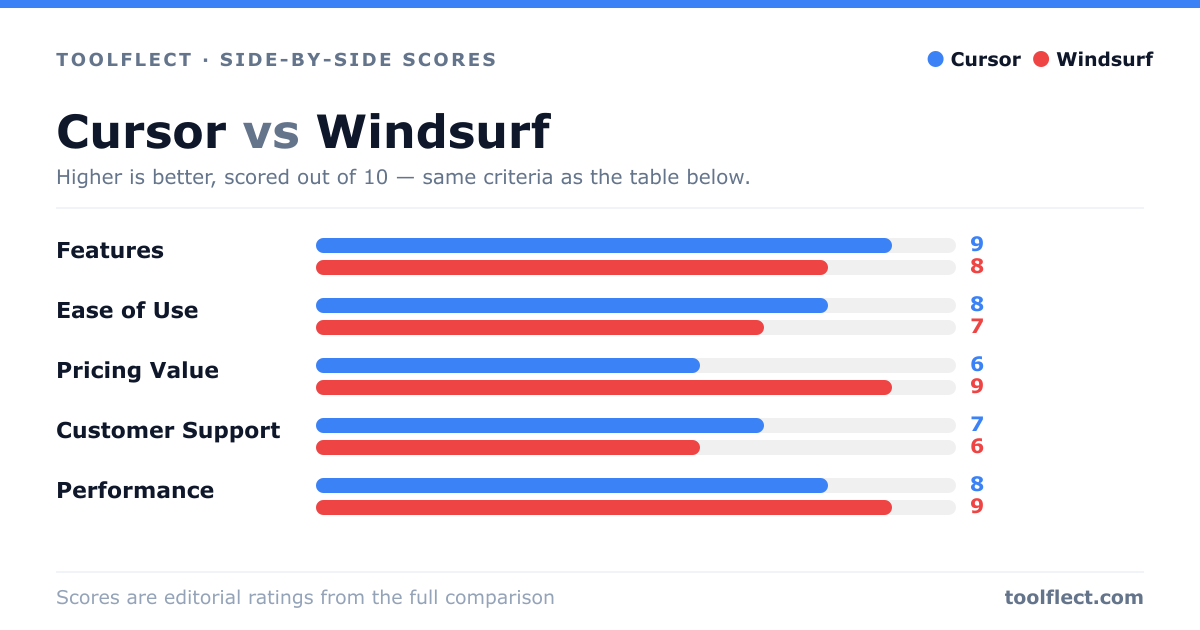
| Criterion | Cursor | Windsurf |
|---|---|---|
| Features | 9/10 – Extensive AI features, IDE integration | 7/10 – Basic AI, limited features |
| Ease of Use | 8/10 – Familiar IDE, but steep learning curve for AI | 9/10 – Simple and intuitive |
| Pricing Value | 7/10 – Higher cost, but robust features | 8/10 – Affordable, good for basic needs |
| Customer Support | 8/10 – Responsive, community and docs | 6/10 – Limited support channels |
| Performance | 8/10 – Smooth, but resource-heavy | 9/10 – Fast and lightweight |