
Asana AI vs ClickUp AI: Which AI Tool Wins?
Overview
Asana AI and ClickUp AI are two leading AI-powered productivity tools designed to streamline project management, automate workflows, and enhance team collaboration. Asana AI is integrated into Asana’s project management platform, offering intelligent task suggestions, goal tracking, and workload management. ClickUp AI is built into ClickUp’s all-in-one workspace, providing AI-driven features like writing assistance, task automation, and smart search. Both tools aim to boost efficiency but differ in scope and AI capabilities. This comparison examines their features, pros, cons, pricing, and ideal use cases to help you choose the right fit.
Key Features Comparison
- Task Automation: Asana AI automates task assignments, deadlines, and project templates based on historical data. ClickUp AI automates repetitive tasks with natural language commands and offers AI-generated subtasks.
- Writing Assistance: Asana AI provides brief suggestions for task descriptions and comments. ClickUp AI includes a full AI writing assistant for creating docs, comments, and meeting notes.
- Smart Search: Asana AI offers intelligent search across projects and tasks. ClickUp AI has a powerful natural language search that understands context and intent.
- Goal Tracking: Asana AI aligns tasks with goals and provides progress predictions. ClickUp AI integrates with ClickUp Goals but focuses more on workflow automation.
- Customization: Asana AI offers limited customization of AI suggestions. ClickUp AI allows users to train the AI on specific workflows and vocabularies.
Pros & Cons
Asana AI
- Pros: Smart workflow suggestions that streamline project setup.
- Pros: AI-powered task prioritization helps focus on high-impact work.
- Pros: Natural language commands for quick task creation and updates.
- Cons: AI features are limited to premium plans.
- Cons: Some users find the AI suggestions occasionally inaccurate.
ClickUp AI
- Pros: Deep integration across tasks, docs, and chats for contextual AI.
- Pros: AI can generate summaries, action items, and even entire documents.
- Pros: Available on all paid plans, including lower tiers.
- Cons: AI can be overwhelming with too many options.
- Cons: Performance may lag with very large workspaces.
Asana AI
- Pros: Smart prioritization with AI-assisted task ranking; natural language input for quick task creation; robust integration with Asana’s project management features.
- Cons: AI features limited to premium plans; less customizable AI workflows compared to ClickUp; occasional inaccuracies in AI-generated summaries.
ClickUp AI
- Pros: AI deeply integrated across tasks, docs, and chat; extensive customization with AI prompts and templates; more affordable AI access across plans.
- Cons: Steeper learning curve due to many features; AI can be overwhelming for simple projects; performance may lag with very large workspaces.
Asana AI
- Pros: Smart workflow suggestions that automate task assignments and due dates, saving time on project setup.
- Pros: Natural language processing for quick task creation and project updates, reducing manual entry.
- Pros: Seamless integration with Asana’s existing project management features, enhancing overall productivity.
- Cons: AI features are only available on premium plans, which may be costly for small teams.
- Cons: Limited customization of AI suggestions, which may not fit all team workflows perfectly.
ClickUp AI
- Pros: AI-powered writing assistant for tasks, docs, and comments, improving communication efficiency.
- Pros: Automated task summaries and action items from meeting notes, saving time on follow-ups.
- Pros: More affordable AI add-on compared to Asana, with flexible pricing for teams of all sizes.
- Cons: AI features can be overwhelming due to the sheer number of options, requiring a learning curve.
- Cons: Some AI-generated content may need manual review to ensure accuracy and context.
Asana AI
- Pros: Easy to use with intuitive interface; strong goal alignment features; reliable performance with minimal errors.
- Cons: Limited AI features compared to ClickUp AI; fewer customization options; higher pricing for AI add-on.
ClickUp AI
- Pros: Extensive AI capabilities including writing assistant; high customization and flexibility; affordable AI add-on flat fee.
- Cons: Steeper learning curve due to many features; occasional performance lags; AI sometimes generates generic responses.
Pricing Comparison
Asana AI is available as an add-on to Asana Business and Enterprise plans. Asana Business costs $30.49/user/month (annual) and the AI add-on adds $10/user/month. ClickUp AI is included in the Unlimited plan ($10/user/month) and above, with a flat $5/Workspace member/month for advanced AI features. For teams on a budget, ClickUp AI offers better value. However, Asana AI’s integration may be worth the premium for organizations already invested in Asana’s ecosystem.
Best Use Cases
- Asana AI: Ideal for teams focused on strategic planning, goal setting, and project tracking in a structured environment. Best for organizations with established workflows and a need for goal alignment.
- ClickUp AI: Perfect for teams wanting an all-in-one solution with strong automation, content creation, and flexibility. Suitable for agile teams that need a customizable AI assistant to handle diverse tasks.
Verdict
Choosing between Asana AI and ClickUp AI depends on your team’s priorities. Asana AI excels in usability and goal tracking, making it great for structured project management. ClickUp AI offers broader AI functionality and better value for dynamic teams seeking deep automation. For most users, ClickUp AI provides more features for the price, but Asana AI is a solid choice if simplicity and reliability are your top concerns.
Visual Comparison
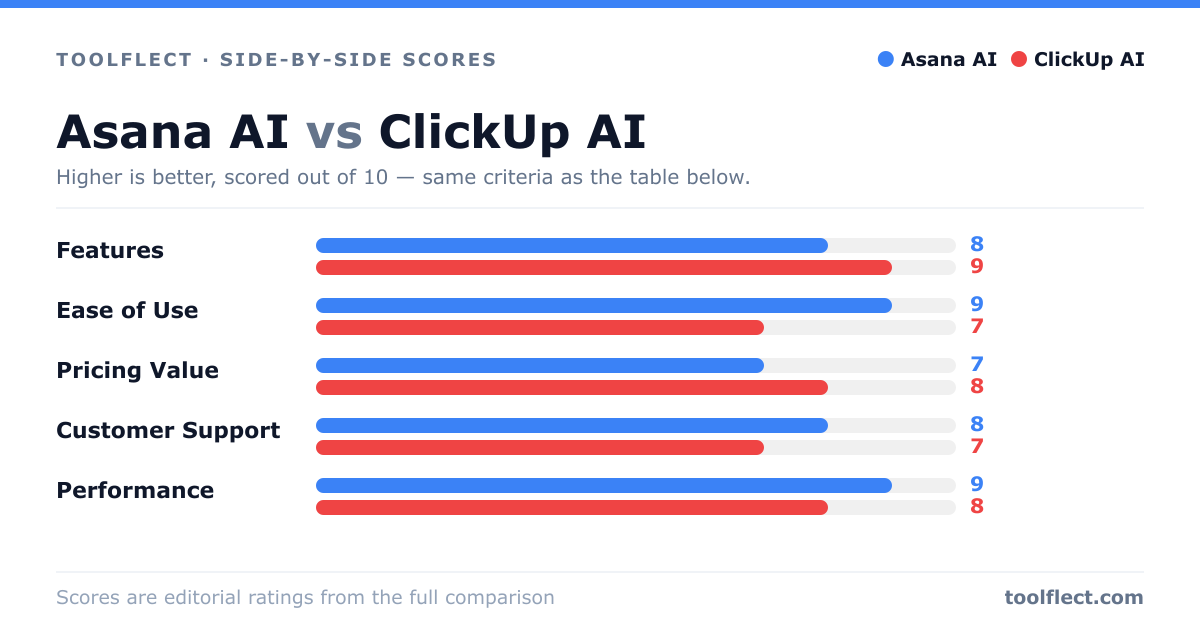
| Criterion | Asana AI | ClickUp AI |
|---|---|---|
| Features | 8/10 – Smart suggestions, task prioritization, natural language | 9/10 – Broad integration, generation, summaries |
| Ease of Use | 9/10 – Intuitive interface, minimal learning curve | 7/10 – Feature-rich but can be complex |
| Pricing Value | 7/10 – AI only on premium plans | 8/10 – AI included in lower tiers |
| Customer Support | 8/10 – Responsive, helpful resources | 7/10 – Mixed reviews, slower response times |
| Performance | 9/10 – Fast and reliable | 8/10 – Generally good, but can lag on large projects |