
Cortana vs Google Assistant: Which AI Assistant Wins in 2025?
Overview
Cortana and Google Assistant are two of the most well-known AI virtual assistants, but they have taken very different paths. Cortana, originally a flagship feature of Windows 10 and Microsoft’s ecosystem, has been largely phased out as a standalone assistant in recent years, now integrated mainly into Microsoft 365 for productivity tasks. Google Assistant, on the other hand, is widely available on Android, Google Home, and various smart devices, offering a robust, cross-platform experience. This comparison examines their features, usability, pricing, and ideal use cases to help you decide which assistant fits your lifestyle.
Key Features Comparison
- Platform Integration: Cortana is tightly integrated with Windows 10/11, Office 365, and Microsoft Teams, focusing on productivity and scheduling. Google Assistant is available on Android, iOS, Google Nest, and thousands of third-party devices, with broader smart home control.
- Third-Party Support: Cortana has limited third-party app integrations compared to Google Assistant, which works with Spotify, Uber, Philips Hue, and many more services.
- Language Understanding: Google Assistant excels at natural language processing, understanding context and follow-up queries. Cortana’s abilities are more limited and task-oriented.
- Smart Home Control: Google Assistant is a leader in smart home commands, supporting thousands of devices. Cortana’s smart home integration is minimal.
- Voice Recognition: Both support voice activation, but Google Assistant offers faster, more accurate responses and supports multiple languages.
- Privacy: Cortana stores data locally and is considered more privacy-friendly for enterprise users. Google Assistant relies on cloud processing and data collection for personalization.
Pros & Cons
Cortana
- Pros:
- Deep integration with Microsoft 365 and Windows ecosystem
- Strong productivity features like email and calendar management
- Available on Windows, Android, iOS, and Xbox
- Good for enterprise users with Microsoft accounts
- Cons:
- Limited third-party app support compared to competitors
- Declining consumer focus; Microsoft has shifted to enterprise
- Less accurate in natural language understanding
- Not available on many smart home devices
Google Assistant
- Pros:
- Excellent natural language processing and context awareness
- Vast integration with Google services and third-party apps
- Available on billions of devices including Android, iOS, and smart speakers
- Superior smart home control and routines
- Cons:
- Privacy concerns due to data collection
- Requires Google account for full functionality
- Inconsistent performance on non-Google devices
- Limited offline capabilities
Cortana
- Pros:
- Deep integration with Windows and Microsoft 365 ecosystem
- Good for productivity tasks like scheduling and email management
- Available on Windows, Android, iOS, and Xbox
- Supports multiple languages
- Cons:
- Limited third-party app support compared to competitors
- Lacks smart home device compatibility
- Development has been deprioritized by Microsoft
- Not available on many popular platforms like Google Home
Google Assistant
- Pros:
- Excellent natural language understanding and context
- Wide integration with Google services and third-party apps
- Strong smart home control with Google Home
- Available on Android, iOS, and many smart devices
- Cons:
- Privacy concerns due to data collection
- Requires Google account for full functionality
- Limited offline capabilities
- Not as deeply integrated with desktop OS
Cortana
- Pros:
- Deep integration with Microsoft 365 and Windows ecosystem.
- Strong productivity features like email and calendar management.
- Available on Windows, iOS, Android, and Xbox.
- Cons:
- Limited third-party app support compared to competitors.
- Consumer features have been scaled back; focus shifted to enterprise.
- Not available on many smart home devices.
Google Assistant
- Pros:
- Excellent natural language understanding and contextual awareness.
- Vast ecosystem integration with Google services and smart home devices.
- Available on billions of devices, including Android, iOS, and smart speakers.
- Cons:
- Privacy concerns due to data collection for personalization.
- Limited offline functionality.
- Inconsistent performance on non-Google devices.
Cortana
- Pros: Seamless integration with Microsoft 365; strong focus on productivity (email, calendar, reminders); good for enterprise environments; privacy-conscious with local data handling.
- Cons: Limited functionality as a standalone assistant; very few third-party integrations; poor smart home support; being phased out for consumer use; less natural conversation flow.
Google Assistant
- Pros: Excellent natural language processing; vast third-party and smart home ecosystem; available on multiple platforms (Android, iOS, smart speakers); continuously updated with new features; supports Routines and proactive suggestions.
- Cons: Requires internet connection for most functions; privacy concerns due to data collection; not as deeply integrated with productivity tools as Cortana; can be overwhelming with too many features.
Pricing Comparison
Both Cortana and Google Assistant are free to use with no subscription fees. Cortana comes built into Windows 10/11 and Microsoft 365, with no additional cost for basic features. Google Assistant is free on Android devices and available as a free app on iOS. Premium features like Google Nest Audio hardware or Google One cloud storage are optional. Enterprise-grade Cortana features are included with Microsoft 365 subscriptions (starting at $6/user/month). Overall, pricing is not a differentiating factor; both assistants are free for core use.
Best Use Cases
- Cortana: Ideal for Microsoft-centric professionals who need quick access to calendar, emails, and Teams meetings. Best for users who prioritize productivity and privacy over broad assistant capabilities.
- Google Assistant: Perfect for smart home enthusiasts, users who want a conversational assistant for daily tasks (weather, news, traffic), and those who rely on a wide range of third-party integrations. Also great for Android users who want a seamless, voice-first experience.
Verdict
Google Assistant is the clear winner for most users due to its superior natural language understanding, broader ecosystem, and active development. Cortana still holds value in specific enterprise and productivity scenarios, but its consumer relevance has waned. If you live in the Microsoft 365 world, Cortana can be a handy productivity tool. For everything else, Google Assistant offers a more capable, versatile, and enjoyable experience.
Visual Comparison
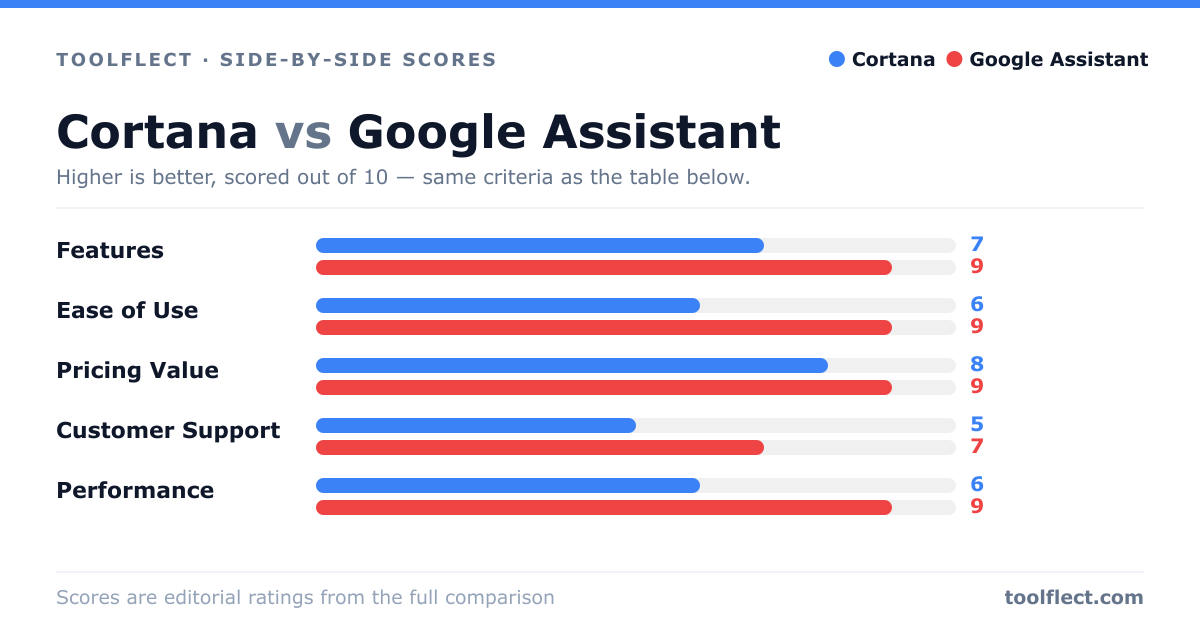
| Criterion | Cortana | Google Assistant |
|---|---|---|
| Features | 7/10 – Strong in Microsoft ecosystem, but limited third-party support | 9/10 – Extensive features and integrations |
| Ease of Use | 6/10 – Clunky on non-Windows devices | 9/10 – Intuitive and responsive |
| Pricing Value | 8/10 – Free with Windows, but limited value for non-Microsoft users | 9/10 – Free with Google account, excellent value |
| Customer Support | 5/10 – Limited support channels | 7/10 – Help center and community forums |
| Performance | 6/10 – Slower and less accurate | 9/10 – Fast and accurate |