
Remove.bg vs Photoroom: Which AI Image Tool Wins?
Overview
Remove.bg and Photoroom are both AI-powered tools for image editing, but they serve different primary purposes. Remove.bg specializes in automatic background removal with high accuracy, while Photoroom offers a comprehensive suite for product photography, including background removal, retouching, and image generation. This comparison evaluates their features, pricing, and best use cases.
Key Features Comparison
Remove.bg
- Automatic background removal from images of people, products, animals, etc.
- API integration for developers
- Batch processing support
- Foreground/background color adjustment
Photoroom
- Background removal with edge detection and manual refinement
- AI-generated backgrounds and scenes
- Retouching tools (blemish removal, color correction)
- Batch editing and templates for e-commerce
Pros & Cons
Remove.bg
- Pros: Fast and accurate background removal using AI; simple drag-and-drop interface; free for low-resolution images; API available for developers.
- Cons: Limited editing features beyond background removal; high-resolution downloads require paid credits; no batch processing on free tier; less control over fine details.
Photoroom
- Pros: Comprehensive editing suite including background removal, retouching, and templates; AI-powered tools for product and portrait photos; offers batch processing and API; free plan with watermarked exports.
- Cons: Steeper learning curve due to more features; some advanced features require subscription; processing can be slower for complex images; free plan has limited resolution.
Remove.bg
- Pros: Fast and accurate background removal for images with clear subjects; simple API integration for developers; free tier available for low-resolution images.
- Cons: Limited editing features beyond background removal; higher-resolution images require paid credits; less effective on complex backgrounds or subjects with fine details.
Photoroom
- Pros: Offers a wide range of editing tools including background replacement, retouching, and templates; AI-powered features for product and portrait photography; user-friendly interface with batch processing.
- Cons: Some advanced features require a subscription; processing time can be slower for complex edits; free version has watermarks and limited resolution.
Remove.bg
- Pros: Fast and accurate background removal for images with people or objects; simple API integration for developers; free tier available for low-resolution images.
- Cons: Limited editing features beyond background removal; high-resolution downloads require paid credits; no batch processing on free plan.
Photoroom
- Pros: Comprehensive editing suite including background removal, retouching, and adding shadows/reflections; AI-powered tools for product photography; offers templates and batch processing.
- Cons: Steeper learning curve due to more features; free version has watermarks and limited resolution; pricing can be higher for advanced features.
Remove.bg
- Pros: Excellent accuracy for simple backgrounds, fast processing, user-friendly interface, robust API.
- Cons: Limited features beyond background removal, no advanced editing or generation, paid plans can be costly for heavy usage.
Photoroom
- Pros: All-in-one solution for product images, creative AI backgrounds, retouching, good for e-commerce sellers.
- Cons: Background removal may require manual correction for complex images, steeper learning curve, more expensive for full features.
Pricing Comparison
Remove.bg offers a free tier with low-resolution downloads and a pay-as-you-go model (credits). Paid plans start at $9/month for up to 200 images. Photoroom has a free tier with watermark, Pro at $9.99/month (unlimited background removal, 100 retouches/month), and Business at $29.99/month (more advanced features, team collaboration). Both have annual discounts.
Best Use Cases
- Remove.bg: Ideal for developers needing API integration, quick background removal from simple images (e.g., portraits, stock photos).
- Photoroom: Best for e-commerce sellers who need professional product images with custom backgrounds, retouching, and batch processing.
Verdict
Choose Remove.bg if your primary need is fast, accurate background removal without extra features. Opt for Photoroom if you require a complete image editing suite for product photography. For heavy batch processing or API usage, Remove.bg excels; for creative control and all-in-one editing, Photoroom is superior.
Visual Comparison
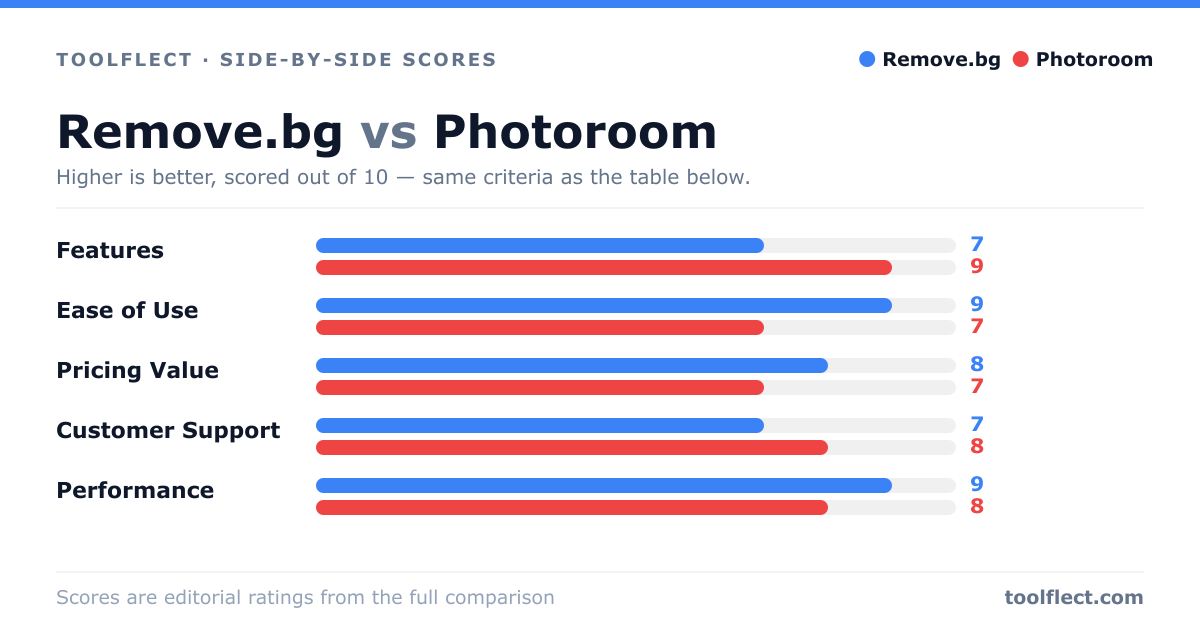
| Criterion | Remove.bg | Photoroom |
|---|---|---|
| Features | 7/10 – Focused on background removal with basic editing | 9/10 – Extensive editing tools, templates, and AI enhancements |
| Ease of Use | 9/10 – Very simple and intuitive | 7/10 – More complex but still user-friendly |
| Pricing Value | 8/10 – Free for low-res, affordable credits | 7/10 – Subscription required for full features, but generous free tier |
| Customer Support | 7/10 – Email and help center | 8/10 – Email, chat, and extensive documentation |
| Performance | 9/10 – Fast and reliable | 8/10 – Good but can be slower with complex edits |