
Kling AI vs Pika: Which AI Video Generator Wins?
Overview
Kling AI and Pika are two leading AI video generation platforms that have gained significant traction in 2025. Kling AI, developed by Kuaishou, focuses on high-fidelity video synthesis with advanced control features, while Pika prioritizes user-friendliness and creative flexibility. This article provides a comprehensive comparison to help you decide which tool best fits your needs.
Key Features Comparison
- Text-to-Video Generation: Kling AI excels in generating realistic videos from detailed text prompts, with support for high resolutions up to 1080p and 4K. Pika also offers text-to-video but at lower resolutions and with a simpler prompt interpretation.
- Image-to-Video: Both platforms support image-to-video, but Kling AI provides more advanced motion control and camera movements, including pan, tilt, and zoom. Pika offers a more straightforward approach with preset motion styles.
- Video Editing Capabilities: Pika focuses on real-time video editing with features like inpainting, outpainting, and style transfer. Kling AI focuses more on generation, but its lip-sync and face animation features are superior.
- Customization: Kling AI offers finer controls over camera angles, lighting, and subject behavior. Pika provides a more automated process with intuitive sliders for style and motion.
- Integration and API: Both platforms provide APIs, but Kling AI’s API is more robust and supports batch processing, making it suitable for production pipelines. Pika’s API is simpler but less flexible.
- Creative Effects: Pika is known for its extensive library of creative effects and filters, ideal for social media content. Kling AI focuses more on realism and fidelity, with fewer stylized effects.
Pros & Cons
Kling AI
- Pros: High-quality video generation with realistic motion and physics; supports 1080p resolution and longer clips; advanced controls for camera movement and object manipulation; strong community and tutorials.
- Cons: Limited free tier; requires a learning curve for advanced features; occasional rendering delays during peak times; not as many preset styles as Pika.
Pika
- Pros: User-friendly interface with quick generation; innovative features like Pikaffects for surreal transformations; good for short, stylized clips; active Discord community for support and inspiration.
- Cons: Video resolution capped at 720p; shorter clip lengths; less control over motion and physics; pricing can be expensive for high-volume use.
Kling AI
- Pros: High-quality video generation with realistic motion and physics.
- Pros: Supports both text-to-video and image-to-video.
- Pros: Offers multiple aspect ratios and resolutions.
- Cons: Limited free tier; requires credits for longer videos.
- Cons: Generation can be slow during peak times.
Pika
- Pros: User-friendly interface with quick generation.
- Pros: Innovative features like Pikaffects for adding effects.
- Pros: Good for short, stylized clips.
- Cons: Video length limited to a few seconds.
- Cons: Less control over motion and physics.
Kling AI
- Pros: High-quality video generation with realistic motion and physics.
- Pros: Supports long video generation (up to 2 minutes) and multiple aspect ratios.
- Pros: Advanced controls for camera movement and motion intensity.
- Cons: Limited availability in some regions; requires waitlist or subscription.
- Cons: Can be expensive for high-volume use.
Pika
- Pros: User-friendly interface with simple text prompts.
- Pros: Fast generation times and easy editing tools.
- Pros: Offers a free tier with limited credits.
- Cons: Video length is shorter (up to 4 seconds per clip).
- Cons: Less control over motion and camera compared to Kling AI.
Kling AI
- Pros: Superior video quality and realism; advanced camera control; excellent lip-sync; high-resolution output; flexible API.
- Cons: Steeper learning curve; higher computational cost; limited creative effects; user interface less intuitive.
Pika
- Pros: Very easy to use; quick generation; diverse creative styles; affordable plans; active community.
- Cons: Lower video resolution; less control over camera and motion; limited for professional-grade production; API lacks advanced features.
Pricing Comparison
Pricing strategies differ significantly. Kling AI offers a credit-based system with pay-per-use pricing. Entry-level plans start at $5 for 100 credits, and a standard 5-second 1080p video costs around 10 credits. Subscription plans offer better rates, but top-tier features like 4K rendering require premium credits. Pika operates on a subscription model with three tiers: Free (limited generations), Standard at $10/month (10 videos max), and Pro at $30/month (unlimited generations with priority queue). For casual users, Pika’s free tier is attractive, but for high-volume professional use, Kling AI’s credit system may be more cost-effective.
Best Use Cases
- Kling AI: Professional filmmaking, marketing video production, content requiring realistic human animation, projects needing precise camera control, and enterprise-level video automation.
- Pika: Social media content, quick concept visualization, YouTube intros, personal creative projects, and users prioritizing simplicity and speed over realism.
Verdict
Choosing between Kling AI and Pika depends on your priorities. If you need high-quality, realistic video with advanced controls and are willing to invest time in learning, Kling AI is the superior choice. Conversely, if you value ease of use, quick creative iterations, and a playful approach, Pika is more suitable. For professionals, Kling AI offers a more powerful toolkit; for hobbyists and social media creators, Pika provides a rapid and fun experience.
Visual Comparison
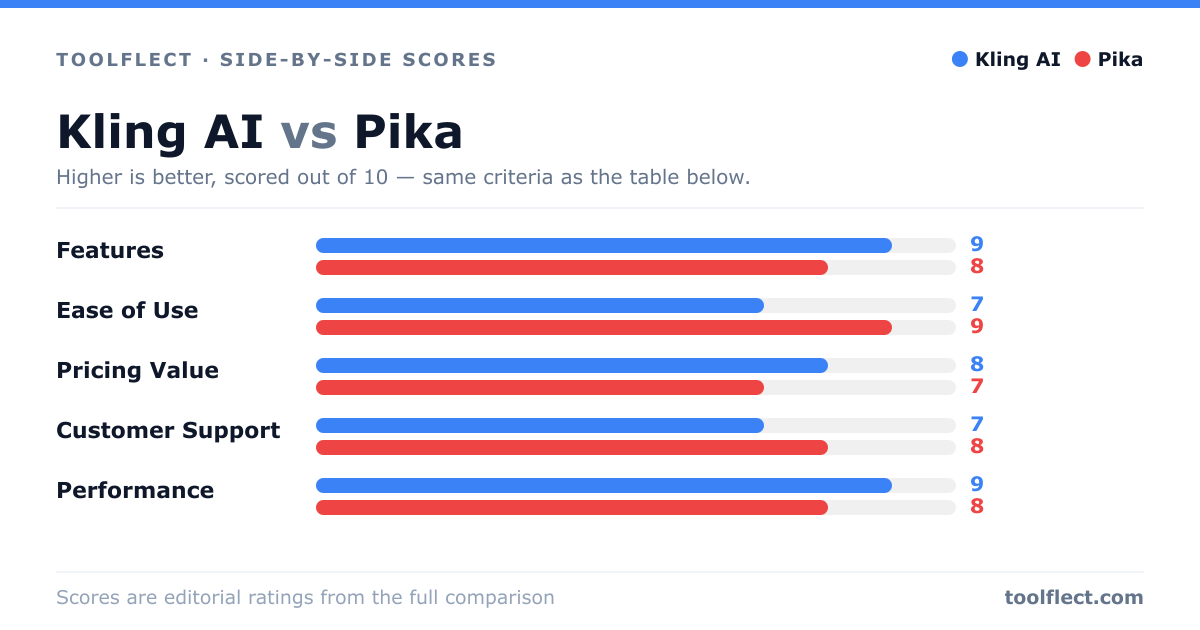
| Criterion | Kling AI | Pika |
|---|---|---|
| Features | 9/10 – Advanced motion control, 1080p, longer clips | 8/10 – Pikaffects, easy presets, but shorter clips |
| Ease of Use | 7/10 – Steeper learning curve for advanced options | 9/10 – Intuitive, quick results |
| Pricing Value | 8/10 – Competitive for quality, but limited free tier | 7/10 – Higher cost for features, lower resolution |
| Customer Support | 7/10 – Email support, active community | 8/10 – Discord support, responsive |
| Performance | 9/10 – High-quality output, but slower rendering | 8/10 – Fast generation, but lower resolution |