
D-ID vs HeyGen: Which AI Video Creation Tool Wins?
Overview
D-ID and HeyGen are two leading AI-powered video creation platforms that allow users to generate professional-looking videos from text or images. D-ID focuses on real-time face animation and talking avatars, making it ideal for personalized customer interactions and digital humans. HeyGen offers a broader range of tools, including customizable avatars, multilingual video translation, and a user-friendly interface suitable for marketers and content creators. Both have carved out niches in the AI video space, but they differ significantly in approach, capabilities, and target audiences.
Key Features Comparison
- Avatar Realism: D-ID is renowned for its highly realistic facial animation and lip-sync accuracy, especially with uploaded portraits. HeyGen provides a variety of pre-built avatars but allows extensive customization, including clothing and appearance.
- Script-to-Video: Both platforms support text-to-video generation. HeyGen offers more templates and a simplified script editor, while D-ID integrates more deeply with real-time APIs for dynamic responses.
- Language Support: HeyGen excels in multilingual video translation with voice cloning and lip-syncing across 175+ languages. D-ID also supports multiple languages but focuses more on natural intonation than wide-scale translation.
- Customization: HeyGen lets users create custom avatars from video recordings. D-ID allows uploading a single photo to animate, which is faster but offers fewer physical customization options.
- Integration & API: D-ID offers robust API access for developers, enabling real-time interactive avatars in applications and chatbots. HeyGen provides API support but is generally favored for its web-based ease of use.
- Video Templates: HeyGen comes with a rich library of social media and marketing templates. D-ID focuses more on raw avatar generation with fewer pre-designed layouts.
Pros & Cons
D-ID
- Pros: Realistic avatar animations with natural facial expressions; supports multiple languages; easy-to-use interface for quick video generation.
- Cons: Limited customization of avatars; pricing can be high for advanced features; video length restrictions on lower tiers.
HeyGen
- Pros: Extensive avatar library with diverse styles; advanced customization options; competitive pricing with generous free tier.
- Cons: Slightly steeper learning curve; some users report occasional rendering delays; limited integration options compared to D-ID.
D-ID
- Pros: Realistic avatar animations with natural facial expressions; supports multiple languages and voices; easy-to-use interface for creating talking-head videos.
- Cons: Limited customization of avatar appearance; pricing can be high for advanced features; video rendering can be slow for longer clips.
HeyGen
- Pros: Extensive library of customizable avatars and templates; supports 40+ languages and voice cloning; offers a free tier with basic features.
- Cons: Some advanced features require a paid plan; avatar movements can sometimes appear less natural; customer support response times vary.
D-ID
- Pros: Realistic avatar animations with natural facial expressions; supports multiple languages; easy-to-use API for developers.
- Cons: Limited customization options for avatars; video quality can be lower for complex scenes; pricing can be high for small businesses.
HeyGen
- Pros: Extensive avatar library with diverse styles; user-friendly interface for quick video creation; offers a free tier with basic features.
- Cons: Less realistic facial animations compared to D-ID; limited language support; advanced features require a paid subscription.
D-ID
- Pros: Superior realism in facial animations; real-time API for dynamic use cases; no need for video recording—just a photo; strong privacy controls for generated content.
- Cons: Steeper learning curve for beginners; limited template library; pricing can be higher for enterprise-level API access.
HeyGen
- Pros: Extremely user-friendly interface; versatile avatar customization; excellent multilingual support; affordable starter plans; best for rapid content creation.
- Cons: Custom avatars require video uploads which may be time-consuming; less suited for real-time interactive applications that demand low latency.
Pricing Comparison
D-ID offers a free trial with limited minutes, then paid plans starting at approximately $5.99/month for the Basic plan, which includes 5 minutes of video. Professional plans cost around $29.99/month for 15 minutes plus API access. Enterprise custom pricing is also available. HeyGen also has a free plan with watermark and limited exports. Paid plans start at $24/month for the Creator plan, offering 10 minutes of video per month, and scale up to $99/month for the Business plan with 30 minutes and brand kit features. For high-volume needs, enterprise plans are available for both. Overall, D-ID may be more cost-effective for light users and developers, while HeyGen provides more breadth for regular content creators.
Best Use Cases
- D-ID: Ideal for creating AI-powered customer support avatars, interactive digital humans in apps, corporate training videos with a personalized touch, and real-time conversational agents.
- HeyGen: Best suited for marketing videos, social media content, explainer videos, multilingual sales pitches, and educational materials that require rapid production and easy editing.
Verdict
Both D-ID and HeyGen are exceptional AI video creation tools, but they serve different primary purposes. Choose D-ID if you need ultra-realistic, interactive avatars with real-time API integration (e.g., for chatbots or virtual assistants). Choose HeyGen if you prioritize ease of use, variety of templates, and multilingual video generation for marketing and content production. Test both with their free trials to see which aligns better with your workflow.
Visual Comparison
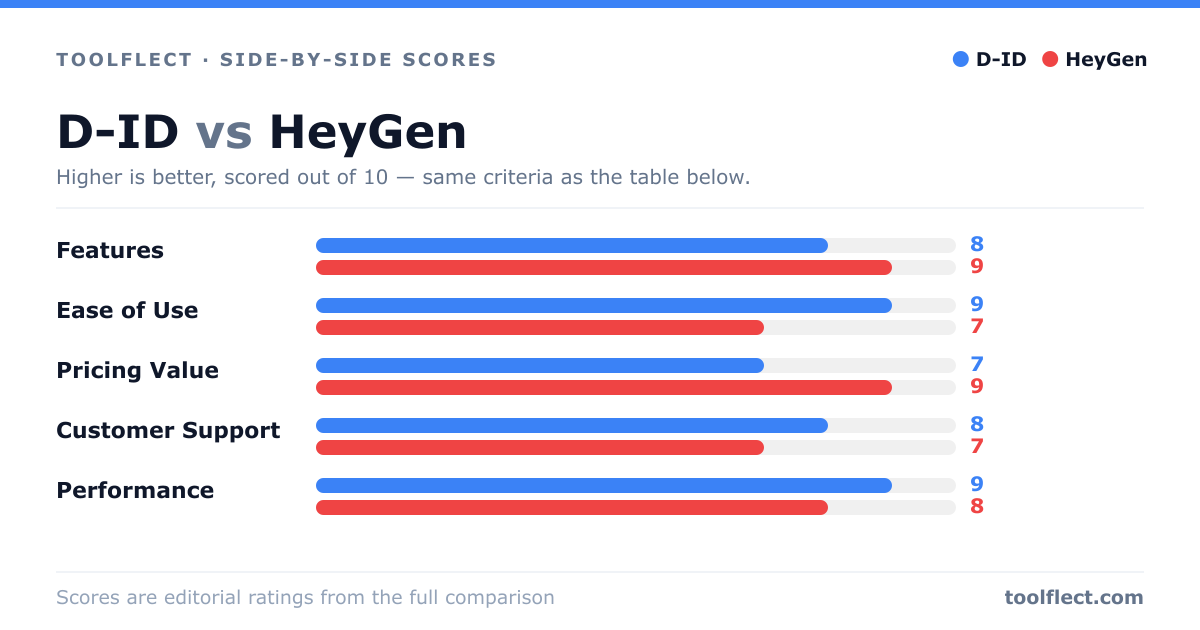
| Criterion | D-ID | HeyGen |
|---|---|---|
| Features | 8/10 – Realistic avatars, but fewer customization options. | 9/10 – Extensive avatar library and advanced editing tools. |
| Ease of Use | 9/10 – Intuitive interface, quick video creation. | 7/10 – More powerful but requires time to learn. |
| Pricing Value | 7/10 – Higher cost for premium features. | 9/10 – Affordable plans with a robust free tier. |
| Customer Support | 8/10 – Responsive support via email and chat. | 7/10 – Support is good but slower on weekends. |
| Performance | 9/10 – Fast rendering and reliable output. | 8/10 – Generally good, but occasional delays during peak times. |