
Genmo vs Pika: Which AI Video Tool Wins?
Overview
Genmo and Pika are two leading AI-powered video creation platforms that allow users to generate short-form videos from text prompts. Both tools have gained popularity among content creators, marketers, and hobbyists for their ability to turn ideas into engaging visuals quickly. While they share a core purpose, each platform has distinct strengths, limitations, and pricing models. This comparison will help you decide which tool is the better fit for your video creation needs.
Key Features Comparison
Both Genmo and Pika offer text-to-video generation, but they differ in advanced capabilities:
- Genmo: Supports high-resolution video output, multiple aspect ratios, and a creative ‘Replay’ feature that refines clips. It also offers a user-friendly interface with prompt templates and a community gallery for inspiration.
- Pika: Provides more advanced editing tools, including video extension, fusion (combining two prompts), and stylistic presets. Pika also offers a ‘negative prompt’ feature for better control and supports longer video durations.
Pros & Cons
Genmo
- Pros:
- Free tier available with generous credits for experimentation.
- Supports text-to-video and image-to-video generation.
- Offers a simple, intuitive interface suitable for beginners.
- Generates videos in a variety of styles, including anime and realistic.
- Cons:
- Video length limited to a few seconds (typically up to 4-8 seconds).
- Resolution capped at 1080p, no 4K output.
- Lacks advanced editing features like multi-scene or camera controls.
- Rendering can be slow during peak times.
Pika
- Pros:
- Offers more control with advanced features like camera movement and style presets.
- Supports longer video generation (up to 15 seconds).
- Higher resolution options up to 4K.
- Active community and regular updates with new features.
- Cons:
- Free tier is limited; most features require a paid subscription.
- Learning curve steeper due to more complex interface.
- Generating high-resolution videos can be expensive in credits.
- Occasional artifacts in complex motion scenes.
Genmo
- Pros:
- Free to use with no watermarks on generated videos
- Supports text-to-video and image-to-video generation
- High-resolution output up to 1080p
- Active community and regular updates
- Cons:
- Limited video length (up to 4 seconds)
- No advanced editing features
- Occasional artifacts in complex scenes
- Lacks API access for developers
Pika
- Pros:
- User-friendly interface with simple controls
- Supports longer videos (up to 4 seconds in free tier, longer with credits)
- Offers style presets and motion controls
- Fast generation times
- Cons:
- Free tier includes watermark
- Limited customization options compared to advanced tools
- Requires credits for higher resolutions and longer videos
- No offline mode
Genmo
- Pros:
- Free tier with generous credits for experimentation
- Simple text-to-video interface, easy for beginners
- Supports multiple aspect ratios and styles
- Fast generation times for short clips
- Cons:
- Limited resolution and length in free tier
- Less control over motion and camera angles
- Occasional artifacts in complex scenes
- No API access for developers
Pika
- Pros:
- Advanced motion control and camera movements
- High-quality output with better consistency
- Offers API for integration
- Active community and regular feature updates
- Cons:
- Pricing can be high for heavy usage
- Steeper learning curve for advanced features
- Limited free tier with watermarked exports
- Longer render times for complex prompts
Genmo
- Pros: Simple and intuitive interface; excellent for beginners; strong community support; generous free tier with daily credits; good quality for short clips.
- Cons: Limited customization options; shorter video length by default; occasional inconsistency in rendering complex scenes.
Pika
- Pros: More advanced features like video extension and fusion; higher-grade output quality; supports multi-scene videos; active development with frequent updates.
- Cons: Steeper learning curve; pricing can be higher for full features; some advanced features require paid plans.
Pricing Comparison
Genmo offers a free tier with daily credits (limited number of generations per day) and a ‘Plus’ plan at approximately $10 per month for faster generation, higher resolution, and additional credits. Pika also has a free tier with a limited number of videos, and paid plans start at around $8 per month for the ‘Standard’ plan, which includes more credits and access to all features. Pika’s ‘Pro’ plan at $24 per month offers even more credits and priority processing. While Genmo is slightly cheaper on paper, Pika provides more value for advanced users.
Best Use Cases
- Genmo: Ideal for quick idea visualization, social media clips, beginners learning AI video generation, and projects with simple narrative requirements.
- Pika: Best suited for professional content creators, marketers who need polished videos with brand-specific styling, and anyone requiring advanced editing capabilities like extending or combining clips.
Verdict
Both Genmo and Pika are exceptional AI video tools, but your choice depends on your skill level and needs. If you’re a beginner looking for a free, easy-to-use option with solid output, Genmo is a great starting point. If you need more creative control, higher quality, and advanced features, Pika is worth the investment. For most serious creators, Pika offers the better long-term value, but Genmo remains a strong contender for casual use.
Visual Comparison
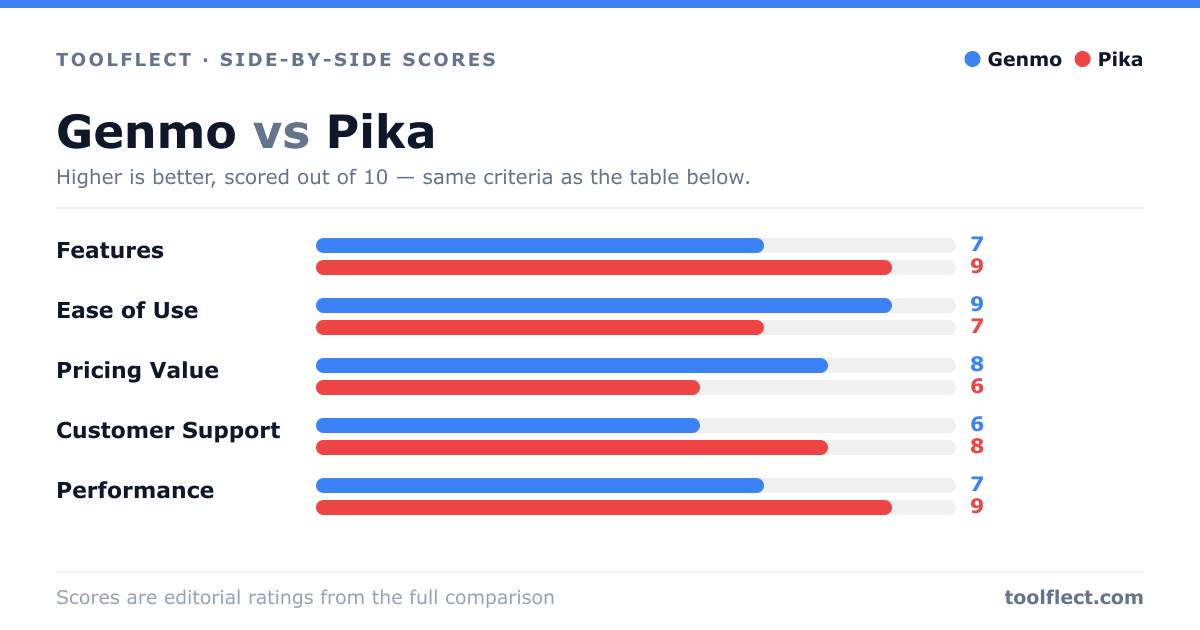
| Criterion | Genmo | Pika |
|---|---|---|
| Features | 7/10 – Basic text-to-video and image-to-video, limited customization. | 9/10 – Advanced controls, camera movement, style presets, longer videos. |
| Ease of Use | 9/10 – Very user-friendly, minimal learning curve. | 7/10 – More complex, but tutorials available. |
| Pricing Value | 8/10 – Generous free tier, affordable paid plans. | 6/10 – Higher cost for advanced features, limited free tier. |
| Customer Support | 6/10 – Email support, community forum, slower response. | 8/10 – Responsive support, active Discord, helpful community. |
| Performance | 7/10 – Good quality for short clips, occasional rendering delays. | 9/10 – High-quality output, faster rendering, but resource-intensive. |