
Scholarcy vs Explainpaper: Which AI Tool Wins for Research & Learning?
Overview
Scholarcy and Explainpaper are two AI-powered tools designed to help researchers, students, and professionals digest academic papers more efficiently. Scholarcy excels at extracting structured summaries, flashcards, and bibliographic data, while Explainpaper focuses on making complex papers accessible by explaining jargon and concepts in plain language. Both tools aim to save time and enhance understanding, but they cater to slightly different needs.
Key Features Comparison
- Paper Summarization: Scholarcy provides concise, bulleted summaries with key findings, while Explainpaper offers full-paper explanations that readers can click through for definitions and clarifications.
- Content Extraction: Scholarcy extracts figures, tables, and references automatically; Explainpaper does not extract multimedia but offers inline explanations.
- Customization: Scholarcy allows users to adjust summary length and format (e.g., flashcard, mindmap). Explainpaper offers customizable depth of explanation per term.
- Integration: Scholarcy integrates with Zotero, Mendeley, and browsers. Explainpaper has a standalone web app and browser extension.
- Language Support: Scholarcy supports multiple languages (e.g., Chinese, Spanish). Explainpaper currently supports English only.
Pros & Cons
Scholarcy
- Pros: Automatically extracts key points, summaries, and references from research papers; integrates with Zotero and Mendeley; offers browser extension for quick access.
- Cons: Free version has limited features; summaries may oversimplify complex arguments; requires PDF upload, not direct URL.
Explainpaper
- Pros: Interactive paper reading with click-to-explain on any text; uses GPT-3.5 for explanations; good for learning and understanding difficult concepts.
- Cons: Limited to PDF uploads; explanations can be verbose; no citation management or reference extraction.
Scholarcy
- Pros:
- Automatically extracts key points, summaries, and references from research papers.
- Creates interactive flashcards and mind maps for better retention.
- Integrates with Zotero, Mendeley, and other reference managers.
- Offers browser extension for quick access.
- Cons:
- Free tier has limited features and monthly limits.
- May struggle with highly technical or non-standard PDF formats.
- Requires internet connection for most features.
- Some users find the interface cluttered.
Explainpaper
- Pros:
- Simplifies complex papers by allowing users to highlight and get explanations.
- Clean, intuitive interface focused on reading experience.
- Supports collaborative annotation and sharing.
- Free to use with no limits on basic features.
- Cons:
- Limited to explanation of text, not full summarization or extraction.
- No integration with reference managers.
- Lacks advanced features like flashcards or mind maps.
- May not handle very long documents efficiently.
Scholarcy
- Pros:
- Automatically extracts key points, summaries, and references from research papers, saving time.
- Offers a browser extension and web app for easy access.
- Provides flashcards and interactive summaries for better learning.
- Supports multiple document formats including PDF and Word.
- Cons:
- Free version has limited features and usage.
- May struggle with complex or poorly formatted PDFs.
- Summaries can sometimes be too brief or miss nuance.
- No offline mode; requires internet connection.
Explainpaper
- Pros:
- Simple and intuitive interface for uploading and annotating papers.
- Uses AI to explain complex concepts in plain language.
- Allows highlighting and note-taking directly on the paper.
- Free to use with no sign-up required for basic features.
- Cons:
- Limited to PDF uploads; no support for other formats.
- Explanations may be too simplistic for advanced researchers.
- No citation management or reference extraction.
- Lacks advanced features like flashcards or summaries.
Scholarcy
- Pros: Rich feature set (flashcards, mindmaps), strong reference extraction, multiple export formats, good for systematic reviews.
- Cons: Steeper learning curve, summaries can be overly long, free tier limited.
Explainpaper
- Pros: Very intuitive interface, instant explanations of complex terms, excellent for beginners or non-native speakers.
- Cons: Limited to English, no advanced export options, less useful for extracting data points.
Pricing Comparison
- Scholarcy: Free plan (5 article summaries/month). Pro plan: $9.99/month (unlimited summaries, flashcard exports). Team plans available.
- Explainpaper: Free tier (10 explanations/month). Premium: $15/month (unlimited explanations, priority support). Annual discounts offered.
Best Use Cases
- Scholarcy: Ideal for researchers conducting literature reviews, who need structured data extraction and want to create flashcards for study.
- Explainpaper: Best for students or professionals encountering unfamiliar terminology, and for those who prefer reading full papers with contextual help.
Verdict
Both tools are excellent for their respective strengths. Scholarcy is more powerful for in-depth research work, while Explainpaper is simpler and more accessible for learning. Choose Scholarcy if you need comprehensive extraction and study aids; choose Explainpaper if your primary goal is to understand papers without leaving the reading environment.
Visual Comparison
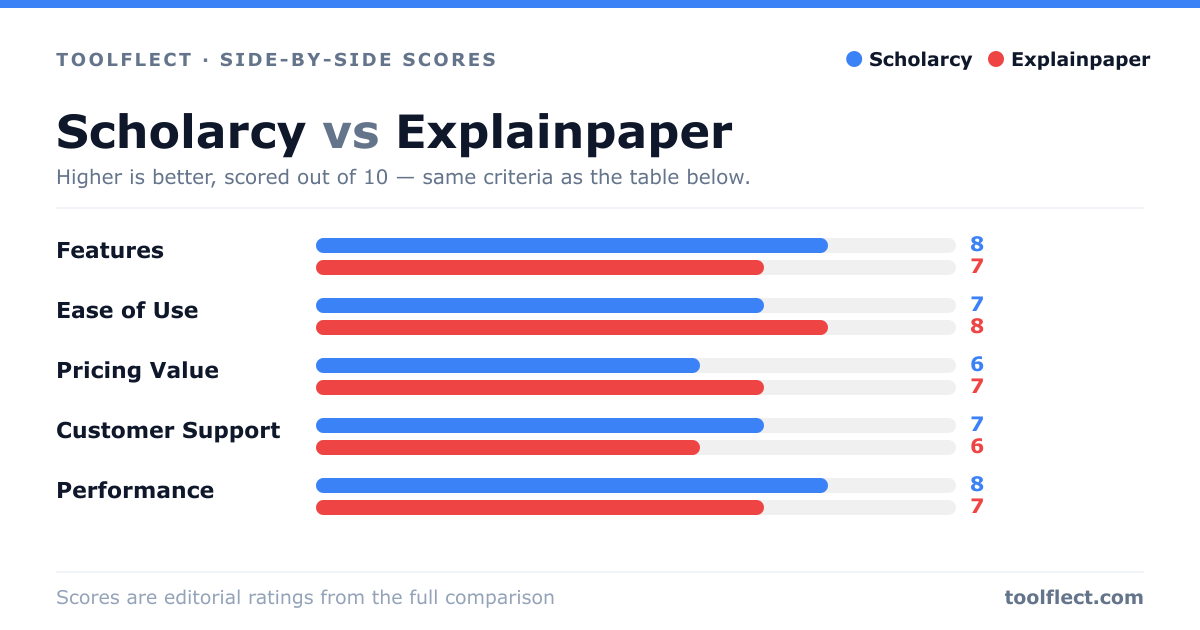
| Criterion | Scholarcy | Explainpaper |
|---|---|---|
| Features | 8/10 – Summarization, key points, references, browser extension | 7/10 – Interactive explanations, but lacks reference management |
| Ease of Use | 7/10 – Simple interface, but requires PDF upload | 8/10 – Intuitive click-to-explain, but limited to PDFs |
| Pricing Value | 6/10 – Free tier limited, paid plans from $9.99/mo | 7/10 – Free tier available, paid plans from $5/mo |
| Customer Support | 7/10 – Email support, knowledge base | 6/10 – Email support, no live chat |
| Performance | 8/10 – Fast processing, accurate summaries | 7/10 – Good explanations, but can be slow on large PDFs |