
GitHub Copilot vs Codeium: Which AI Coding Assistant Wins?
Overview
GitHub Copilot and Codeium are two leading AI-powered coding assistants that integrate with popular IDEs to provide code suggestions, autocomplete, and more. Copilot, developed by GitHub in collaboration with OpenAI, is built on the Codex model and offers deep integration with GitHub. Codeium, a newer entrant, emphasizes speed, free tiers, and support for a wide range of languages and editors. Both tools aim to boost developer productivity by reducing boilerplate code and suggesting context-aware completions.
Key Features Comparison
- Language Support: GitHub Copilot supports dozens of languages (Python, JavaScript, TypeScript, etc.). Codeium also supports many languages plus specialized ones like Ruby, Go, and Rust.
- IDE Integration: Copilot works with VS Code, JetBrains, Neovim, and more. Codeium extends to over 40 editors including JupyterLab, Sublime Text, and Vim.
- Context Awareness: Both leverage surrounding code for suggestions, but Codeium claims to have a larger context window for better completions.
- Chat & Inline Commands: Copilot offers chat in VS Code and JetBrains (beta). Codeium has a chat interface in many editors and supports natural language commands.
- Customization: Copilot allows disabling suggestions for public code only. Codeium offers per-repo configuration and custom tuning.
- Security & Privacy: Both have enterprise plans with private code handling, but Codeium’s free tier also ensures no data retention for code snippets.
Pros & Cons
GitHub Copilot
- Pros:
- Excellent code completion and suggestion quality, especially for popular languages and frameworks.
- Deep integration with GitHub and Visual Studio Code, making it seamless for developers already in the GitHub ecosystem.
- Supports a wide range of languages and IDEs, including JetBrains, Neovim, and Visual Studio.
- Continuously improved with new models and features like chat and pull request assistance.
- Cons:
- Requires a paid subscription after the free trial, which may be costly for individual developers.
- Can sometimes suggest insecure or inefficient code, requiring careful review.
- Limited customization options for fine-tuning suggestions to specific coding styles.
- Privacy concerns for organizations due to code being sent to Microsoft servers.
Codeium
- Pros:
- Free for individual developers, with no credit card required, making it accessible.
- Offers a generous free tier for commercial use, which is attractive for startups and small teams.
- Provides additional features like code search and an AI chat, enhancing productivity.
- Supports a wide range of IDEs and languages, with a focus on performance and low latency.
- Cons:
- Code suggestion quality may not be as polished as Copilot for complex or niche code.
- Less integrated with GitHub, requiring additional setup for some workflows.
- Limited community and third-party resources compared to Copilot.
- Some users report occasional inaccuracies or irrelevant suggestions.
GitHub Copilot
- Pros: Excellent code completion for popular languages; integrates seamlessly with GitHub and VS Code; strong community and documentation.
- Cons: Requires subscription after trial; can suggest insecure or inefficient code; limited customization for team-specific styles.
Codeium
- Pros: Free for individual use; supports many IDEs and languages; offers chat and search features; good for privacy with on-prem deployment.
- Cons: Less accurate for niche languages; smaller community; occasional latency issues.
GitHub Copilot
- Pros: Excellent code completion, supports many languages, integrates with GitHub and VS Code.
- Cons: Requires subscription, can suggest insecure code, limited customization.
Codeium
- Pros: Free for individuals, fast and accurate suggestions, supports 70+ languages.
- Cons: Less polished IDE integration, smaller community, some features require enterprise plan.
GitHub Copilot
- Pros: Deep GitHub integration, excellent for popular languages, consistent updates from Microsoft.
- Cons: Higher cost for individual use, limited free tier (trial only), sometimes suggests insecure or biased code.
Codeium
- Pros: Generous free tier with unlimited completions, broad editor support, fast inference, built-in chat.
- Cons: Newer platform, smaller community, less mature in complex code generation compared to Copilot.
Pricing Comparison
GitHub Copilot: Individual plan at $10/month ($100/year), Business at $19/user/month, Enterprise custom pricing. Free 30-day trial.
Codeium: Free Forever plan for individual developers (up to 2000 completions/month?). Pro at $9/month for unlimited completions and priority speed. Teams and Enterprise available.
Best Use Cases
- GitHub Copilot: Best for developers heavily using GitHub, working in mainstream stacks, and needing deep integration with GitHub Actions and pull requests.
- Codeium: Ideal for cost-conscious developers, those using niche editors, or teams wanting a free but capable AI assistant with chat support.
Verdict
Both tools are powerful, but the choice depends on workflow and budget. GitHub Copilot excels in ecosystem integration and mature code generation, while Codeium offers better value with a strong free tier and broader editor support. Try both free trials to see which fits your coding style.
Visual Comparison
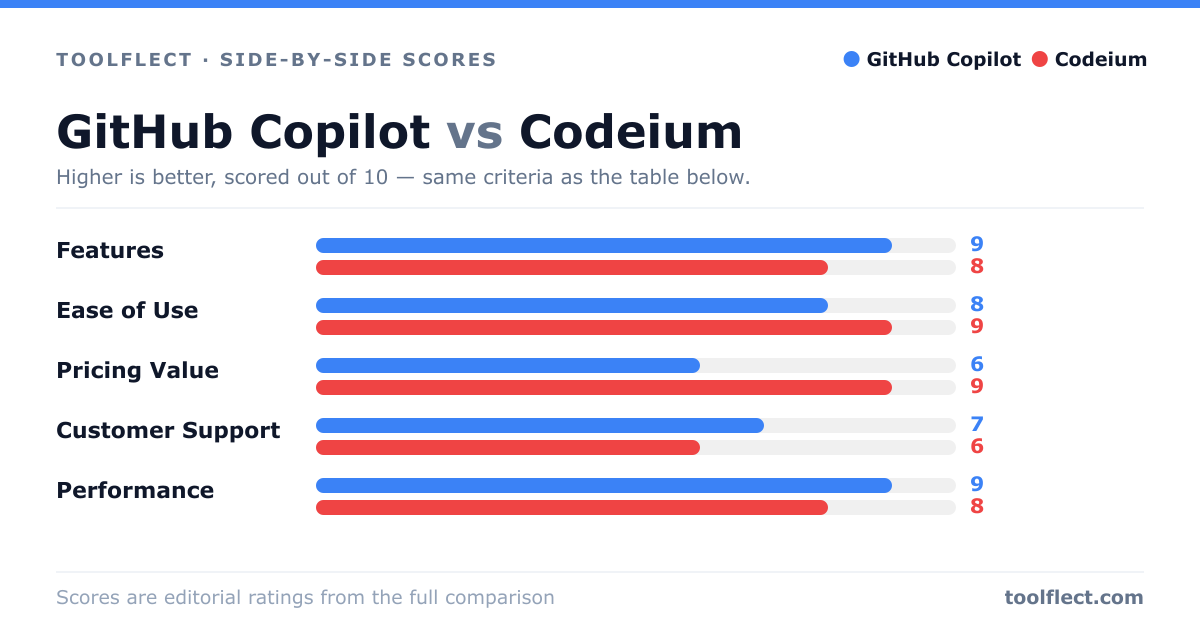
| Criterion | GitHub Copilot | Codeium |
|---|---|---|
| Features | 9/10 – Advanced code completion, chat, pull request assistance | 8/10 – Code completion, chat, code search, and more |
| Ease of Use | 8/10 – Seamless in VS Code and GitHub, but setup can be complex | 9/10 – Simple installation and intuitive interface |
| Pricing Value | 6/10 – Paid subscription, but offers a free trial | 9/10 – Free for individuals, affordable for teams |
| Customer Support | 7/10 – Support via GitHub community and tickets | 6/10 – Limited support, mainly community-based |
| Performance | 9/10 – Fast and accurate suggestions, but can be resource-heavy | 8/10 – Low latency, but sometimes less accurate |