
Chroma vs Weaviate: Which Vector Database Fits Your AI Stack?
Overview
Chroma and Weaviate are two popular open-source vector databases designed for AI applications. Chroma is lightweight and developer-friendly, focusing on simplicity and rapid prototyping. Weaviate is a feature-rich vector database with built-in hybrid search, CRUD operations, and advanced filtering. Both support storing and querying embeddings, but they cater to different use cases and scales.
Key Features Comparison
- Core Storage: Chroma stores embeddings with metadata; Weaviate stores objects with vectors and properties.
- Search Types: Chroma supports similarity search; Weaviate supports similarity, hybrid, and keyword search.
- Indexing: Chroma uses brute-force or approximate nearest neighbor (ANNs) via HNSW; Weaviate uses HNSW and other configurable indices.
- API: Chroma offers a simple Python API; Weaviate provides GraphQL, REST, and gRPC APIs.
- Data Management: Chroma has limited data management (CRUD on collections); Weaviate offers full CRUD with references and filtering.
- Deployment: Chroma runs in-process or as a server; Weaviate can be deployed as a scalable cluster.
Pros & Cons
Chroma
- Pros:
- Lightweight and easy to embed in Python applications
- Simple API for quick prototyping
- Supports multiple distance functions (L2, IP, cosine)
- Good for small to medium-sized datasets
- Cons:
- Limited scalability for very large datasets
- Fewer advanced features (e.g., hybrid search, filtering)
- Less mature ecosystem compared to Weaviate
Weaviate
- Pros:
- Scalable to billions of objects with distributed architecture
- Built-in hybrid search (BM25 + vector)
- Rich filtering and aggregation capabilities
- Strong support for GraphQL and REST APIs
- Cons:
- Heavier setup and more complex configuration
- Higher resource consumption
- Steeper learning curve for beginners
Chroma
- Pros:
- Lightweight and easy to set up, ideal for prototyping and small to medium projects.
- Simple API with Python and JavaScript clients, reducing learning curve.
- Supports in-memory and persistent storage, allowing flexible deployment.
- Integrates well with LangChain and LlamaIndex for RAG workflows.
- Cons:
- Limited scalability for very large datasets compared to distributed systems.
- Fewer advanced features like hybrid search and built-in vector compression.
- Smaller community and ecosystem compared to more mature databases.
- Performance may degrade with high query loads without proper tuning.
Weaviate
- Pros:
- Scalable and distributed, handling billions of vectors with horizontal scaling.
- Rich feature set including hybrid search, vector compression, and multi-tenancy.
- Built-in modules for generative search, question answering, and summarization.
- Strong consistency and reliability with replication and backup options.
- Cons:
- Steeper learning curve due to more complex configuration and concepts.
- Heavier resource footprint, requiring more memory and CPU for optimal performance.
- Pricing for managed services can be higher, especially for large-scale use.
- Setup and maintenance are more involved compared to simpler alternatives.
Chroma
- Pros:
- Lightweight and easy to set up, ideal for prototyping and small to medium projects.
- Built-in embedding management and simple API for quick integration.
- Open-source with an active community, offering flexibility and transparency.
- Supports persistent storage and basic filtering, suitable for many use cases.
- Cons:
- Limited scalability for very large datasets compared to more robust solutions.
- Fewer advanced features like hybrid search and distributed deployment.
- Performance may degrade with complex queries or high concurrency.
- Documentation and enterprise support are less comprehensive.
Weaviate
- Pros:
- Scalable and designed for production, with distributed architecture and high availability.
- Supports hybrid search (vector + keyword) and multiple vectorization modules.
- Rich features: filtering, aggregation, and GraphQL API for flexible queries.
- Strong performance with large datasets and concurrent workloads.
- Cons:
- More complex setup and configuration, requiring more time to learn.
- Heavier resource consumption, which may increase costs.
- Some advanced features are only available in the enterprise edition.
- Smaller community compared to some open-source alternatives.
Chroma
Pros:
- Extremely easy to set up and use with minimal configuration.
- Lightweight, runs in-memory or embedded, no heavy infrastructure.
- Great for prototyping, small projects, and learning.
- Free and open-source (Apache 2.0).
Cons:
- Limited advanced features like hybrid search, filtering, and complex data models.
- No built-in replication or sharding for large-scale production.
- Smaller community and fewer integrations compared to Weaviate.
Weaviate
Pros:
- Rich feature set: hybrid search, vectorization modules (e.g., OpenAI, Hugging Face), CRUD, and references.
- Designed for production with horizontal scaling, replication, and high availability.
- Strong ecosystem: GraphQL interface, client libraries, and cloud support.
Cons:
- Steeper learning curve due to more concepts and configuration options.
- Heavier resource footprint, requires more memory and compute.
- Free tier on Weaviate Cloud has limited storage; self-hosting may require operational overhead.
Pricing Comparison
Chroma is completely free and open-source with no paid tiers. You can run it locally or on your own infrastructure without licensing costs. There are no managed cloud services yet (only early preview).
Weaviate offers a free community edition (self-hosted) and managed cloud tiers: a free sandbox (5 GB), Professional ($25/month for 50 GB), and Enterprise (custom). The cloud handles maintenance, scaling, and backups.
Best Use Cases
- Chroma: Ideal for AI developers prototyping chatbots, semantic search, or RAG applications who need a quick, simple vector store. Also suitable for small-scale projects or educational purposes.
- Weaviate: Best for production applications requiring robust search (e.g., e-commerce, enterprise knowledge bases), complex data relationships, and the need for hybrid search or built-in vectorization. Also for teams that want a fully managed solution.
Verdict
Choose Chroma if you value simplicity and ease of use, and your project is small or early-stage. Choose Weaviate if you need advanced search capabilities, scalability, and are building for production. Both are excellent tools, but they serve different niches. Chroma wins on developer experience; Weaviate wins on feature completeness and scalability.
Visual Comparison
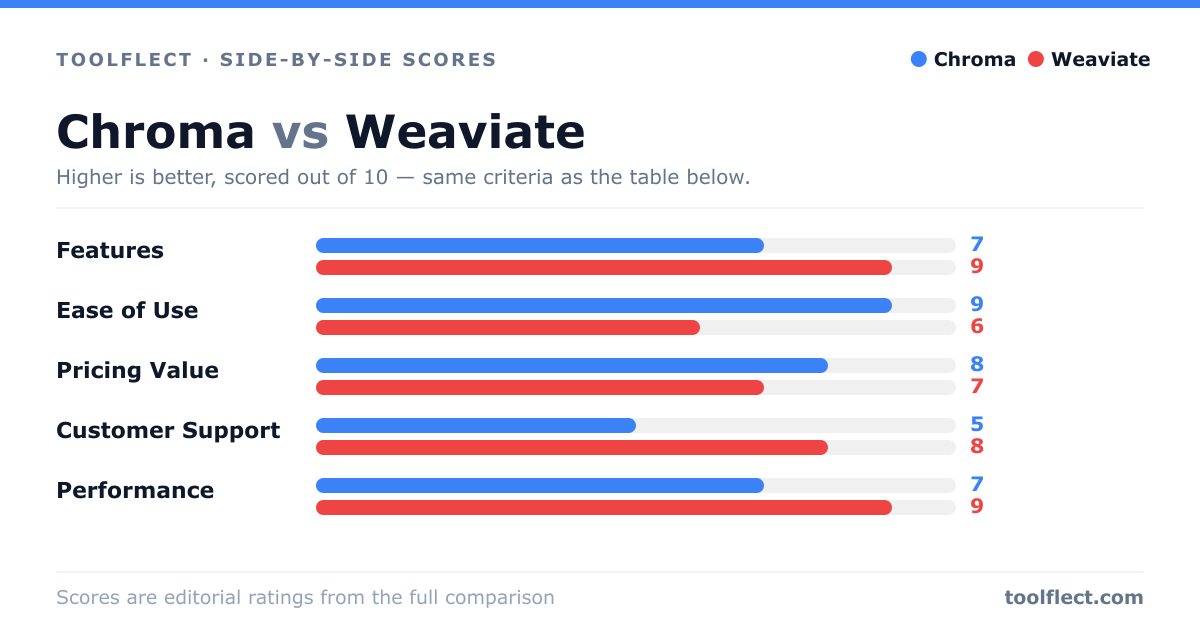
| Criterion | Chroma | Weaviate |
|---|---|---|
| Features | 7/10 – Basic vector search, metadata filtering, and multiple distance metrics | 9/10 – Advanced hybrid search, filtering, and vectorization modules |
| Ease of Use | 9/10 – Simple Python API, minimal setup | 6/10 – Requires more configuration and understanding of distributed systems |
| Pricing Value | 8/10 – Free and open-source, low overhead | 7/10 – Open-source but enterprise features and managed service cost extra |
| Customer Support | 5/10 – Community support primarily, limited official channels | 8/10 – Active community, professional support options available |
| Performance | 7/10 – Good for small to medium datasets, degrades with scale | 9/10 – High performance at scale, optimized for large datasets |