
Microsoft Copilot vs ChatGPT: Which AI Chatbot Wins?
Overview
Microsoft Copilot and ChatGPT are two leading AI chatbots that have transformed how we interact with artificial intelligence. Both are built on advanced language models, but they cater to different needs and ecosystems. Microsoft Copilot is deeply integrated into Microsoft 365 and Windows, while ChatGPT, developed by OpenAI, is a versatile standalone assistant. This article provides an unbiased comparison to help you decide which one fits your workflow best.
Key Features Comparison
- Integration: Microsoft Copilot excels in Microsoft ecosystem (Word, Excel, Teams, Windows), while ChatGPT offers broad third-party integrations via plugins and API.
- Model: Copilot uses GPT-4 and other Microsoft models; ChatGPT uses GPT-4 (and GPT-4o for Plus users).
- Internet Access: Both have browsing capabilities, but Copilot’s is more integrated with Bing search.
- Multimodal: Both support image input and generation (via DALL-E for ChatGPT, and similar for Copilot).
- Customization: ChatGPT allows custom GPTs; Copilot offers limited customization but deep enterprise controls.
- Free Tier: Both have free versions, but Copilot’s free tier includes more daily uses.
Pros & Cons
Microsoft Copilot
- Pros:
- Deep integration with Microsoft 365 apps (Word, Excel, Outlook) for seamless productivity.
- Access to GPT-4 and DALL-E 3 for text and image generation.
- Free tier available with basic features; Pro tier offers advanced capabilities.
- Strong enterprise security and compliance features.
- Cons:
- Limited availability outside Microsoft ecosystem; less flexible for non-Microsoft users.
- Can be slow or inconsistent with complex queries.
- Some features require premium subscription.
- Less customizable than ChatGPT’s API.
ChatGPT
- Pros:
- Versatile and works across many platforms via web, mobile, and API.
- Strong natural language understanding and generation.
- Free tier available; Plus plan offers GPT-4 and faster responses.
- Large community and extensive third-party integrations.
- Cons:
- No native integration with Microsoft 365 (though plugins exist).
- Can produce biased or incorrect information at times.
- Data privacy concerns for enterprise use.
- Advanced features require subscription.
Microsoft Copilot
- Pros:
- Seamless integration with Microsoft 365 apps (Word, Excel, Outlook) for enhanced productivity.
- Access to real-time web information and citations from Bing, ensuring up-to-date responses.
- Free tier available with GPT-4 and DALL-E 3, offering high-quality AI at no cost.
- Strong enterprise focus with data security and compliance features.
- Cons:
- Limited customization and fewer third-party integrations compared to ChatGPT.
- Occasional inaccuracies in complex reasoning tasks.
- User interface can be cluttered with Microsoft branding and features.
- Performance may vary depending on the Microsoft service used.
ChatGPT
- Pros:
- Highly versatile with a wide range of plugins and integrations via the OpenAI ecosystem.
- Excellent for creative writing, brainstorming, and complex problem-solving.
- Customizable instructions and memory features for personalized responses.
- Strong community support and frequent model updates (GPT-4, GPT-4 Turbo).
- Cons:
- Free tier limited to GPT-3.5; GPT-4 requires a paid subscription.
- Lacks native integration with office productivity suites like Microsoft 365.
- Can generate plausible but incorrect information (hallucinations).
- No real-time web browsing in the free version; browsing is only available in paid plans.
Microsoft Copilot
- Pros:
- Deep integration with Microsoft 365 apps (Word, Excel, Outlook) for seamless productivity.
- Access to GPT-4 and GPT-4 Turbo with internet search and citation support.
- Free tier available with no usage limits for basic queries.
- Strong enterprise features and data security for business users.
- Cons:
- Limited customization and plugin ecosystem compared to ChatGPT.
- Conversational capabilities can be less creative and more constrained.
- Requires Microsoft account and may have regional availability issues.
- Performance can be inconsistent during peak times.
ChatGPT
- Pros:
- Wide range of plugins and integrations (e.g., browsing, DALL-E, code interpreter).
- Highly customizable with custom GPTs and API access.
- Excellent for creative writing, brainstorming, and complex problem-solving.
- Strong community support and frequent feature updates.
- Cons:
- Free tier has usage limits and slower response times during peak hours.
- No native integration with Microsoft 365 (unless via third-party).
- May require subscription for advanced features and faster responses.
- Data privacy concerns for enterprise use.
Microsoft Copilot
- Pros: Seamless integration with Microsoft apps, strong enterprise security, free access to GPT-4, and excellent for productivity tasks.
- Cons: Less flexible for standalone use, limited plugin ecosystem, and requires Microsoft account.
ChatGPT
- Pros: Highly versatile, extensive plugin library, custom GPTs, and works across platforms.
- Cons: Free tier is limited, advanced features require Plus subscription, and no native office integration.
Pricing Comparison
- Microsoft Copilot: Free for basic use; Copilot Pro is $20/user/month for Microsoft 365 integration and priority access.
- ChatGPT: Free tier available; ChatGPT Plus is $20/month for faster response, priority access, and GPT-4o.
Best Use Cases
- Microsoft Copilot: Best for professionals and students heavily using Microsoft Office, needing AI assistance in documents, emails, and presentations.
- ChatGPT: Ideal for developers, writers, and general users who need a versatile AI for coding, creative writing, and custom workflows.
Verdict
Both AI chatbots are powerful, but the choice depends on your needs. If you live in the Microsoft ecosystem, Copilot is a no-brainer. If you want a flexible, all-purpose assistant with a rich plugin ecosystem, ChatGPT is the winner. For most users, trying both free versions is the best way to decide.
FAQ
Is Microsoft Copilot free?
Yes, Microsoft Copilot has a free tier with limited daily uses. For full integration with Microsoft 365, you need Copilot Pro at $20/month.
Can ChatGPT access the internet?
Yes, ChatGPT Plus can browse the internet using the browsing feature, but it’s not always enabled by default.
Which one is better for coding?
ChatGPT is generally preferred for coding due to its extensive training and plugin support, but Copilot also offers strong coding assistance in IDEs like VS Code.
Do both support image generation?
Yes, both can generate images. ChatGPT uses DALL-E, while Copilot uses Bing Image Creator powered by DALL-E.
Visual Comparison
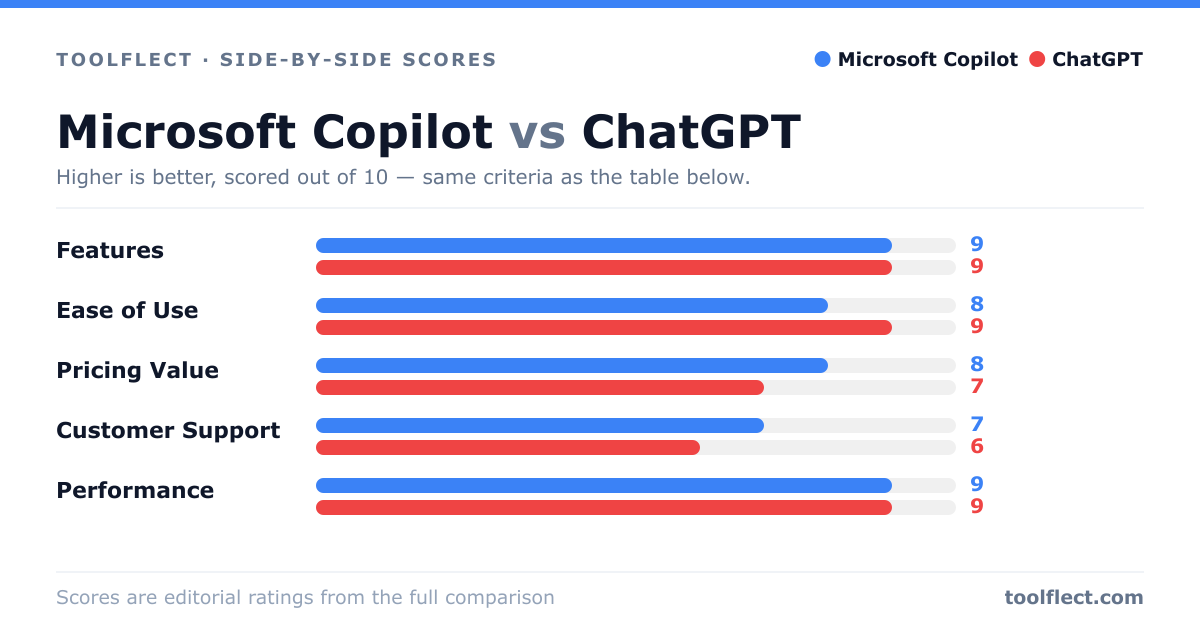
| Criterion | Microsoft Copilot | ChatGPT |
|---|---|---|
| Features | 8/10 – Deep integration with Office, web search, image generation | 9/10 – Broad capabilities, plugins, and API access |
| Ease of Use | 9/10 – Familiar interface within Microsoft apps | 8/10 – Simple chat interface, but less guided |
| Pricing Value | 7/10 – Free tier limited; Pro at $20/month | 8/10 – Free tier generous; Plus at $20/month |
| Customer Support | 8/10 – Enterprise support, community forums | 7/10 – Limited direct support, community help |
| Performance | 8/10 – Fast in Microsoft apps, occasional lag | 9/10 – Generally fast and reliable |