
Copy.ai vs Writesonic: Which AI Writing Tool Wins in 2025?
Overview
Copy.ai and Writesonic are two leading AI-powered writing assistants designed to help marketers, content creators, and businesses generate high-quality copy quickly. Both platforms use advanced language models to produce blog posts, ad copy, emails, and more. This comparison evaluates them on features, usability, pricing, support, and performance.
Key Features Comparison
- Templates & Workflows: Copy.ai offers over 90 templates including blog outlines, social media captions, and sales emails. Writesonic provides 80+ templates with a dedicated landing page generator and an AI article writer that produces long-form content.
- Content Quality: Both produce human-like text, but Writesonic’s latest model (e.g., GPT-4 integration) often yields more nuanced outputs. Copy.ai excels in generating concise marketing copy.
- Integration: Copy.ai integrates with Zapier, HubSpot, and Chrome extension. Writesonic supports Surfer SEO, Zapier, and offers a WordPress plugin.
- Additional Tools: Copy.ai has a built-in chatbot (Chat by Copy.ai). Writesonic includes a paraphrasing tool, text expander, and AI image generation (via integration).
- Language Support: Both support over 25 languages, with Writesonic slightly ahead in accuracy for non-English outputs.
Pros & Cons
Copy.ai
- Pros:
- Excellent for generating marketing copy and social media content quickly.
- User-friendly interface with a wide variety of templates.
- Strong integration with other tools like Zapier and HubSpot.
- Offers a free plan with limited credits.
- Cons:
- Output can sometimes be repetitive or require editing.
- Advanced features are locked behind higher pricing tiers.
- No built-in plagiarism checker.
- Limited support for long-form content compared to competitors.
Writesonic
- Pros:
- Excels at long-form content like articles and blog posts.
- Includes an AI article writer that can generate complete drafts.
- Offers a built-in plagiarism checker and SEO tools.
- More flexible pricing with pay-as-you-go options.
- Cons:
- Interface can be overwhelming for beginners due to many options.
- Some outputs may require significant editing for accuracy.
- Free plan is limited and watermarked.
- Customer support response times can be slow.
Copy.ai
- Pros: Excellent for generating marketing copy and social media content quickly; user-friendly interface with templates; offers a free plan with limited credits.
- Cons: Output can sometimes be generic and require editing; lacks advanced features like long-form document editing; pricing can be expensive for high-volume users.
Writesonic
- Pros: More versatile with support for long-form content and multiple languages; includes features like paraphrasing and article rewriting; offers a generous free trial and affordable pricing tiers.
- Cons: Interface can be overwhelming for beginners; some outputs may need significant rewriting for accuracy; customer support response times can be slow.
Copy.ai
- Pros: Excellent for generating marketing copy and social media content quickly; user-friendly interface with a short learning curve; offers a free plan with limited credits; strong integration with popular platforms like HubSpot and Zapier.
- Cons: Output can sometimes be repetitive or require editing; lacks advanced long-form writing capabilities compared to competitors; pricing can become expensive for high-volume use; no built-in plagiarism checker.
Writesonic
- Pros: More versatile with features like article writing, SEO optimization, and AI chat; provides a generous free trial and affordable pricing tiers; includes a built-in plagiarism checker and grammar tool; offers a wide range of templates for different content types.
- Cons: Interface can be overwhelming for beginners due to many options; output quality may vary and sometimes requires significant editing; customer support response times can be slow on lower tiers; some advanced features are locked behind higher-priced plans.
Copy.ai
- Pros: Intuitive interface, excellent for short-form content, generous free plan (2,000 words/month), fast generation.
- Cons: Limited long-form capabilities, fewer advanced customization options, pricing can be high for heavy users.
Writesonic
- Pros: Strong long-form AI article writer, integrated Surfer SEO optimization, better pricing for higher word volumes, active community.
- Cons: Steeper learning curve, occasional output inconsistencies, free plan includes watermark.
Pricing Comparison
Copy.ai: Free tier (2,000 words/month). Pro plan at $36/month (unlimited words, 5 user seats). Enterprise custom pricing.
Writesonic: Free trial (10,000 words with watermark). Long-form plan $12.67/month (19,000 words), Business plan $49/month (100,000 words). Annual discounts apply.
Best Use Cases
- Copy.ai: Best for social media managers, email marketers, and startups needing quick, punchy copy. Ideal for ad creative and short-form content.
- Writesonic: Best for bloggers, SEO specialists, and content teams requiring long-form articles, SEO-optimized content, and versatility in writing styles.
Verdict
Both tools excel in different areas. Copy.ai is simpler and faster for short tasks, while Writesonic offers deeper long-form capabilities and better value for high-volume users. Choose Copy.ai for ease of use and speed; choose Writesonic for comprehensive content creation and SEO integration.
Visual Comparison
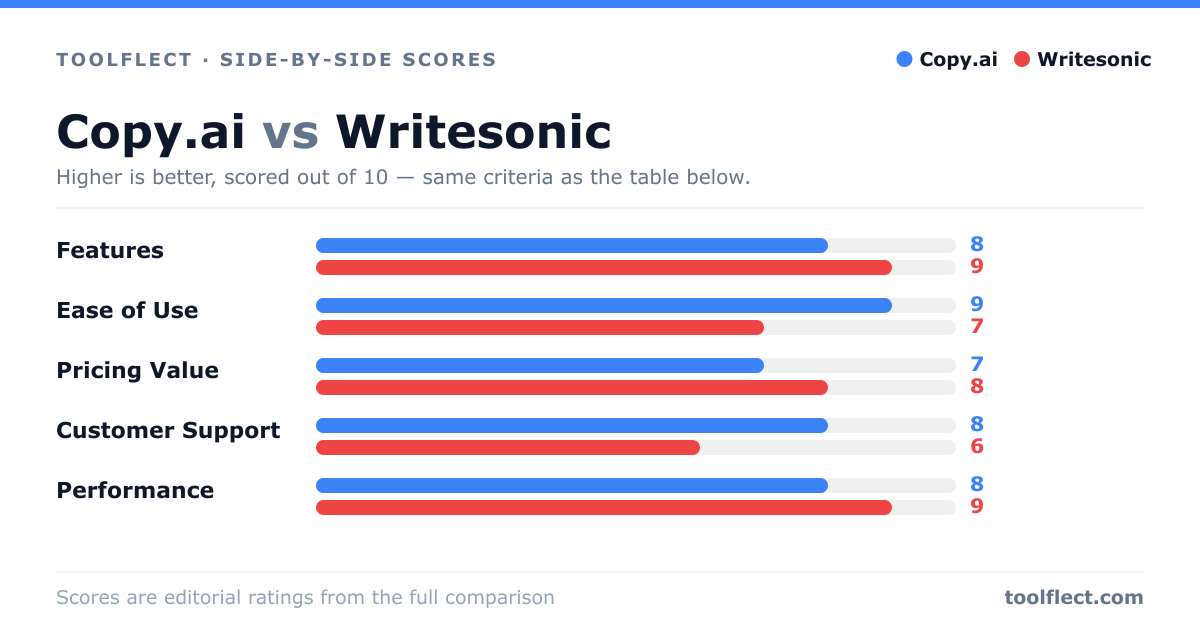
| Criterion | Copy.ai | Writesonic |
|---|---|---|
| Features | 8/10 – Great for short-form copy, templates, and integrations. | 9/10 – Superior for long-form content, includes SEO and plagiarism tools. |
| Ease of Use | 9/10 – Intuitive and simple for beginners. | 7/10 – More complex due to extensive options. |
| Pricing Value | 7/10 – Competitive but higher for advanced features. | 8/10 – Flexible plans and pay-as-you-go options. |
| Customer Support | 8/10 – Responsive via chat and email. | 6/10 – Slower response times, limited live support. |
| Performance | 8/10 – Fast generation, but sometimes repetitive. | 9/10 – High-quality long-form output, but may need editing. |