
GitHub Copilot vs Tabnine: Which AI Coding Assistant Wins?
Overview
GitHub Copilot and Tabnine are two leading AI-powered code completion tools that integrate with popular IDEs. Copilot, developed by GitHub in collaboration with OpenAI, leverages the Codex model to suggest entire lines or functions based on context. Tabnine, formerly Codota, uses deep learning models trained on open-source code to provide real-time completions. Both aim to boost developer productivity, but they differ in approach, customization, and pricing.
Key Features Comparison
- Context Awareness: Copilot understands the full context of your codebase, including comments and function names, to generate relevant suggestions. Tabnine also provides context-aware completions but relies more on local patterns.
- Language Support: Copilot supports a wide range of languages, including Python, JavaScript, TypeScript, Ruby, Go, and more. Tabnine supports over 30 languages, with strong performance in Java, Python, and JavaScript.
- IDE Integration: Copilot works with VS Code, JetBrains IDEs, Neovim, and more. Tabnine integrates with VS Code, IntelliJ, Eclipse, and other JetBrains tools, plus Jupyter Notebooks.
- Customization: Tabnine allows users to train models on private codebases for tailored suggestions. Copilot does not currently offer private model training but uses public code.
- Privacy: Tabnine offers an on-premise option for enterprises prioritizing data privacy. Copilot sends code snippets to GitHub servers; no on-premise option exists.
Pros & Cons
GitHub Copilot
- Pros:
- Excellent code completion for popular languages and frameworks.
- Seamless integration with GitHub and Visual Studio Code.
- Context-aware suggestions based on your codebase.
- Supports multiple IDEs including JetBrains and Neovim.
- Cons:
- Can be slow on large codebases.
- May suggest insecure or outdated code patterns.
- Requires a GitHub account and subscription.
- Limited customization options.
Tabnine
- Pros:
- Privacy-focused with on-premise deployment options.
- Supports a wide range of IDEs and editors.
- Customizable to your team’s coding style.
- Fast and lightweight, even on large projects.
- Cons:
- Free tier has limited features.
- Suggestions can be less accurate than Copilot for some languages.
- Requires more setup for team-wide use.
- No built-in chat or explanation features.
GitHub Copilot
- Pros:
- Excellent code completion and suggestion quality, especially for popular languages and frameworks.
- Seamless integration with GitHub and Visual Studio Code, plus support for many other IDEs.
- Context-aware suggestions that understand your codebase and coding style.
- Continuously updated with new models and features.
- Cons:
- Requires a GitHub account and may have privacy concerns for some organizations.
- Can be resource-intensive, potentially slowing down larger projects.
- Suggestions may occasionally be incorrect or insecure, requiring careful review.
- Limited customization options compared to some alternatives.
Tabnine
- Pros:
- Strong focus on privacy and security, with on-premise deployment options.
- Supports a wide range of IDEs and languages, including less common ones.
- Customizable to your team’s coding patterns and preferences.
- Lightweight and fast, with minimal impact on IDE performance.
- Cons:
- Suggestions may be less accurate than Copilot for complex or less common code patterns.
- Free tier has limited features; advanced features require a paid subscription.
- Integration with GitHub is not as deep as Copilot’s.
- User interface and configuration can be less intuitive for beginners.
GitHub Copilot
- Pros: Excellent code completion, supports many languages, integrates with popular IDEs, learns from public code.
- Cons: Requires subscription, can suggest insecure code, limited customization, privacy concerns.
Tabnine
- Pros: Privacy-focused, on-premise options, supports many languages, customizable models.
- Cons: Less accurate than Copilot, smaller community, fewer integrations, basic free tier.
GitHub Copilot
Pros: Exceptional context understanding, generates multi-line functions, continuously improving, free for open-source maintainers and students.
Cons: Limited customization, requires internet, privacy concerns for sensitive code.
Tabnine
Pros: Faster completions, customizable with private code, on-premise deployment, strong privacy controls.
Cons: Less context-aware, shorter suggestions (mostly single-line), fewer language-specific optimizations.
Pricing Comparison
- GitHub Copilot: $10/month for individuals, $19/user/month for business (with support and admin controls), free for verified students and open-source maintainers.
- Tabnine: Free tier with basic completions; Pro at $12/month (individual) with advanced features; Enterprise custom pricing (on-premise, compliance).
Best Use Cases
- GitHub Copilot is ideal for rapid prototyping, learning new languages, and open-source contributors who want deep code context.
- Tabnine suits teams needing high-speed completions, strict data privacy, customization with private codebases, and offline-friendly environments.
Verdict
Choose GitHub Copilot if you value advanced code generation and work in a public or open-source context. Opt for Tabnine if you need speed, privacy, and the ability to train on your own code. Both are powerful, but the best choice depends on your specific workflow and security requirements.
Visual Comparison
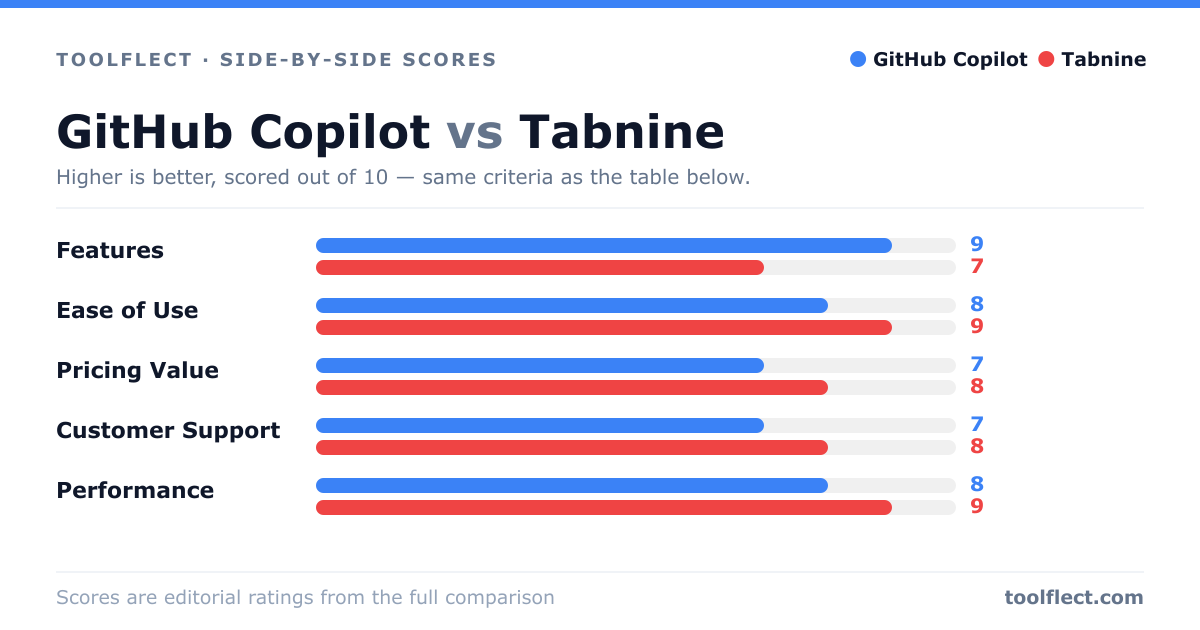
| Criterion | GitHub Copilot | Tabnine |
|---|---|---|
| Features | 9/10 – Rich suggestions, chat, and multi-language support | 7/10 – Solid autocomplete, but fewer advanced features |
| Ease of Use | 8/10 – Simple setup, but requires GitHub account | 9/10 – Easy to install and configure |
| Pricing Value | 7/10 – $10/month, good for individuals, but pricey for teams | 8/10 – Free tier available, Pro at $12/month, good value |
| Customer Support | 7/10 – Community support, no direct chat | 8/10 – Responsive support, dedicated team plans |
| Performance | 8/10 – Fast, but can lag on huge repos | 9/10 – Lightweight and quick |