
Make vs n8n: Which Automation Tool Wins?
Overview
Make (formerly Integromat) and n8n are two popular automation platforms that allow users to connect apps and automate workflows without extensive coding. Make is a cloud-based, visual automation tool known for its user-friendly interface and powerful features. n8n is an open-source, self-hostable workflow automation tool that offers flexibility and control, appealing to developers and tech-savvy users. This article provides an unbiased comparison to help you decide which tool suits your needs best.
Key Features Comparison
- Visual Workflow Builder: Both tools offer drag-and-drop interfaces, but Make’s is more intuitive for beginners, while n8n’s is more technical but flexible.
- Integration Library: Make has over 1,000 pre-built integrations, while n8n has around 400, but n8n’s open-source nature allows custom integrations via API.
- Error Handling: Make provides advanced error handling with rollback and partial execution, whereas n8n offers basic error workflows but requires more manual setup.
- Self-Hosting: n8n can be self-hosted, giving full control over data and infrastructure; Make is cloud-only, but offers enterprise options with dedicated instances.
- Collaboration: Make supports team collaboration with shared team spaces; n8n has limited collaboration features, but you can share workflows via git.
- Custom Code: Both allow custom JavaScript, but n8n’s code nodes are more powerful and integrated.
Pros & Cons
Make
- Pros: Visual drag-and-drop builder is intuitive for non-coders; extensive app integrations (over 1,500); flexible scenario design with conditional logic; generous free plan.
- Cons: Can become expensive at scale; complex scenarios may suffer from performance issues; limited error handling and debugging tools; no native code execution.
n8n
- Pros: Open-source with self-hosting option; code nodes allow custom JavaScript; strong data transformation capabilities; active community and fair pricing.
- Cons: Steeper learning curve for beginners; fewer pre-built templates; self-hosting requires technical maintenance; some integrations less polished.
Make
- Pros: Visual drag-and-drop builder is intuitive for non-coders; extensive app integrations (over 1,500); flexible scenario branching with routers; generous free plan with 1,000 operations/month.
- Cons: Complex scenarios can become hard to debug; pricing scales with operations, can get expensive; no native code execution for advanced logic; limited error handling compared to n8n.
n8n
- Pros: Open-source and self-hostable (fair-code license); supports custom JavaScript and Python code nodes; robust error handling and retries; strong community and enterprise features.
- Cons: Steeper learning curve for non-technical users; UI less polished than Make; self-hosting requires maintenance; free cloud tier has limited executions (2,500/month).
Make
- Pros: Visual drag-and-drop builder with extensive app integrations; flexible pricing tiers including a free plan; supports complex scenarios with multiple branches and data operations.
- Cons: Steeper learning curve for complex scenarios; performance can lag with high-volume tasks; limited error handling and debugging tools.
n8n
- Pros: Self-hosted option for full data control; fair-code license with community support; powerful workflow automation with code nodes for custom logic.
- Cons: Requires technical setup and maintenance; UI less intuitive for non-developers; fewer pre-built templates compared to Make.
Make
- Pros: User-friendly interface, extensive integrations, visual error handling, good for non-developers.
- Cons: Cloud-only, pricing can become expensive at scale, less control over infrastructure.
n8n
- Pros: Open-source and self-hostable, cost-effective for high volume, highly customizable, strong developer community.
- Cons: Steeper learning curve, fewer native integrations, requires technical knowledge for setup and maintenance.
Pricing Comparison
Make offers a free plan with limited operations (1,000 ops/month) and paid plans starting at $9/month (Core) with more operations and features. Higher tiers include Pro ($16/month) and Teams ($29/month). Custom enterprise pricing is available.
n8n is free if you self-host (open-source), but you pay for hosting and maintenance. The cloud version (n8n Cloud) starts at $20/month for 2,500 workflow executions, with higher tiers up to $100+/month. Self-hosting can be cheaper for high-volume usage, but requires server costs and technical expertise.
Best Use Cases
- Make: Ideal for small to medium businesses, marketers, and non-technical users who need quick automation with a gentle learning curve and a wide range of integrations.
- n8n: Best for developers, IT teams, and businesses with specific data privacy or compliance needs that require self-hosting, or those who need high-volume automation at lower cost.
Verdict
Both Make and n8n are powerful automation tools, but they cater to different audiences. Choose Make if you prioritize ease of use, a vast integration library, and don’t mind a cloud-only solution. Choose n8n if you need open-source flexibility, self-hosting capabilities, and have the technical skills to manage it. Ultimately, the best choice depends on your technical proficiency, budget, and specific automation requirements.
Visual Comparison
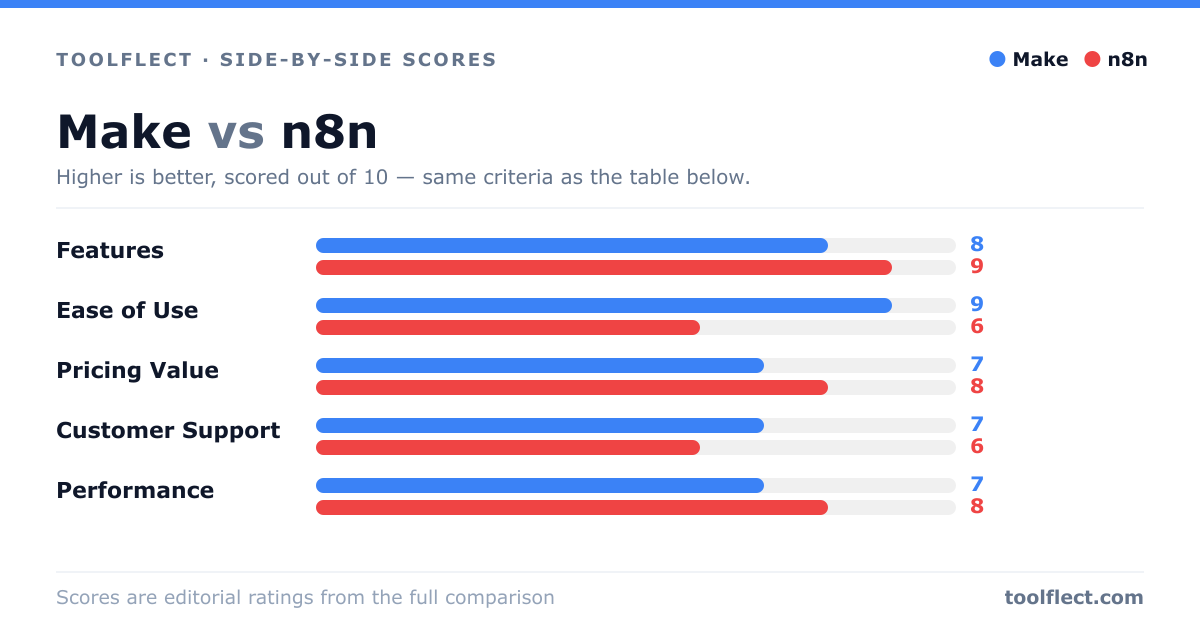
| Criterion | Make | n8n |
|---|---|---|
| Features | 8/10 – Rich visual automation, many apps | 9/10 – Code nodes, self-host, flexible |
| Ease of Use | 9/10 – Very user-friendly drag-drop | 6/10 – Steeper learning curve |
| Pricing Value | 7/10 – Free tier, but costly at scale | 8/10 – Fair pricing, open-source option |
| Customer Support | 7/10 – Standard support, community | 6/10 – Community-driven, paid support |
| Performance | 7/10 – Good, but can lag on complex | 8/10 – Reliable, especially self-hosted |