
SlidesAI vs Beautiful.ai: Which AI Presentation Tool Wins?
Overview
SlidesAI and Beautiful.ai are two popular AI-powered presentation tools that help users create professional slides quickly. SlidesAI is a Google Slides add-on that generates presentations from text, while Beautiful.ai is a standalone web app with smart templates and automated design. Both aim to save time and improve design, but they cater to different workflows and user needs.
Key Features Comparison
- SlidesAI: Text-to-slide generation, works within Google Slides, supports multiple languages, offers various themes and customization options, and includes a library of icons and images.
- Beautiful.ai: Smart templates that auto-adjust layouts, real-time design suggestions, team collaboration features, and a wide range of slide types (e.g., charts, timelines, diagrams).
Pros & Cons
SlidesAI
- Pros: Automatically generates slides from text, saving time; integrates with Google Slides; offers various templates and design options; supports multiple languages.
- Cons: Limited customization compared to manual design; output may require manual adjustments; free plan has limited features; no offline access.
Beautiful.ai
- Pros: Smart templates that adapt to content; intuitive drag-and-drop interface; real-time collaboration; high-quality, professional designs.
- Cons: Limited control over design elements; can be expensive for individuals; requires internet connection; learning curve for advanced features.
SlidesAI
- Pros:
- Seamless integration with Google Slides and PowerPoint
- AI generates slides from text prompts quickly
- Customizable themes and templates
- Collaboration features for teams
- Cons:
- Limited design flexibility compared to manual tools
- May require manual adjustments for complex layouts
- Free plan has limited features
Beautiful.ai
- Pros:
- Smart templates that automatically adjust to content
- Modern, professional design with minimal effort
- Real-time collaboration and cloud storage
- Extensive library of templates and icons
- Cons:
- Steeper learning curve for advanced customization
- Higher pricing tiers for full features
- Limited export options in lower plans
SlidesAI
- Pros: Automatically generates slides from text, saving time; integrates with Google Slides; offers various templates and customization options.
- Cons: Limited design flexibility compared to manual design; may require manual adjustments for complex layouts; free plan has limited features.
Beautiful.ai
- Pros: Smart templates that automatically adjust to content; sleek, modern designs; real-time collaboration features.
- Cons: Higher pricing tiers; limited control over design elements; learning curve for advanced customization.
SlidesAI
Pros: Easy to use for Google Slides users, quick generation from text, affordable pricing, and seamless integration with Google Workspace.
Cons: Limited design flexibility compared to Beautiful.ai, requires a Google account, and may produce less polished designs out-of-the-box.
Beautiful.ai
Pros: Superior design automation, beautiful templates, real-time collaboration, and a more intuitive interface for non-designers.
Cons: Higher pricing, no direct Google Slides integration, and a learning curve for advanced features.
Pricing Comparison
SlidesAI offers a free plan with limited features, and paid plans start at $10 per month (billed annually) for individuals. Beautiful.ai has a free trial, but paid plans start at $12 per month (billed annually) for individuals, with team plans costing more. Both offer discounts for annual billing.
Best Use Cases
- SlidesAI: Ideal for Google Slides users who need quick text-to-slide conversion for educational or business presentations.
- Beautiful.ai: Best for teams and professionals who prioritize design quality and need advanced collaboration features.
Verdict
Both tools are excellent, but they serve different needs. If you live in Google Slides and want a simple, cost-effective solution, SlidesAI is a great choice. If you want the most polished designs and are willing to pay more, Beautiful.ai is the winner. Ultimately, the best tool depends on your workflow and design requirements.
FAQ
Can SlidesAI be used without Google Slides?
No, SlidesAI is a Google Slides add-on, so you need a Google account and access to Google Slides to use it.
Does Beautiful.ai offer a free plan?
Beautiful.ai offers a free trial, but there is no permanent free plan. After the trial, you must subscribe to a paid plan.
Which tool is better for team collaboration?
Beautiful.ai has more robust collaboration features, including real-time editing and shared libraries, making it better for teams.
Can I import existing presentations into SlidesAI or Beautiful.ai?
SlidesAI works with Google Slides, so you can import existing presentations into Google Slides and then use SlidesAI. Beautiful.ai allows you to import PowerPoint files, but formatting may vary.
Visual Comparison
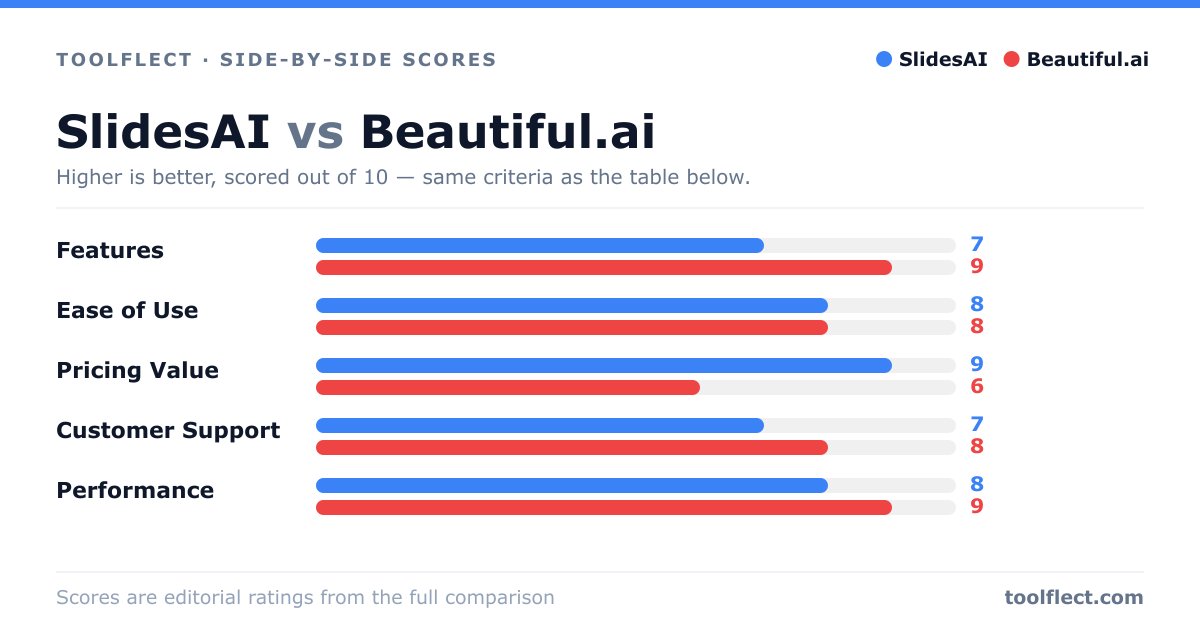
| Criterion | SlidesAI | Beautiful.ai |
|---|---|---|
| Features | 8/10 – Text-to-slide generation, templates, Google Slides integration | 9/10 – Smart templates, real-time collaboration, extensive design options |
| Ease of Use | 9/10 – Simple text input, quick slide creation | 8/10 – Intuitive but some advanced features require learning |
| Pricing Value | 7/10 – Free tier available, affordable paid plans | 6/10 – Higher cost, but valuable for teams |
| Customer Support | 7/10 – Email support, help center | 8/10 – Live chat, extensive resources |
| Performance | 8/10 – Fast generation, reliable | 9/10 – Smooth performance, responsive |