
Webflow AI vs Wix AI: Which AI Tool Wins?
Overview
Webflow AI and Wix AI are two powerful AI-driven website design tools that aim to simplify the web design process. Webflow AI is integrated into the Webflow platform, known for its advanced design capabilities and clean code output. Wix AI, on the other hand, is part of the Wix ecosystem, which is popular for its ease of use and all-in-one website building solutions. Both tools leverage artificial intelligence to help users create stunning websites without extensive coding knowledge, but they cater to different audiences and use cases.
Key Features Comparison
- Design Flexibility: Webflow AI offers pixel-perfect design control with a visual canvas that generates clean HTML/CSS. Wix AI provides a more guided approach with AI-driven templates and drag-and-drop editing.
- AI Assistance: Webflow AI assists with layout suggestions, content generation, and SEO optimization. Wix AI includes a chat assistant that helps with design, content, and even business solutions.
- E-commerce: Both platforms support e-commerce, but Webflow AI offers more customization for product design, while Wix AI provides easier setup with AI-powered product descriptions.
- Integrations: Webflow AI integrates with a wide range of third-party tools via APIs, while Wix AI has a built-in app market with many integrations.
- Collaboration: Webflow AI supports team collaboration with roles and permissions, while Wix AI offers real-time collaboration for multiple users.
Pros & Cons
Webflow AI
- Pros: Powerful AI-assisted design tools that generate responsive layouts and interactions; deep customization with CMS and e-commerce capabilities; strong visual development environment for designers.
- Cons: Steeper learning curve for beginners; pricing can be higher for advanced features; AI features may require some manual fine-tuning.
Wix AI
- Pros: User-friendly AI site builder (Wix ADI) that creates personalized websites quickly; extensive app market and templates; affordable plans for small businesses.
- Cons: Less design flexibility compared to Webflow; AI-generated sites may look generic; limited advanced customization without coding.
Webflow AI
- Pros: Powerful visual development with AI-assisted design generation; robust CMS and hosting; excellent for custom, scalable websites.
- Cons: Steeper learning curve; pricing can be high for advanced features; AI features may require a paid plan.
Wix AI
- Pros: User-friendly AI site builder (ADI) that creates personalized sites quickly; extensive app market; affordable entry-level plans.
- Cons: Less design flexibility for complex customizations; AI-generated designs can be template-like; performance may lag on large sites.
Webflow AI
- Pros: Integrated AI design assistance for rapid prototyping; powerful CMS and hosting in one platform; extensive customization with code export.
- Cons: Steeper learning curve for beginners; pricing can be high for advanced features; AI features are not as comprehensive as dedicated AI tools.
Wix AI
- Pros: User-friendly AI site builder with natural language prompts; affordable plans with generous free tier; strong app market for extensions.
- Cons: Less design flexibility compared to Webflow; AI-generated sites may require manual tweaks; performance can be slower on complex sites.
Webflow AI
- Pros: High design flexibility, clean code output, powerful CMS, excellent for custom designs.
- Cons: Steeper learning curve, higher pricing, may be overkill for simple sites.
Wix AI
- Pros: Very user-friendly, quick setup, affordable plans, great for beginners.
- Cons: Less design control, code output is not as clean, limited for complex customizations.
Pricing Comparison
Webflow AI pricing starts at $14/month for basic sites, with more advanced plans up to $49/month for CMS and business features. Wix AI offers a free plan with limited features, and premium plans start at $17/month, with business plans around $27/month. Both offer annual discounts.
Best Use Cases
- Webflow AI: Best for designers and developers who need full control over design and functionality, such as creating custom websites for clients or building complex web applications.
- Wix AI: Ideal for small business owners, bloggers, and beginners who want to quickly create a professional-looking website without technical hassle.
Verdict
Both Webflow AI and Wix AI are excellent tools, but they serve different purposes. If you prioritize design flexibility and clean code, Webflow AI is the winner. If you value ease of use and quick results, Wix AI is the better choice. Ultimately, the decision depends on your skill level and project requirements.
FAQ
Can I switch from Wix AI to Webflow AI later?
Yes, you can migrate your website from Wix to Webflow, but it may require manual redesign and content migration. Webflow offers import tools, but it’s not a one-click process.
Which AI tool is better for SEO?
Both tools offer SEO features, but Webflow AI provides more advanced control over meta tags, structured data, and site speed, making it slightly better for SEO.
Do I need coding skills to use Webflow AI?
No, Webflow AI is designed to be visual, but having some understanding of HTML/CSS can help you take full advantage of its features.
Is Wix AI free?
Wix AI has a free plan, but it includes Wix ads and a subdomain. To use a custom domain and remove ads, you need a premium plan.
Visual Comparison
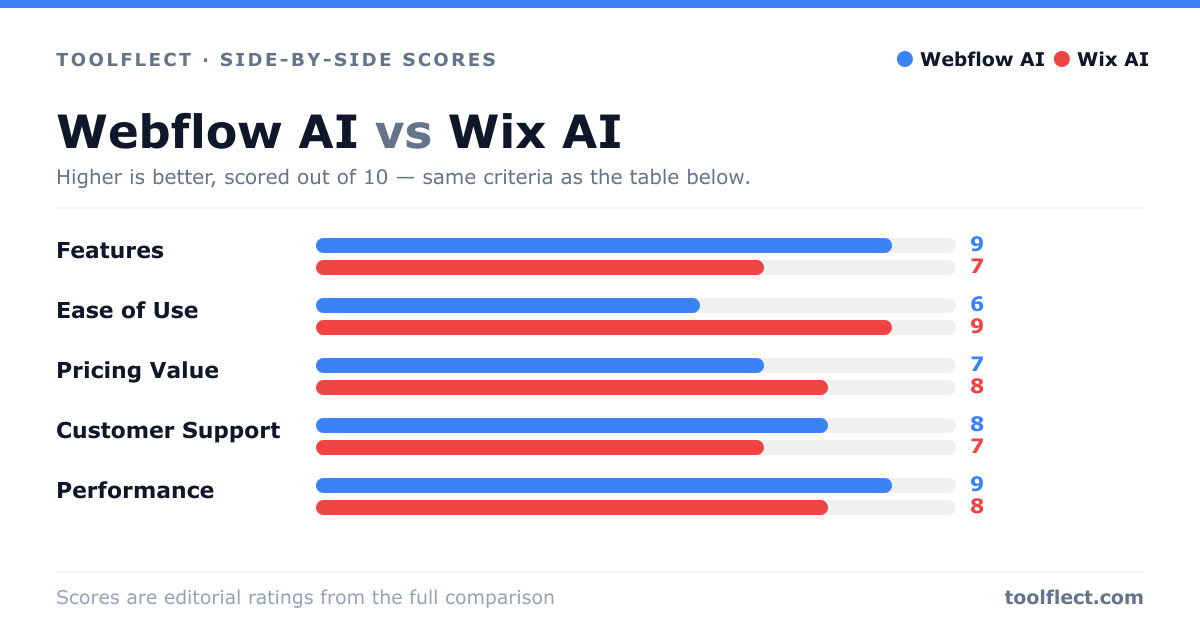
| Criterion | Webflow AI | Wix AI |
|---|---|---|
| Features | 9/10 – Advanced design and CMS tools, AI assists in layout and interactions. | 7/10 – AI builder and app market, but less depth for complex projects. |
| Ease of Use | 6/10 – Powerful but requires learning curve. | 9/10 – Very intuitive, AI guides you through setup. |
| Pricing Value | 7/10 – Higher cost but robust features. | 8/10 – Affordable plans with good value. |
| Customer Support | 8/10 – Responsive support and community. | 7/10 – Support available but mixed reviews. |
| Performance | 9/10 – Fast, optimized sites. | 8/10 – Good performance, but can be slower with heavy apps. |