
Microsoft Copilot vs ChatGPT: Which AI Chatbot Wins in 2026?
Overview
Microsoft Copilot and ChatGPT are two leading AI chatbots that have transformed how we interact with artificial intelligence. Both are built on advanced language models, but they serve different ecosystems and use cases. Microsoft Copilot is deeply integrated into Microsoft 365 and Windows, while ChatGPT offers a versatile standalone platform with a wide range of plugins and integrations. This comparison will help you understand their strengths and weaknesses to choose the right one for your needs.
Key Features Comparison
- Integration: Microsoft Copilot excels in Microsoft ecosystem (Office, Windows, Bing), while ChatGPT offers broad third-party integrations via plugins and API.
- Model: Copilot uses GPT-4 and Microsoft’s proprietary models, while ChatGPT uses OpenAI’s GPT-4 (and GPT-4 Turbo for Plus users).
- Multimodal: Both support text and image inputs, but Copilot also integrates with DALL-E for image generation, and ChatGPT Plus offers DALL-E 3.
- Context Window: Copilot has a 8k token context (or 16k with some features), while ChatGPT Plus offers up to 128k tokens for longer conversations.
- Accessibility: Copilot is free with a Microsoft account, while ChatGPT has a free tier and a paid Plus subscription.
- Customization: ChatGPT allows custom GPTs and system prompts, while Copilot offers limited customization but deep integration with Microsoft apps.
Pros & Cons
Microsoft Copilot
- Pros:
- Seamless integration with Microsoft 365 apps (Word, Excel, Outlook) for productivity.
- Access to GPT-4 and DALL-E 3, with free tier available.
- Strong enterprise features and data security (Microsoft Graph grounding).
- Multimodal capabilities and internet search via Bing.
- Cons:
- Limited customization and fewer third-party plugins compared to ChatGPT.
- Performance can be inconsistent, especially with complex queries.
- Requires Microsoft account and may have usage limits on free tier.
- Less community support and fewer tutorials than ChatGPT.
ChatGPT
- Pros:
- Highly versatile with extensive plugin ecosystem and custom GPTs.
- Excellent for creative writing, brainstorming, and coding assistance.
- Strong free tier and affordable Plus plan.
- Wide community support and frequent feature updates.
- Cons:
- No native integration with Microsoft 365 (requires third-party tools).
- Can generate plausible but incorrect information (hallucinations).
- Internet browsing and image generation are limited to paid plans.
- Potential privacy concerns with data usage for training.
Microsoft Copilot
- Pros:
- Deep integration with Microsoft 365 apps (Word, Excel, Outlook) for seamless productivity.
- Access to real-time web information and enterprise-grade security.
- Strong multimodal capabilities with GPT-4 Turbo and DALL-E 3.
- Free tier available with basic features.
- Cons:
- Limited customization and fewer third-party integrations compared to ChatGPT.
- Performance can be inconsistent with complex queries.
- Requires Microsoft ecosystem for full functionality.
- Some features are locked behind Microsoft 365 subscription.
ChatGPT
- Pros:
- Highly versatile with extensive plugin ecosystem and custom GPTs.
- Excellent natural language understanding and generation.
- Strong community support and frequent updates.
- Free tier available with access to GPT-4o mini.
- Cons:
- No native integration with Microsoft Office tools.
- Real-time web browsing and image generation require paid subscription.
- Occasional factual inaccuracies and biases.
- Can be slower during peak usage times.
Microsoft Copilot
- Pros:
- Deep integration with Microsoft 365 apps (Word, Excel, Outlook) for seamless productivity.
- Access to real-time web data and enterprise-grade security features.
- Offers a free tier with basic features, plus premium plans for advanced capabilities.
- Cons:
- Limited customization and less flexible than ChatGPT for general-purpose tasks.
- Requires a Microsoft account and may have restrictions in some regions.
- Performance can be slower when handling complex, multi-step queries.
ChatGPT
- Pros:
- Highly versatile and can handle a wide range of tasks, from creative writing to coding.
- Strong community support and extensive plugin ecosystem.
- Offers both free and paid tiers, with the paid tier providing faster responses and priority access.
- Cons:
- Lacks native integration with Microsoft 365, though third-party workarounds exist.
- May produce biased or inaccurate responses if not properly prompted.
- Free tier can be slow during peak times, and advanced features require a subscription.
Microsoft Copilot
- Pros: Seamless integration with Microsoft 365, Windows, and Bing; free to use; strong for productivity tasks; supports image generation.
- Cons: Limited context window; less flexible for custom use cases; requires Microsoft account; sometimes slower response times.
ChatGPT
- Pros: Highly versatile; large context window; extensive plugin ecosystem; custom GPTs; strong community support.
- Cons: Free tier is limited; Plus subscription costs $20/month; no native integration with Microsoft Office; may require manual setup for some tasks.
Pricing Comparison
- Microsoft Copilot: Free for basic use; Microsoft 365 Personal ($6.99/month) or Family ($9.99/month) includes Copilot in Office apps; Copilot Pro available for $20/month with priority access and advanced features.
- ChatGPT: Free tier with limited features; ChatGPT Plus at $20/month offers faster responses, priority access, and GPT-4; ChatGPT Team at $25/user/month for business; Enterprise pricing custom.
Best Use Cases
- Microsoft Copilot: Best for professionals and students who rely on Microsoft Office; for drafting emails, summarizing documents, creating presentations, and automating workflows in Excel and Word.
- ChatGPT: Best for developers, researchers, and creatives who need a versatile AI for coding, writing, brainstorming, and exploring custom AI applications.
Verdict
Both Microsoft Copilot and ChatGPT are powerful AI chatbots, but they excel in different areas. If you are deeply embedded in the Microsoft ecosystem and need an AI that works seamlessly with Office and Windows, Microsoft Copilot is the clear winner. On the other hand, if you want a flexible, feature-rich AI with a large context window and extensive customization, ChatGPT is the better choice. Ultimately, the decision depends on your specific needs and workflow.
FAQ
Is Microsoft Copilot free?
Yes, Microsoft Copilot is free for basic use with a Microsoft account. However, advanced features and integration with Office apps require a Microsoft 365 subscription or Copilot Pro.
Can ChatGPT be used for free?
Yes, ChatGPT has a free tier that provides access to GPT-3.5. For GPT-4 and additional features, you need a ChatGPT Plus subscription.
Which is better for coding?
ChatGPT is generally preferred for coding due to its large context window and ability to handle complex programming tasks. However, Copilot can also assist with coding, especially in Visual Studio and GitHub.
Can I use Microsoft Copilot with Google Docs?
No, Microsoft Copilot is designed to work with Microsoft 365 apps. For Google Docs, you would need to use ChatGPT or other AI tools that integrate with Google Workspace.
Visual Comparison
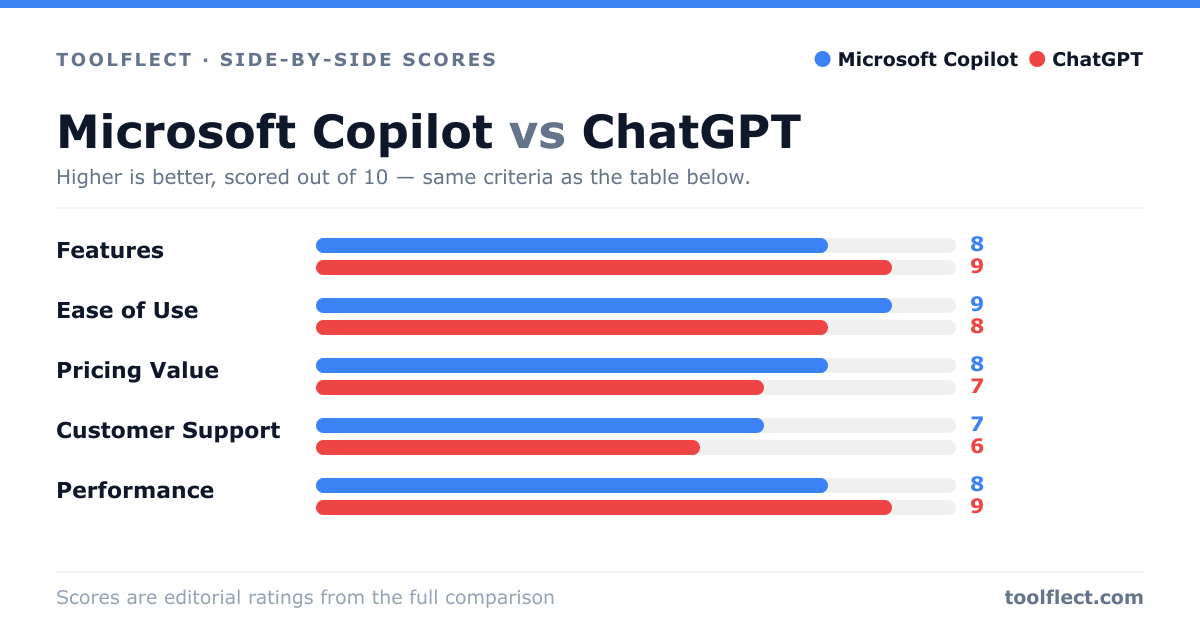
| Criterion | Microsoft Copilot | ChatGPT |
|---|---|---|
| Features | 8/10 – Deep integration with Microsoft 365, GPT-4, DALL-E 3, Bing search | 9/10 – Extensive plugins, custom GPTs, multimodal, but some features paywalled |
| Ease of Use | 9/10 – Intuitive within Microsoft apps, but separate app can be confusing | 8/10 – Simple interface, but advanced features require learning curve |
| Pricing Value | 7/10 – Free tier available, but Pro is pricey; value depends on Microsoft ecosystem | 8/10 – Free tier generous, Plus is affordable for most users |
| Customer Support | 6/10 – Limited support, mainly via forums and help articles | 7/10 – Support via email and community, but no live chat |
| Performance | 8/10 – Fast and reliable, but occasional inaccuracies | 9/10 – Highly accurate and creative, but can be slow during peak times |