
Pipedrive AI vs Keap: Which CRM Automation Tool Wins?
Overview
Pipedrive AI is a sales-focused CRM that leverages artificial intelligence to help sales teams manage pipelines, predict deals, and automate repetitive tasks. Its AI features include activity suggestions, lead scoring, and smart email insights. Keap (formerly Infusionsoft) is an all-in-one CRM and marketing automation platform designed for small businesses. It combines contact management, email marketing, sales pipelines, and e-commerce in a single system. While Pipedrive AI excels in streamlining the sales process, Keap offers broader automation capabilities that span marketing and customer relationships.
Key Features Comparison
- Sales Pipeline Management: Pipedrive AI offers highly visual and customizable pipelines with AI-driven predictions. Keap provides pipeline management but with less intuitive visual design.
- Marketing Automation: Keap shines with robust email campaigns, landing pages, and lead capture forms. Pipedrive AI has basic automation focused on sales activities.
- AI Capabilities: Pipedrive AI includes AI-powered lead scoring, deal probability predictions, and activity recommendations. Keap’s AI is limited to behavioral scoring and campaign optimization.
- E-commerce Integration: Keap offers built-in invoicing, payment processing, and order management. Pipedrive AI relies on third-party integrations for e-commerce.
- Integration Ecosystem: Both platforms integrate with popular tools like Mailchimp, QuickBooks, and Zapier. Pipedrive’s marketplace is larger for sales tools; Keap integrates well with marketing and accounting software.
Pros & Cons
Pipedrive AI
- Pros: AI-powered sales assistant automates repetitive tasks like data entry and follow-ups, saving time.
- Pros: Seamless integration with Pipedrive’s CRM, providing real-time insights and next-best-action recommendations.
- Pros: User-friendly interface with visual pipelines, making it easy to track deals and activities.
- Cons: AI features are only available on higher-tier plans, which may be costly for small businesses.
- Cons: Limited customization options for AI workflows compared to more advanced automation tools.
Keap
- Pros: Robust marketing automation with drag-and-drop campaign builder, ideal for small businesses.
- Pros: Built-in CRM and sales pipeline management, with lead scoring and tagging.
- Pros: Strong email marketing capabilities with personalization and A/B testing.
- Cons: Steeper learning curve due to complex feature set.
- Cons: Pricing can be higher for advanced features, and some users report occasional performance lags.
Pipedrive AI
- Pros: AI-powered sales assistant (Sales Assistant) provides real-time recommendations and next-best actions; strong pipeline management and visual sales process; extensive integration ecosystem (300+ apps); user-friendly interface with drag-and-drop customization.
- Cons: AI features are limited to higher-tier plans; advanced reporting requires add-ons; can become expensive for small teams; no native email marketing automation.
Keap
- Pros: Comprehensive marketing automation (email, SMS, social); built-in CRM with contact scoring and tagging; excellent for small businesses with e-commerce and appointment scheduling; includes payment processing and invoicing.
- Cons: Steeper learning curve due to complexity; interface feels dated; pricing is higher for advanced features; limited customization in reporting.
Pipedrive AI
- Pros: AI-powered sales assistant (Sales Assistant) provides real-time recommendations for next best actions, helping to prioritize deals and improve conversion rates.
- Pros: Seamless integration with Pipedrive’s CRM, allowing AI insights to be directly applied to deal management and pipeline forecasting.
- Pros: User-friendly interface with drag-and-drop pipeline management, making it easy for sales teams to adopt.
- Cons: AI features are only available on higher-tier plans (Advanced, Professional, Enterprise), which may be costly for small businesses.
- Cons: Limited customization of AI models; users cannot train the AI on their own data beyond standard CRM data.
Keap
- Pros: Comprehensive marketing automation with visual campaign builder, enabling complex email sequences and lead nurturing without coding.
- Pros: Built-in CRM with contact management, lead scoring, and appointment scheduling, ideal for small businesses and service providers.
- Pros: Strong e-commerce integration for payment processing and invoicing, streamlining sales and follow-ups.
- Cons: Steeper learning curve due to the breadth of features; initial setup can be time-consuming.
- Cons: AI capabilities are less advanced compared to dedicated AI tools; primarily rule-based automation rather than predictive AI.
Pipedrive AI
Pros: Intuitive interface, strong sales pipeline visualization, effective AI predictions, affordable entry-level pricing. Cons: Limited marketing automation, no native e-commerce, less suited for non-sales teams.
Keap
Pros: Comprehensive marketing automation, built-in e-commerce and invoicing, all-in-one solution for small businesses. Cons: Steeper learning curve, higher cost, less focus on sales pipeline design.
Pricing Comparison
Pipedrive AI: Plans start at $14.90/user/month (Essential) with AI features available on Advanced plan ($27.90/user/month) and above. Keap: Pricing starts at $129/month for up to 500 contacts (Pro) and $199/month for up to 1,500 contacts (Max), with additional costs for more contacts. Keap also charges per user. Overall, Pipedrive AI is more affordable for small sales teams, while Keap’s pricing is higher but includes more built-in marketing and e-commerce features.
Best Use Cases
- Pipedrive AI: Best for small to medium sales teams that need a highly intuitive, AI-driven sales CRM without extensive marketing automation. Ideal for B2B sales with long pipelines.
- Keap: Best for solopreneurs and small businesses that want an all-in-one solution combining CRM, marketing automation, and e-commerce. Suitable for businesses with heavy email marketing and lead nurturing needs.
Verdict
Neither tool is universally superior. Choose Pipedrive AI if your primary goal is to optimize a sales pipeline with AI assistance and you prioritize ease of use. Choose Keap if you need a complete business automation platform that handles marketing, sales, and payments in one place. For most sales-focused teams, Pipedrive AI offers better value; for marketing-heavy operations, Keap is the stronger choice.
Visual Comparison
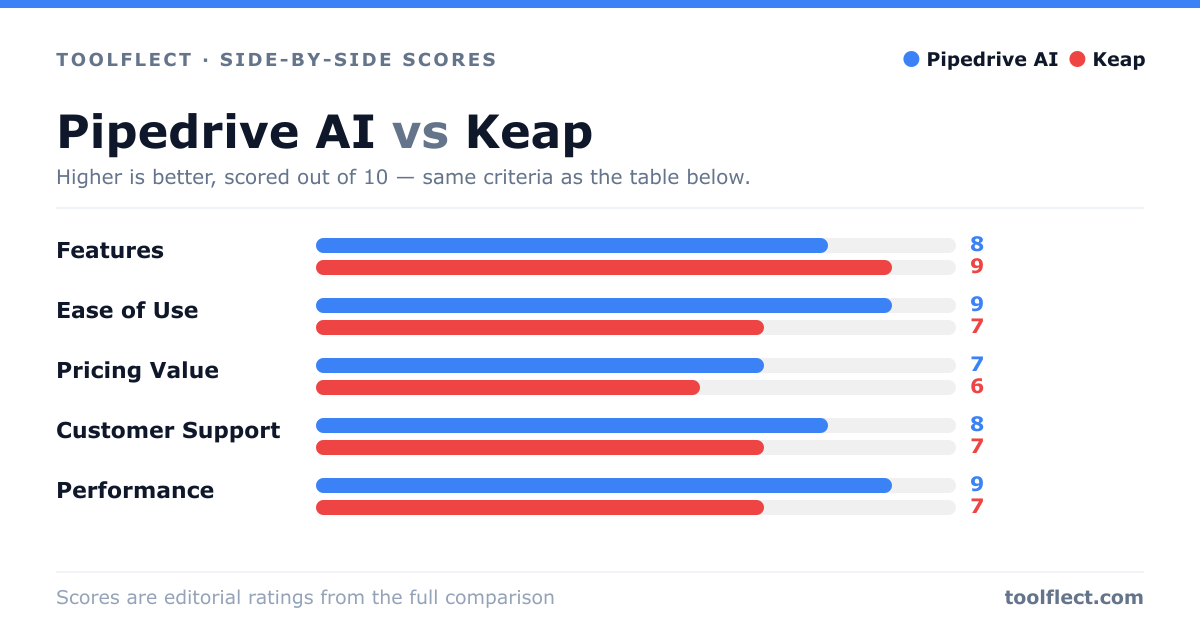
| Criterion | Pipedrive AI | Keap |
|---|---|---|
| Features | 8/10 – AI sales assistant, pipeline management, email integration | 9/10 – Marketing automation, CRM, lead scoring, e-commerce tools |
| Ease of Use | 9/10 – Intuitive interface, quick setup | 7/10 – Powerful but complex, requires training |
| Pricing Value | 7/10 – Higher tiers for AI, but good value for sales-focused teams | 6/10 – More expensive for full features, but comprehensive |
| Customer Support | 8/10 – Responsive support, extensive knowledge base | 7/10 – Good support but mixed reviews on response times |
| Performance | 9/10 – Fast and reliable, minimal downtime | 7/10 – Occasional slowdowns reported |