
Pictory vs Vidyo.ai: Which AI Video Tool Wins?
Overview
Pictory and Vidyo.ai are two leading AI-powered video creation platforms that simplify video production for marketers, content creators, and businesses. Pictory excels at transforming text content (blog posts, scripts) into engaging videos with automatic captioning and stock media. Vidyo.ai specializes in repurposing long-form videos into short, shareable clips using AI to identify key moments and generate highlights, captions, and social media snippets. Both tools reduce editing time and improve video output, but they cater to different workflows.
Key Features Comparison
- Pictory: Text-to-video conversion, automatic captioning, storyboard creation, stock media library (over 3 million assets), voiceover generation, brand customization, and cloud-based editing. Supports multiple languages and offers a blog-to-video feature.
- Vidyo.ai: Video repurposing, AI highlight extraction, auto-captioning with emojis, template-based editing, social media export (TikTok, Reels, Shorts), and scene segmentation. Focuses on converting long videos into multiple short clips quickly.
Pros & Cons
Pictory
- Pros: Automatically generates short clips from long videos; AI-powered text-based editing; easy for beginners; cloud-based, no software installation.
- Cons: Limited customization options; voiceover quality can be robotic; no mobile app; pricing may be high for occasional users.
Vidyo.ai
- Pros: Fast video processing; supports multiple languages; offers auto-subtitles and translation; good for social media content.
- Cons: Less intuitive interface; limited export resolutions on lower plans; occasional accuracy issues in transcription; customer support response can be slow.
Pictory
- Pros:
- Excellent for repurposing long-form content into short clips.
- AI-powered text-to-video with automatic captions and summaries.
- User-friendly interface with drag-and-drop editing.
- Supports multiple aspect ratios for different platforms.
- Cons:
- Limited customization options for advanced users.
- No mobile app for on-the-go editing.
- Pricing can be high for small businesses.
- Rendering can be slow for longer videos.
Vidyo.ai
- Pros:
- Fast and accurate AI-powered video editing.
- Great for creating viral clips from podcasts and long videos.
- Offers a free tier with basic features.
- Automatic captions and highlight detection.
- Cons:
- Limited export resolution on lower plans.
- No desktop app; web-based only.
- Advanced features require a subscription.
- Occasional inaccuracies in AI-generated summaries.
Pictory
- Pros: AI-powered text-to-video conversion from scripts or articles; automatic captions and subtitles; extensive stock media library; easy-to-use interface for beginners.
- Cons: Limited customization options for advanced users; video length restrictions on lower plans; no real-time collaboration features.
Vidyo.ai
- Pros: Fast video editing with AI; supports repurposing long videos into short clips; automatic highlight detection; good for social media content creation.
- Cons: Steeper learning curve for complex edits; watermark on free plan; limited export resolutions on basic tiers.
Pictory
Pros: Excellent for creating videos from scratch using text; easy to use with intuitive interface; large stock library; good for SEO and blog promotion; reliable customer support.
Cons: Limited advanced editing features; video repurposing capabilities weaker than Vidyo; pricing can be high for premium plans.
Vidyo.ai
Pros: Superb for repurposing long videos into clips; AI highlight detection saves time; built-in social media optimization; affordable pricing for basic plans.
Cons: Less suitable for text-to-video creation; fewer customization options; customer support response time can vary; limited stock media.
Pricing Comparison
Pictory offers three tiers: Standard ($23/month), Professional ($47/month), and Teams ($163/month). All plans include a free trial with watermarks. Vidyo.ai has a Free tier (limited exports), Starter ($19/month – 60 min video input), Professional ($39/month – 180 min), and Agency ($99/month – 600 min). Both provide annual discounts. Pictory is more expensive for higher features, while Vidyo is cost-effective for video repurposing.
Best Use Cases
- Pictory: Best for bloggers, content marketers, and businesses needing to turn articles or scripts into polished videos quickly. Ideal for educational content, product demos, and social media posts where text is primary.
- Vidyo.ai: Best for podcasters, webinar hosts, and social media managers who need to extract highlights from long videos (e.g., interviews, presentations) and create multiple short clips for platforms like TikTok, Instagram Reels, and YouTube Shorts.
Verdict
Choose Pictory if your focus is creating videos from text and you want a rich stock media library with robust captioning. Choose Vidyo.ai if you regularly produce long-form videos and need to repurpose them into short clips efficiently. Both tools are excellent but serve different primary needs; your decision should be based on whether you start with text or video.
Visual Comparison
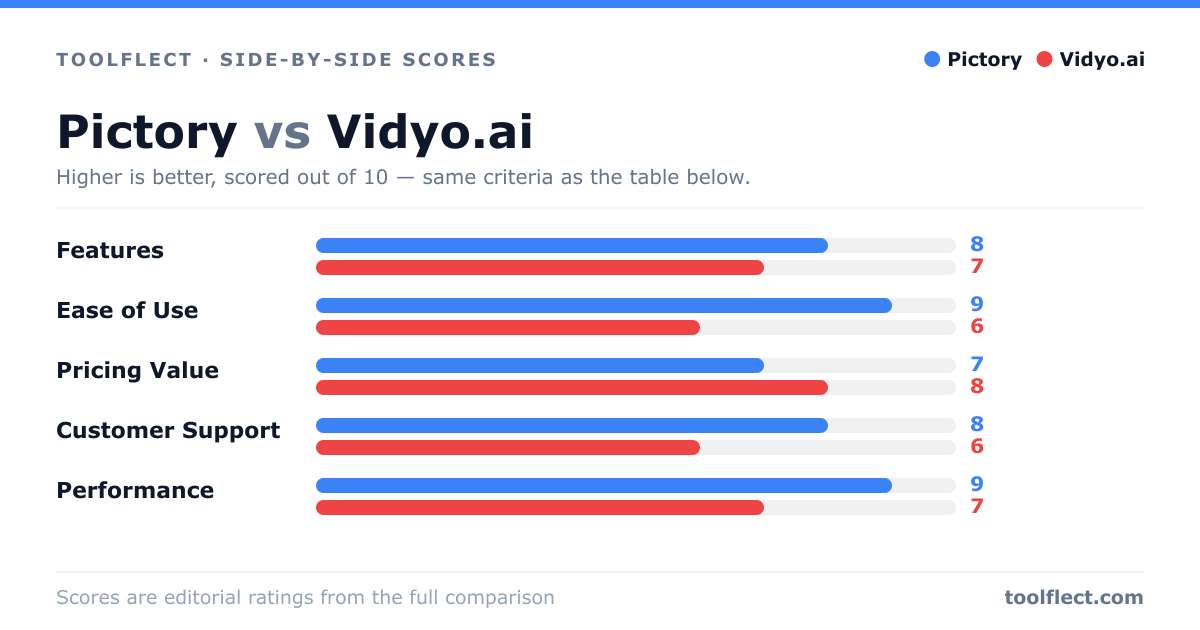
| Criterion | Pictory | Vidyo.ai |
|---|---|---|
| Features | 8/10 – Text-based editing, auto-clips, voiceover | 7/10 – Auto-subtitles, translation, multi-language |
| Ease of Use | 9/10 – Intuitive interface, quick learning curve | 6/10 – Steeper learning curve, less intuitive |
| Pricing Value | 7/10 – Higher cost but robust features | 8/10 – More affordable for basic needs |
| Customer Support | 8/10 – Responsive, helpful support | 6/10 – Slower response times |
| Performance | 9/10 – Reliable, fast processing | 7/10 – Good speed but occasional glitches |