
Google Assistant vs Alexa: Which AI Voice Assistant Wins?
Overview
Google Assistant and Amazon Alexa are two of the most popular AI voice assistants, integrated into a wide range of smart devices. Google Assistant is known for its superior natural language processing and search capabilities, while Alexa boasts a vast ecosystem of skills and third-party integrations. This article provides a detailed, unbiased comparison to help you decide which assistant suits your needs.
Key Features Comparison
- Natural Language Understanding: Google Assistant excels at understanding context and follow-up questions, while Alexa is improving but still lags behind.
- Smart Home Control: Both support extensive smart home devices, but Alexa has a larger library of compatible products.
- Skills and Actions: Alexa offers over 100,000 skills; Google Assistant has fewer but focuses on quality and deep integration.
- Device Ecosystem: Alexa is available on Echo devices, while Google Assistant powers Google Nest and Android devices.
- Multilingual Support: Both support multiple languages, but Google Assistant has broader language coverage.
Pros & Cons
Google Assistant
- Pros:
- Superior natural language understanding and context awareness
- Deep integration with Google services (Search, Maps, Gmail, Calendar)
- Excellent on smart displays and Android devices
- Continually improving with Google’s AI advancements
- Cons:
- Privacy concerns due to data collection and storage
- Limited third-party smart home device compatibility compared to Alexa
- Less customizable routines and skills
- Not available on many non-Android devices
Amazon Alexa
- Pros:
- Vast ecosystem of compatible smart home devices and skills
- Strong presence in Amazon ecosystem (shopping, Prime, Fire TV)
- More flexible routines and skills for customization
- Works with a wide range of devices including iOS and Android
- Cons:
- Less natural conversation and context handling
- Privacy concerns with voice recordings and data sharing
- Can be slower to respond in complex queries
- Some features require Amazon subscriptions
Google Assistant
- Pros: Superior natural language understanding and context awareness; deep integration with Google services (Search, Maps, Gmail); extensive knowledge base for answering questions.
- Cons: Limited third-party smart home device compatibility compared to Alexa; privacy concerns due to data collection; fewer skills and routines than Alexa.
Alexa
- Pros: Vast ecosystem of compatible smart home devices; extensive skills library (over 100,000); strong shopping and Amazon integration; better for controlling multiple devices.
- Cons: Less natural conversation flow; sometimes struggles with complex queries; more ads and promotional content in responses; privacy concerns with voice recordings.
Google Assistant
- Pros:
- Superior natural language understanding and context awareness.
- Deep integration with Google services (Search, Maps, Calendar).
- Works well on a wide range of devices, including Android phones and smart displays.
- Excellent at answering factual questions.
- Cons:
- Limited third-party smart home device compatibility compared to Alexa.
- Privacy concerns due to data collection and storage.
- Some features are region-specific.
Amazon Alexa
- Pros:
- Vast ecosystem of compatible smart home devices.
- Extensive skills library with thousands of third-party integrations.
- Strong shopping and voice purchasing capabilities.
- Better for controlling multiple smart home devices simultaneously.
- Cons:
- Less natural conversational abilities compared to Google Assistant.
- Occasional issues with understanding complex queries.
- Privacy concerns with always-on microphones and data usage.
Google Assistant
- Pros: Superior conversational AI, excellent search integration, proactive assistance (e.g., calendar reminders).
- Cons: Smaller skill library, less third-party hardware support, privacy concerns with Google data collection.
Alexa
- Pros: Vast skill ecosystem, wide device compatibility, strong shopping features (Amazon integration).
- Cons: Less natural conversations, limited contextual awareness, fewer languages compared to Google Assistant.
Pricing Comparison
Both Google Assistant and Alexa are free to use on their respective devices. However, some advanced features (e.g., Alexa Guard Plus, Google Nest Aware) require subscription fees. Overall, the core assistants are available at no cost, making pricing a non-issue for most users.
Best Use Cases
- Google Assistant: Ideal for users heavily invested in Google services (Gmail, Calendar, Google Home), those who value natural conversations, and Android phone owners.
- Alexa: Best for Amazon shoppers, smart home enthusiasts wanting maximum device compatibility, and users who prefer a wide variety of skills.
Verdict
Neither assistant is universally superior—the choice depends on your ecosystem and priorities. If you value natural language understanding and Google integration, choose Google Assistant. If you want the broadest smart home support and skill library, go with Alexa.
Visual Comparison
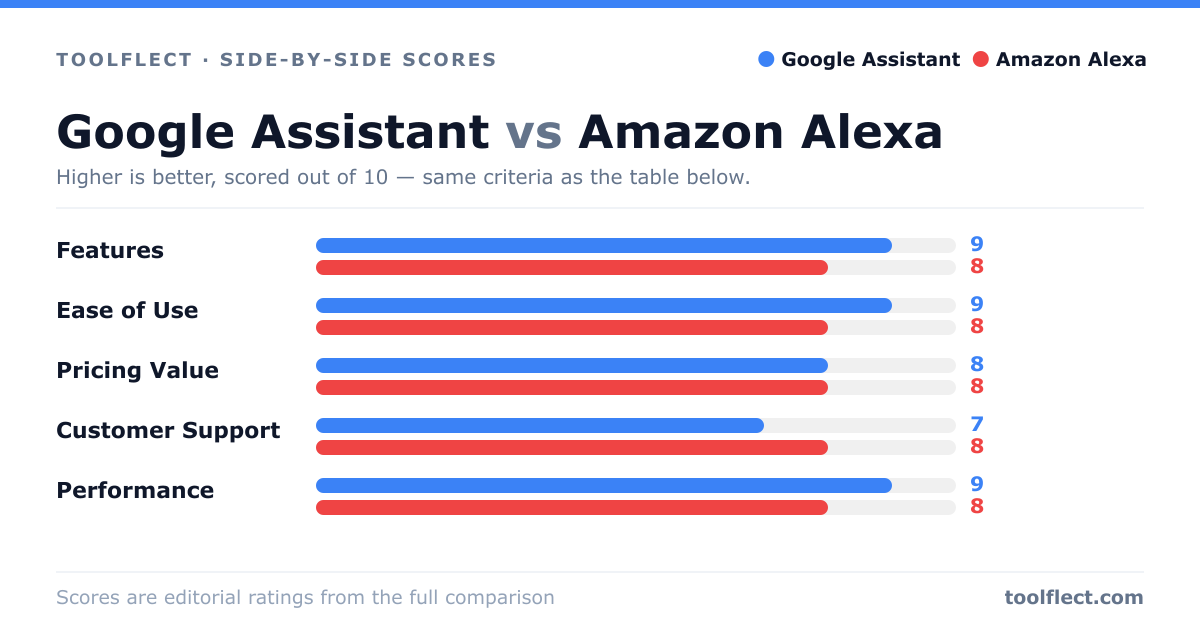
| Criterion | Google Assistant | Amazon Alexa |
|---|---|---|
| Features | 9/10 – Deep Google integration, proactive assistance | 8/10 – Extensive skills and smart home support |
| Ease of Use | 9/10 – Natural language, intuitive | 8/10 – Simple but less conversational |
| Pricing Value | 8/10 – Free with Android, good value | 8/10 – Free with Echo, but some features need subscriptions |
| Customer Support | 7/10 – Google support, community forums | 8/10 – Amazon support, extensive help docs |
| Performance | 9/10 – Fast, accurate responses | 8/10 – Reliable but sometimes slower |