
DALL-E vs Bing Image Creator: Which AI Image Generator Wins?
Overview
DALL-E, developed by OpenAI, and Bing Image Creator, powered by Microsoft using DALL-E technology, are two leading AI image generators. While both share a common foundation, they differ in access, features, pricing, and integration. This comparison breaks down their strengths and weaknesses to help you choose.
Key Features Comparison
- DALL-E: Available via ChatGPT Plus (DALL-E 3) or API. Offers high-quality, detailed images, inpainting/outpainting, and style customization. Generates images at 1024×1024 resolution with options for variations.
- Bing Image Creator: Free to use via Bing Chat or bing.com/create. Runs on DALL-E 3 but with restrictions: limited to 15 boosts per week (faster generation), then slower. No API access. Basic editing features like cropping and resizing.
Pros & Cons
DALL-E
- Pros: Exceptional image quality and detail; strong text rendering; creative and accurate interpretation of prompts.
- Cons: Not free (requires API credits or ChatGPT Plus); limited control over image variations; slower generation times.
- Pros: Integrates with OpenAI ecosystem; supports editing and inpainting.
- Cons: No built-in community or sharing features; usage limits on free tier.
Bing Image Creator
- Pros: Free to use with a Microsoft account; fast generation; integrates with Bing search.
- Cons: Image quality can be inconsistent; less detailed than DALL-E; requires internet and Microsoft account.
- Pros: Offers multiple variations per prompt; simple interface; good for quick drafts.
- Cons: Limited customization options; no API access; ads and promotional content.
DALL-E
- Pros: High-quality, photorealistic images; strong text rendering; fine-grained control via prompts.
- Cons: Requires subscription (ChatGPT Plus) for full access; limited free credits; slower generation times.
Bing Image Creator
- Pros: Free to use with a Microsoft account; integrated with Bing search; fast generation.
- Cons: Less control over image details; occasional quality inconsistencies; requires internet connection and Microsoft account.
DALL-E
- Pros: Exceptional image quality with high fidelity to text prompts; Advanced understanding of complex concepts and styles; Integration with OpenAI ecosystem and API for developers.
- Cons: Requires OpenAI account and may have usage limits; Not free for high-volume use; Can sometimes generate biased or inappropriate content.
Bing Image Creator
- Pros: Free to use with a Microsoft account; Powered by DALL-E technology but with additional safety filters; Seamless integration with Bing search and Microsoft products.
- Cons: Image resolution and quality may be slightly lower; Limited customization options compared to DALL-E; Requires internet connection and may have queue times.
DALL-E
Pros:
- Superior image quality and detail
- Advanced editing features (inpainting, outpainting)
- API access for developers
Cons:
- Requires paid subscription (ChatGPT Plus ~$20/mo) or API credits
- Limited free usage
Bing Image Creator
Pros:
- Completely free with boosts
- Easy integration with Bing search and chat
- No sign-up for basic use (Microsoft account required)
Cons:
- Lower resolution and slower without boosts
- Limited editing capabilities
- No API or advanced customization
Pricing Comparison
DALL-E: $20/month for ChatGPT Plus (limited images) or API pay-as-you-go (~$0.04-0.08 per image depending on resolution). Bing Image Creator: Free with 15 fast generations (boosts) per week, then unlimited slow generations. No tiered plans.
Best Use Cases
DALL-E: Professional projects requiring high quality, customization, and batch generation via API. Suitable for designers, marketers, and developers.
Bing Image Creator: Casual users, quick ideation, and educational purposes. Best for those who need free, easy-to-use image generation without complex features.
Verdict
Choose DALL-E if you need top-tier quality, control, and integration. Choose Bing Image Creator if you prioritize cost, ease of use, and don’t require advanced editing. Both produce excellent images, but the right choice depends on your budget and needs.
Visual Comparison
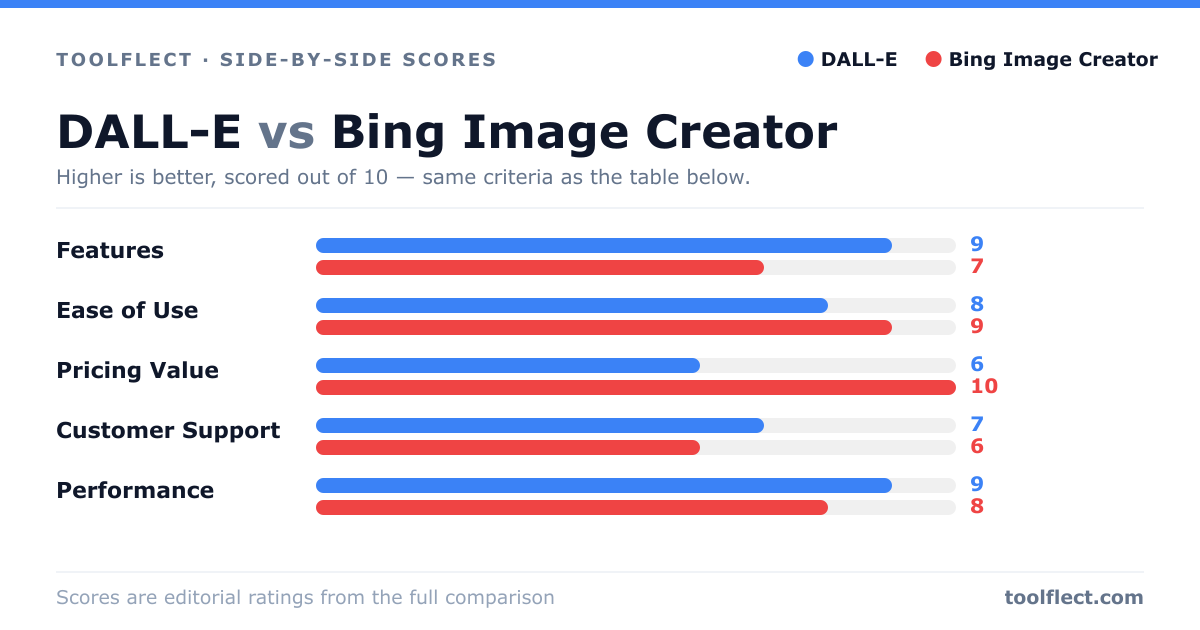
| Criterion | DALL-E | Bing Image Creator |
|---|---|---|
| Features | 9/10 – Advanced editing, inpainting, high detail | 7/10 – Basic generation, variations, no editing |
| Ease of Use | 8/10 – Requires API or ChatGPT Plus, but intuitive | 9/10 – Simple web interface, easy for beginners |
| Pricing Value | 6/10 – Paid, but high quality for professionals | 10/10 – Free, excellent for casual users |
| Customer Support | 7/10 – OpenAI support, but limited for free users | 6/10 – Microsoft support, but not dedicated |
| Performance | 9/10 – Slower but superior output | 8/10 – Fast, but occasional quality issues |