
Google Gemini vs ChatGPT: Which AI Chatbot Reigns Supreme?
Overview
Google Gemini and ChatGPT are two leading AI chatbots powered by large language models. Gemini, developed by Google, is deeply integrated with Google services and aims to provide accurate, up-to-date information. ChatGPT, created by OpenAI, is known for its versatility, creativity, and extensive plugin ecosystem. This article compares them across key dimensions to help you decide which tool better fits your workflow.
Key Features Comparison
- Multimodal Capabilities: Gemini supports text, image, and code inputs natively, while ChatGPT primarily handles text (with image analysis via GPT-4V in Plus).
- Internet Search: Both can browse the web; Gemini leverages Google Search, ChatGPT uses Bing (paid feature in Plus).
- Plugins & Integrations: ChatGPT has a vast plugin store and integrates with third-party apps. Gemini integrates tightly with Google Workspace (Docs, Gmail, Sheets).
- Context Window: Gemini offers up to 1 million tokens in some versions; ChatGPT (GPT-4 Turbo) has 128k tokens.
- Code Generation: Both generate code, but Gemini excels with Google Cloud and Android tools; ChatGPT is strong across languages.
Pros & Cons
Google Gemini
- Pros:
- Seamless integration with Google Workspace (Gmail, Docs, Drive) and Search, enhancing productivity.
- Access to Google’s vast data and advanced AI research, offering up-to-date and accurate information.
- Multimodal capabilities (text, image, audio, video) in a single model, enabling diverse use cases.
- Generous free tier with competitive pricing for advanced features.
- Cons:
- Limited availability in some regions and languages compared to ChatGPT.
- User interface can be less intuitive for non-technical users.
- Fewer third-party integrations and plugins than ChatGPT.
- Occasional factual errors or hallucinations, though improving.
ChatGPT
- Pros:
- Wide range of integrations and plugins (e.g., Zapier, browsing, code interpreter) for extended functionality.
- Highly intuitive and user-friendly interface, suitable for beginners.
- Strong community support and extensive documentation.
- Customizable instructions and memory features for personalized responses.
- Cons:
- Free tier has usage limits and may be slower during peak times.
- Less integrated with productivity suites like Google Workspace.
- Occasional biases or inaccuracies in responses.
- Advanced features (e.g., GPT-4) require a paid subscription.
Google Gemini
- Pros: Seamless integration with Google Workspace (Gmail, Docs, etc.)
- Pros: Strong multimodal capabilities (text, image, audio, video)
- Pros: Access to real-time information via Google Search
- Cons: Limited availability in some regions
- Cons: Can be less accurate on niche or technical topics
ChatGPT
- Pros: Excellent conversational abilities and context retention
- Pros: Extensive plugin ecosystem and API access
- Pros: Strong performance on creative writing and coding tasks
- Cons: Free tier can be slow during peak times
- Cons: May produce plausible-sounding but incorrect information
Google Gemini
- Pros:
- Seamless integration with Google Workspace (Gmail, Docs, etc.)
- Access to real-time information through Google Search
- Strong multimodal capabilities (image, audio, video understanding)
- Generous free tier with 1M token context window
- Cons:
- Limited availability in some regions
- Less customizable than ChatGPT (e.g., no custom instructions)
- Occasional inaccuracies in responses
- User interface can be less intuitive for beginners
ChatGPT
- Pros:
- Highly versatile with plugins and custom GPTs
- Excellent conversational abilities and context retention
- Strong community support and frequent updates
- Available on multiple platforms (web, mobile, API)
- Cons:
- Free tier has limited features (e.g., no web browsing)
- Can be slower during peak times
- Occasionally verbose or overconfident in answers
- Pricing for advanced features can be high
Google Gemini
- Pros: Free tier includes advanced features; real-time Google search; large context window; excellent for Google ecosystem users.
- Cons: Limited third-party plugins; less creative writing; occasional factual errors; availability restricted in some regions.
ChatGPT
- Pros: Rich plugin ecosystem; strong creative writing; voice and image capabilities; customizable GPTs.
- Cons: Paid Plus plan required for advanced features and faster responses; context window smaller; may require more prompt engineering.
Pricing Comparison
Google Gemini offers a generous free tier (Gemini 1.5 Flash) with access to most features. For advanced capabilities like Gemini Pro and 1 million token context, users need a Google One AI Premium plan at $19.99/month (includes 2TB storage). ChatGPT has a free tier with GPT-3.5 and limited GPT-4o access; ChatGPT Plus costs $20/month for GPT-4, DALL-E, and browsing. ChatGPT Team is $25/user/month for business.
Best Use Cases
- Google Gemini: Best for Google Workspace users, researchers needing long-context analysis, developers working with Google Cloud, and those who want a capable free assistant.
- ChatGPT: Ideal for creative writing, content generation, task automation via plugins, and users who want a customizable chatbot with a wide range of integrations.
Verdict
Both chatbots are powerful, but your choice depends on your ecosystem and use case. Google Gemini shines with its integration into Google services, large context window, and strong free offering. ChatGPT leads in creativity, plugins, and customizability. For most users, either is excellent; try both free tiers to see which aligns better with your daily tasks.
Visual Comparison
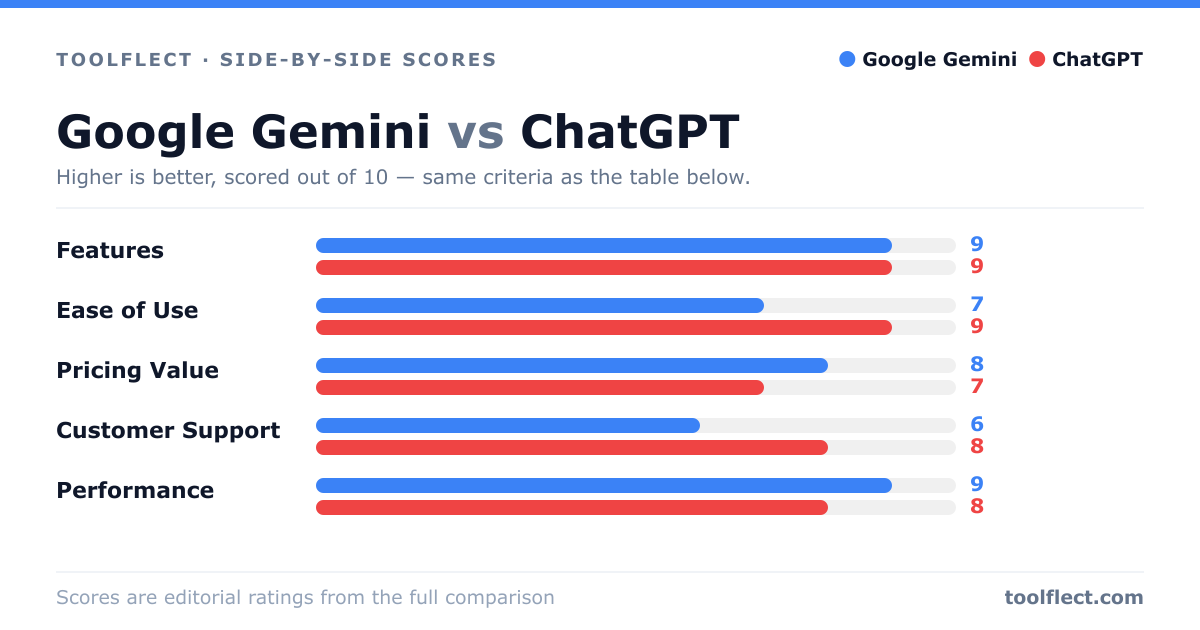
| Criterion | Google Gemini | ChatGPT |
|---|---|---|
| Features | 9/10 – Multimodal, integrates with Google services | 9/10 – Extensive plugins and code interpreter |
| Ease of Use | 7/10 – Clean but less intuitive for some | 9/10 – Very user-friendly and accessible |
| Pricing Value | 8/10 – Free tier generous, paid plans reasonable | 7/10 – Free tier limited, paid plans higher cost |
| Customer Support | 6/10 – Limited direct support, relies on help center | 8/10 – Responsive support and community forums |
| Performance | 9/10 – Fast and accurate, especially with Google data | 8/10 – High accuracy but occasional slowdowns |