
Pitch vs Beautiful.ai: Which Wins?
Overview
Pitch and Beautiful.ai are both modern presentation tools that aim to simplify the creation of visually appealing slides. Pitch focuses on collaborative team workflows, offering real-time editing, version history, and a sleek interface. Beautiful.ai leverages AI to automatically design slides based on your content, ensuring consistent and professional layouts with minimal effort. While both tools prioritize design and ease of use, they cater to different needs: Pitch is ideal for teams that require robust collaboration, whereas Beautiful.ai is perfect for individuals or teams that want automated design without manual tweaking.
Key Features Comparison
Pitch
- Real-time collaboration with multiple users editing simultaneously.
- Version history and commenting for streamlined feedback.
- Extensive template library and customizable themes.
- Integrations with Slack, Figma, and other productivity tools.
- Advanced presentation mode with speaker notes and timer.
Beautiful.ai
- AI-driven design that automatically adjusts layouts as you add content.
- Smart templates that ensure brand consistency.
- Simple drag-and-drop interface with minimal manual formatting.
- Real-time collaboration and sharing options.
- Integration with PowerPoint and Google Slides for export.
Pros & Cons
Pitch
- Pros: Real-time collaboration with team members, version history, and comments.
- Pros: Extensive template library and customizable themes.
- Pros: Integrates with Slack, Google Drive, and other productivity tools.
- Cons: Steeper learning curve for advanced features.
- Cons: Limited offline functionality.
Beautiful.ai
- Pros: AI-powered design that automatically adjusts layouts.
- Pros: Very intuitive and easy to use for beginners.
- Pros: Smart templates that ensure professional-looking slides.
- Cons: Less control over fine-grained design details.
- Cons: Limited collaboration features compared to Pitch.
Pitch
- Pros: Real-time collaboration with team members, version history, and comments.
- Pros: Extensive template library and customization options.
- Pros: Integrates with popular tools like Slack, Figma, and Google Drive.
- Cons: Steeper learning curve for advanced features.
- Cons: Limited offline functionality.
Beautiful.ai
- Pros: AI-driven design that automatically adjusts layouts and styles.
- Pros: Very intuitive and easy to use, even for beginners.
- Pros: Smart templates that ensure professional-looking slides.
- Cons: Less control over fine-grained design details.
- Cons: Limited collaboration features compared to Pitch.
Pitch
- Pros: Real-time collaboration with multiple users, version history, and comments.
- Pros: Extensive template library and customizable themes.
- Pros: Integrates with popular tools like Slack, Google Drive, and Figma.
- Cons: Steeper learning curve for advanced features.
- Cons: Limited offline functionality.
Beautiful.ai
- Pros: AI-driven design that automatically adjusts layouts and styles.
- Pros: Very intuitive and easy to use, even for beginners.
- Pros: Smart templates that ensure consistent branding.
- Cons: Less control over design details.
- Cons: Limited collaboration features compared to Pitch.
Pitch
Pros: Excellent for team collaboration, powerful editing tools, and a polished interface. It offers granular control over design elements.
Cons: Steeper learning curve for beginners, and the free plan has limited features.
Beautiful.ai
Pros: Extremely easy to use, AI handles design automatically, and it saves time for non-designers. It produces consistent, professional-looking slides.
Cons: Less flexibility for custom design, and collaboration features are not as robust as Pitch’s.
Pricing Comparison
Pitch offers a free plan with basic features, while paid plans start at $8 per user/month (annual billing) for the Pro tier. Beautiful.ai also has a free plan, but its Pro plan costs $12 per user/month (annual billing). Both offer enterprise options with custom pricing. For teams on a budget, Pitch may be more cost-effective, but Beautiful.ai’s AI features might justify the higher price for some users.
Best Use Cases
Pitch is best for teams that need to collaborate closely on presentations, such as marketing teams, product teams, or startups that value version control and real-time feedback. Beautiful.ai is ideal for sales professionals, educators, or anyone who needs to create polished presentations quickly without design skills. It’s also great for maintaining brand consistency across an organization.
Verdict
Both tools are excellent in their own right. If your priority is collaboration and fine-grained design control, choose Pitch. If you want an AI-driven, effortless design experience, choose Beautiful.ai. Ultimately, the decision depends on your specific needs and workflow.
FAQ
Can I import PowerPoint files into Pitch or Beautiful.ai?
Yes, both tools allow importing PowerPoint files. Pitch supports importing .pptx files, and Beautiful.ai also allows you to import existing presentations.
Do these tools offer offline access?
Neither Pitch nor Beautiful.ai offers full offline access; they are cloud-based and require an internet connection to create and edit presentations.
Which tool is better for non-designers?
Beautiful.ai is generally more beginner-friendly because its AI handles design automatically, while Pitch requires more manual design effort.
Can I export presentations to PDF or video?
Both tools allow exporting to PDF and video formats, though the exact options may vary depending on your plan.
Visual Comparison
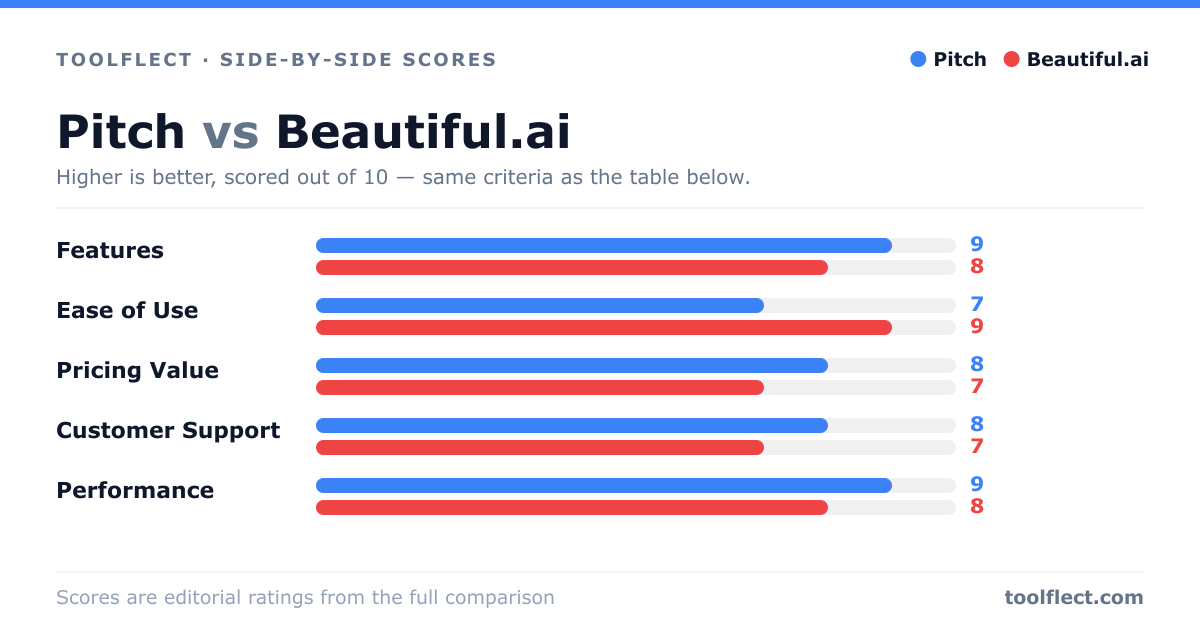
| Criterion | Pitch | Beautiful.ai |
|---|---|---|
| Features | 8/10 – Rich collaboration and integrations | 7/10 – AI design automation but fewer integrations |
| Ease of Use | 7/10 – Powerful but requires learning | 9/10 – Very intuitive and quick to start |
| Pricing Value | 8/10 – Free tier and affordable plans | 7/10 – Slightly higher cost for premium features |
| Customer Support | 7/10 – Responsive but not 24/7 | 6/10 – Limited support channels |
| Performance | 8/10 – Fast and reliable | 8/10 – Smooth performance |