
Apify vs Browse AI: Which AI Tool Wins?
Overview
Apify and Browse AI are both powerful automation platforms designed to help businesses extract data from the web and automate repetitive tasks. Apify is a comprehensive web scraping and automation platform that offers a vast ecosystem of pre-built scrapers, a cloud-based infrastructure, and developer-friendly tools. Browse AI focuses on no-code web scraping and monitoring, allowing users to create scrapers visually without writing code. While they share similarities, they cater to different audiences: Apify is more developer-centric, whereas Browse AI targets non-technical users. This article provides an unbiased comparison to help you decide which tool fits your needs.
Key Features Comparison
- Web Scraping: Apify offers a wide range of pre-built scrapers (Actors) for popular websites like Amazon, Google Maps, and social media. Browse AI provides a visual scraper builder that can extract data from any website with point-and-click simplicity.
- Automation: Apify allows you to schedule runs, set up webhooks, and integrate with other services via API. Browse AI also supports scheduling and integrations with tools like Zapier, Google Sheets, and Slack.
- Data Extraction: Both tools can extract structured data, but Apify provides more advanced data transformation options and supports custom JavaScript code. Browse AI offers a simpler interface with predefined data extraction fields.
- Monitoring: Browse AI excels at website monitoring, alerting you to changes on any page. Apify also has monitoring capabilities but is less focused on this aspect.
- Developer Tools: Apify offers a robust API, SDKs, and a headless browser for complex scraping tasks. Browse AI has a REST API but is primarily designed for non-developers.
- Proxy Management: Apify includes built-in proxy rotation and residential proxies. Browse AI also handles proxies but with less control.
Pros & Cons
Apify
- Pros: Highly customizable scraping with headless browsers and proxies; supports JavaScript-heavy sites; scalable via cloud or self-hosted.
- Cons: Steeper learning curve for non-developers; pricing can get expensive for large-scale usage.
Browse AI
- Pros: No-code visual scraper with pre-built templates; easy to set up and use; includes monitoring and data extraction features.
- Cons: Less flexible for complex scraping tasks; limited customization for advanced users.
Apify
- Pros: Highly customizable with headless browsers and code integration; supports complex scraping workflows.
- Pros: Large library of pre-built actors for common tasks; scalable cloud infrastructure.
- Pros: Transparent pricing with pay-as-you-go model; free tier available.
- Cons: Steeper learning curve for non-developers; requires technical knowledge for advanced features.
- Cons: User interface can be overwhelming for beginners.
Browse AI
- Pros: No-code visual scraper; easy to set up and use for non-technical users.
- Pros: Built-in monitoring and scheduling; data extraction in a structured format.
- Pros: Offers pre-built templates for popular sites; quick to deploy.
- Cons: Less flexible for complex scraping tasks; limited customization options.
- Cons: Pricing can be higher for large-scale usage; free tier has limitations.
Apify
- Pros: Highly customizable scraping with headless browsers; supports JavaScript-heavy sites; scalable via cloud or self-hosted; extensive integration options.
- Cons: Steeper learning curve for non-developers; pricing can escalate with usage; requires technical knowledge for complex tasks.
Browse AI
- Pros: User-friendly no-code interface; quick setup for simple scraping; built-in monitoring and scheduling; good for non-technical users.
- Cons: Limited customization for complex scraping; less flexible with dynamic content; pricing may be higher for large-scale use.
Apify
- Pros: Highly scalable, extensive library of pre-built scrapers, powerful API and SDKs, flexible for custom scraping, strong community and documentation.
- Cons: Steeper learning curve, requires some technical knowledge, pricing can be higher for large-scale usage.
Browse AI
- Pros: Extremely easy to use with no-code interface, quick setup, good for non-technical users, affordable entry-level plans, excellent for monitoring.
- Cons: Limited customization for complex scraping, less control over proxies and data extraction, may struggle with dynamic or complex websites.
Pricing Comparison
Apify offers a free tier with limited usage, then paid plans starting at $49 per month for the Starter plan, which includes 10,000 platform units (compute time). Higher tiers (Scale, Business, Enterprise) offer more resources and features. Browse AI has a free plan with 50 credits per month, and paid plans start at $19 per month for the Starter plan, which includes 100 credits. The Professional plan costs $49 per month, and the Team plan is $99 per month. Both tools offer custom enterprise pricing. Overall, Browse AI is more affordable for small-scale use, while Apify provides better value for high-volume, complex scraping.
Best Use Cases
- Apify: Ideal for developers and data scientists who need to build custom scrapers, handle large-scale data extraction, or integrate scraping into their applications. Also great for businesses that require robust automation workflows.
- Browse AI: Perfect for marketers, analysts, and small business owners who need to extract data quickly without coding. Also excellent for monitoring competitor prices, website changes, and lead generation.
Verdict
Both Apify and Browse AI are excellent tools, but they serve different purposes. If you are a developer or need advanced customization and scalability, Apify is the winner. If you are a non-technical user looking for simplicity and affordability, Browse AI is the better choice. Evaluate your technical skills, budget, and specific requirements to make the right decision.
Visual Comparison
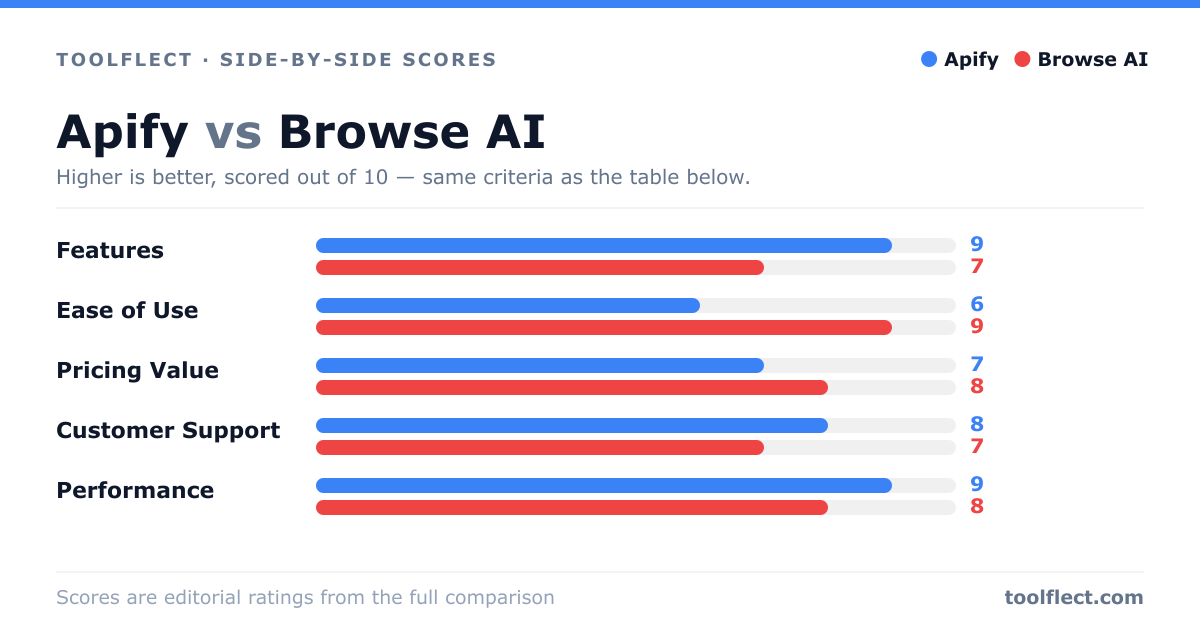
| Criterion | Apify | Browse AI |
|---|---|---|
| Features | 9/10 – Extensive API, actors, and integrations | 7/10 – Good for basic scraping, lacks advanced options |
| Ease of Use | 6/10 – Requires coding knowledge | 9/10 – Intuitive no-code interface |
| Pricing Value | 7/10 – Pay-as-you-go, can be costly at scale | 8/10 – Affordable plans for small to medium usage |
| Customer Support | 8/10 – Responsive support, active community | 7/10 – Support available, but slower response times |
| Performance | 9/10 – Reliable and fast for complex tasks | 8/10 – Good for simple tasks, may struggle with heavy sites |