
Devin vs Claude Code: Which AI Coding Assistant Wins?
Overview
Devin and Claude Code are two prominent AI-powered coding assistants designed to boost developer productivity. Devin, developed by Cognition AI, is marketed as an autonomous AI software engineer that can handle entire projects independently. Claude Code, from Anthropic, is an interactive coding assistant integrated into the terminal, focusing on code generation, explanation, and refactoring. This comparison provides an unbiased look at their features, pricing, and ideal use cases to help you choose the right tool.
Key Features Comparison
- Autonomy: Devin operates as a fully autonomous agent, capable of planning, coding, and executing tasks without constant human supervision. Claude Code is more of a collaborative assistant, requiring user prompts and guidance.
- Integration: Claude Code integrates seamlessly with popular IDEs and terminal environments, offering inline suggestions and chat. Devin works in its own cloud-based environment, which may require a shift in workflow.
- Learning and Adaptation: Devin learns from user feedback and improves over time, adapting to coding styles. Claude Code leverages Anthropic’s Claude models, which are highly capable but do not have persistent learning across sessions.
- Context Understanding: Both tools excel at understanding code context, but Devin’s ability to manage entire repositories gives it an edge in large-scale projects. Claude Code is excellent for focused tasks within a codebase.
- Multi-language Support: Both support a wide range of programming languages, but Devin’s autonomous nature allows it to handle more complex multi-file changes.
Pros & Cons
Devin
- Pros:
- Autonomous task completion with its own cloud environment
- Handles complex multi-step coding tasks with minimal supervision
- Includes built-in code editor, shell, and browser for end-to-end development
- Can learn from past interactions to improve future performance
- Cons:
- Requires significant computational resources, leading to higher costs
- May struggle with highly specialized or niche coding tasks
- Limited customization options for specific workflows
- Steep learning curve for users unfamiliar with AI-assisted development
Claude Code
- Pros:
- Excellent natural language understanding and code generation
- Seamless integration with popular IDEs and version control systems
- Strong support for pair programming and real-time collaboration
- Cost-effective pricing with flexible plans
- Cons:
- Requires manual oversight for complex tasks
- May generate code with subtle bugs if not properly guided
- Limited to the context provided in the conversation
- Dependent on internet connectivity for cloud-based features
Devin
- Pros: Fully autonomous AI software engineer that can plan, code, and execute tasks end-to-end; Integrates with GitHub, Slack, and other dev tools; Handles complex multi-step tasks with minimal human intervention; Learns from codebase and improves over time.
- Cons: Requires significant setup and configuration; Can be overkill for simple tasks; Pricing is high for individual developers; Still in early access, so may have bugs or limitations.
Claude Code
- Pros: Excellent at understanding natural language and code context; Strong code generation and refactoring capabilities; Integrates well with popular IDEs and CI/CD pipelines; Offers a free tier with generous usage limits.
- Cons: Not fully autonomous, requires more human guidance; May struggle with very complex, multi-step tasks; Limited to certain programming languages and frameworks; Performance can vary depending on the task.
Devin
- Pros:
- Autonomous task execution with minimal human intervention
- Handles complex multi-step coding tasks
- Integrated with popular dev tools (GitHub, Slack)
- Provides detailed logs and explanations
- Cons:
- Requires significant setup and configuration
- Can be slow for simple tasks
- Limited to specific workflows
- Pricing may be high for individual developers
Claude Code
- Pros:
- Excellent code understanding and generation
- Fast and responsive
- Easy to integrate into existing projects
- Strong support for multiple languages
- Cons:
- Requires manual review of generated code
- May not handle very complex tasks autonomously
- Limited context window for large projects
- Pricing can be costly for heavy usage
Devin
- Pros: High autonomy, can complete complex tasks independently, learns from feedback, ideal for large projects.
- Cons: Requires a learning curve, less interactive, may be overkill for simple tasks, pricing is higher.
Claude Code
- Pros: Interactive and intuitive, integrates with existing workflows, excellent for quick code generation and refactoring, more affordable.
- Cons: Requires more user involvement, not as autonomous, may struggle with very large-scale projects.
Pricing Comparison
Devin offers a subscription-based pricing model with plans starting at $20 per month for individuals, with enterprise options available. Claude Code is available as part of Anthropic’s API pricing, with costs based on usage (tokens). For heavy users, Claude Code can be more cost-effective, but for those seeking a hands-off experience, Devin’s flat fee might be more predictable.
Best Use Cases
- Devin: Best for teams working on large, complex codebases where autonomous task completion can save significant time. Ideal for automating repetitive coding tasks, bug fixes, and feature development.
- Claude Code: Best for individual developers and small teams who want an interactive assistant to speed up coding, get explanations, and refactor code. Perfect for quick tasks and learning.
Verdict
Both Devin and Claude Code are powerful AI coding tools, but they serve different needs. If you value autonomy and are working on large-scale projects, Devin is the winner. If you prefer a collaborative, interactive assistant that integrates seamlessly into your existing workflow, Claude Code is the better choice. Evaluate your project size, budget, and desired level of control to make the right decision.
Visual Comparison
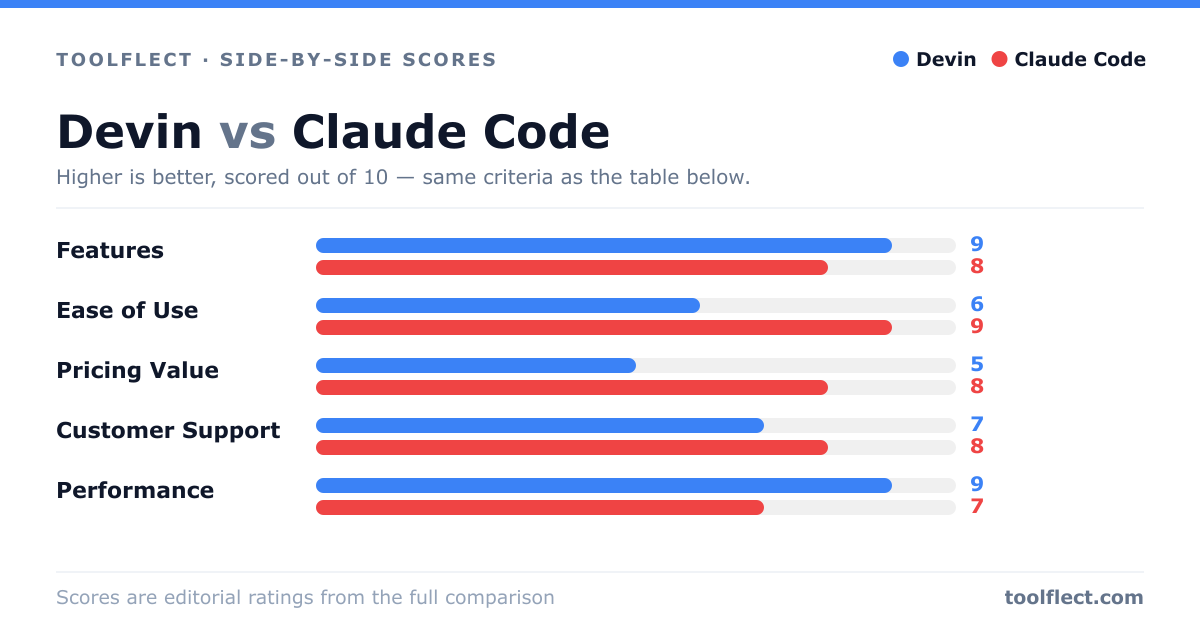
| Criterion | Devin | Claude Code |
|---|---|---|
| Features | 9/10 – Autonomous, full-stack development environment | 8/10 – Robust code generation and IDE integration |
| Ease of Use | 6/10 – Requires learning curve for autonomous workflows | 9/10 – Intuitive and familiar interface |
| Pricing Value | 5/10 – High cost due to resource usage | 8/10 – Affordable with flexible plans |
| Customer Support | 7/10 – Responsive but limited to email | 8/10 – Live chat and extensive documentation |
| Performance | 9/10 – Handles complex tasks efficiently | 7/10 – Good but requires human oversight |