
Sourcegraph Cody vs Cursor: Which AI Coding Assistant Wins?
Overview
Sourcegraph Cody and Cursor are two prominent AI-powered coding tools designed to enhance developer productivity. Cody, developed by Sourcegraph, leverages a deep understanding of codebases to provide context-aware suggestions and answers. Cursor, on the other hand, is an AI-first code editor that integrates AI directly into the editing experience, offering autocomplete, chat, and code generation. This article provides an unbiased comparison to help you choose the right tool for your needs.
Key Features Comparison
- Codebase Understanding: Cody excels at understanding large codebases, using Sourcegraph’s search and indexing to provide accurate answers and suggestions. Cursor also understands code context but is more focused on the current file and project.
- Autocomplete: Cursor offers advanced AI autocomplete that predicts multiple lines and edits, while Cody provides inline suggestions and chat-based assistance.
- Chat Interface: Cody includes a chat panel for asking questions about code, generating code, and explaining code. Cursor has a built-in chat that can reference code selections and files.
- Multi-Language Support: Both support a wide range of programming languages, but Cody’s integration with Sourcegraph allows for better cross-repository analysis.
- Editor Integration: Cursor is a standalone editor (fork of VS Code), while Cody is an extension for VS Code, JetBrains, and other editors.
- Customization: Cursor allows custom AI models and prompts, while Cody offers configurable commands and context.
Pros & Cons
Sourcegraph Cody
- Pros:
- Excellent codebase-wide context understanding, leveraging Sourcegraph’s search.
- Supports multiple LLMs (e.g., Claude, GPT) for flexibility.
- Free tier for individuals and small teams.
- Strong for enterprise code search and navigation.
- Cons:
- Steeper learning curve for setup and configuration.
- Less polished UI compared to Cursor.
- Some features require a paid plan.
- Limited support for non-code files.
Cursor
- Pros:
- Seamless integration with VS Code, easy transition.
- Excellent autocomplete and chat with codebase awareness.
- User-friendly interface with minimal setup.
- Strong community and frequent updates.
- Cons:
- Proprietary model, less control over underlying AI.
- Free tier has limited usage.
- Can be resource-intensive on large projects.
- Less effective for massive monorepos compared to Cody.
Sourcegraph Cody
- Pros:
- Excellent codebase-wide context understanding
- Supports multiple LLMs (Anthropic, OpenAI, etc.)
- Free tier available for individuals
- Strong privacy controls for enterprise
- Cons:
- Setup can be complex for large repositories
- Requires Sourcegraph instance for full features
- Occasional latency with large codebases
- Limited IDE integrations compared to Cursor
Cursor
- Pros:
- Seamless IDE integration with VSCode fork
- Real-time code suggestions and chat
- Excellent for quick edits and refactoring
- User-friendly interface for beginners
- Cons:
- Limited to its own editor environment
- Pricing can be higher for heavy usage
- Less effective on very large codebases
- Dependency on cloud for some features
Sourcegraph Cody
- Pros:
- Deep codebase understanding with context-aware suggestions.
- Supports multiple languages and integrates with popular IDEs.
- Free tier available for individuals.
- Strong for code search and navigation.
- Cons:
- Setup can be complex for large codebases.
- Limited customization compared to some alternatives.
- Requires Sourcegraph instance for full features.
- Occasional latency in suggestions.
Cursor
- Pros:
- AI-native editor with seamless chat and code generation.
- Excellent for rapid prototyping and boilerplate code.
- User-friendly interface with minimal setup.
- Strong community and regular updates.
- Cons:
- Limited to its own editor environment.
- Less effective for very large codebases.
- Pricing can be high for advanced features.
- Dependency on cloud for some features.
Sourcegraph Cody
- Pros: Deep codebase understanding, works across multiple repositories, integrates with existing editors, strong for enterprise use.
- Cons: Requires Sourcegraph setup for full potential, may have a learning curve, less integrated editing experience.
Cursor
- Pros: Seamless AI integration in the editor, excellent autocomplete, user-friendly for beginners, fast performance.
- Cons: Standalone editor may require migration, less effective for very large codebases, limited cross-repo features.
Pricing Comparison
- Sourcegraph Cody: Free tier available with limited features. Pro plan starts at $9/month per user, offering more requests and advanced features. Enterprise pricing is custom.
- Cursor: Free tier includes basic AI features. Pro plan at $20/month per user provides unlimited autocomplete and more chat messages. Business plans are available.
Best Use Cases
- Sourcegraph Cody: Ideal for developers working in large codebases, monorepos, or multiple repositories. Great for teams needing deep code search and context-aware assistance.
- Cursor: Best for developers who want a seamless AI experience within their editor, especially for smaller to medium projects. Suitable for those who prefer an all-in-one editor.
Verdict
Both tools are powerful, but they serve different needs. If you work with complex, large-scale codebases and need deep context across repositories, Sourcegraph Cody is the winner. If you prefer a streamlined, AI-native editor with excellent autocomplete and ease of use, Cursor is the better choice. Evaluate your workflow and priorities to make the right decision.
Visual Comparison
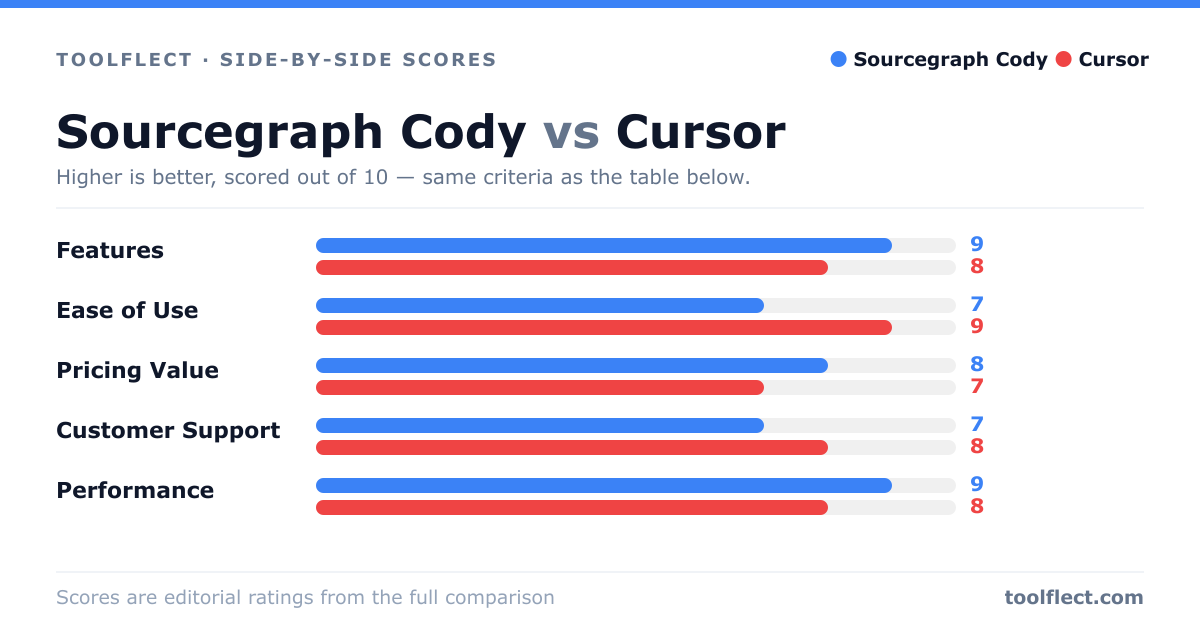
| Criterion | Sourcegraph Cody | Cursor |
|---|---|---|
| Features | 9/10 – Codebase-wide context, multi-LLM support | 8/10 – Autocomplete, chat, and codebase awareness |
| Ease of Use | 7/10 – Requires setup and learning | 9/10 – Familiar VS Code interface |
| Pricing Value | 8/10 – Generous free tier, competitive paid plans | 7/10 – Free tier limited, paid plans higher |
| Customer Support | 7/10 – Community and enterprise support | 8/10 – Responsive support and active community |
| Performance | 9/10 – Fast on large codebases | 8/10 – Smooth but can lag on huge projects |