
NotebookLM vs Mindgrasp: Which AI Research Tool Wins?
Overview
NotebookLM, by Google, is an AI-powered research assistant that helps users upload documents (PDFs, Google Docs, web URLs) and interact with them via a conversational interface. It leverages Gemini models to provide grounded answers with citations, create study guides, and summarize sources. Mindgrasp is an AI learning and research platform that ingests various content types (PDF, video, audio, web) to generate notes, summaries, quizzes, and flashcards. Both tools target students, researchers, and professionals, but they approach the workflow differently: NotebookLM excels at source-grounded Q&A and synthesis, while Mindgrasp focuses on multi-format content conversion and active recall.
Key Features Comparison
- NotebookLM: Source-grounded answers with in-text citations, notebook organization, study guides, FAQ generation, audio overviews (podcast-style summaries), and integration with Google Drive.
- Mindgrasp: Supports PDF, Word, PowerPoint, video, and audio uploads; auto-generates notes, summaries, flashcards, quizzes, and mind maps; also includes a chat assistant and transcription of audio/video content.
- Collaboration: NotebookLM allows sharing notebooks with others. Mindgrasp also enables collaboration, but its core focus is on individual learning.
- Output variety: Mindgrasp produces more study aids (flashcards, quizzes) out-of-the-box, while NotebookLM has the unique Audio Overview feature that creates engaging audio discussions.
Pros & Cons
NotebookLM
- Pros: Seamless integration with Google Drive; Excellent for summarizing and answering questions from your own documents; Free to use with a Google account.
- Cons: Limited to Google ecosystem; No citation export; Lacks advanced note-taking features like flashcards.
Mindgrasp
- Pros: Supports multiple file types (PDF, DOCX, YouTube, etc.); Generates flashcards, quizzes, and summaries; Offers citation export and source linking.
- Cons: Paid plans required for full features; Can be slow with large documents; Interface can be overwhelming for new users.
NotebookLM
- Pros: Deep integration with Google ecosystem; excellent for summarizing and querying uploaded documents; free to use with a Google account.
- Cons: Limited to Google services; requires internet connection; less customizable for advanced research workflows.
Mindgrasp
- Pros: Supports multiple file formats (PDF, DOCX, YouTube, etc.); AI-powered note-taking and quiz generation; offers more flexible pricing plans.
- Cons: Steeper learning curve; some features require a paid subscription; occasional inaccuracies in complex queries.
NotebookLM
- Pros: Seamless integration with Google Drive and Docs; Excellent source grounding with citations; Free to use with a Google account; Strong summarization and Q&A capabilities.
- Cons: Limited to Google ecosystem; No mobile app (web only); Lacks advanced note-taking features; Requires internet connection.
Mindgrasp
- Pros: Supports multiple file types (PDF, DOCX, videos, etc.); Generates quizzes and flashcards; Offers AI tutor chat; Works on mobile and web.
- Cons: Limited free tier; Some features require paid plan; Less integration with other tools; Accuracy can vary with complex documents.
NotebookLM
- Pros: High accuracy with source grounding; transparent citations; excellent for research synthesis; free tier available; intuitive interface.
- Cons: Limited to text-based sources (no audio/video); fewer study tools compared to Mindgrasp; audio overviews sometimes sacrifice nuance.
Mindgrasp
- Pros: Multimodal input (video, audio), extensive study material generation, robust note-taking, powerful for exam prep.
- Cons: Pricing can be higher for premium features; citations less detailed; interface can feel busy at times.
Pricing Comparison
NotebookLM offers a free tier with limited features (e.g., 3 notebooks, 50 sources per notebook) and a Pro tier (NotebookLM Plus) bundled with Google One Premium or Google Workspace plans, starting around $20/month. Mindgrasp has a free plan with limited credits, but its premium plans start at approximately $9.99/month for basic, $14.99/month for the Plus tier, and a lifetime deal option. Both have student discounts. In terms of value, Mindgrasp’s basic paid plan is cheaper than NotebookLM’s full Pro upgrade, but NotebookLM’s free tier is more generous for basic research.
Best Use Cases
- NotebookLM: Ideal for deep research, literature reviews, synthesizing multiple academic papers, and producing a conversational overview of your sources.
- Mindgrasp: Perfect for students who need to convert lecture videos and textbooks into flashcards, quizzes, and structured notes. Also great for professionals who consume content in multiple formats (e.g., webinars, PDFs).
Verdict
Both tools are powerful, but they serve different primary needs. If you are a researcher or writer who needs interactive source interrogation and reliable citations, NotebookLM is the clear winner. If you are a student or lifelong learner who wants to turn any content into study materials and maximize retention, Mindgrasp offers more comprehensive learning features. In a head-to-head, NotebookLM excels at grounded AI reasoning with sources, while Mindgrasp wins on versatility in input types and output variety. Ultimately, the best choice depends on your workflow—select NotebookLM for research, Mindgrasp for learning and exam preparation.
Visual Comparison
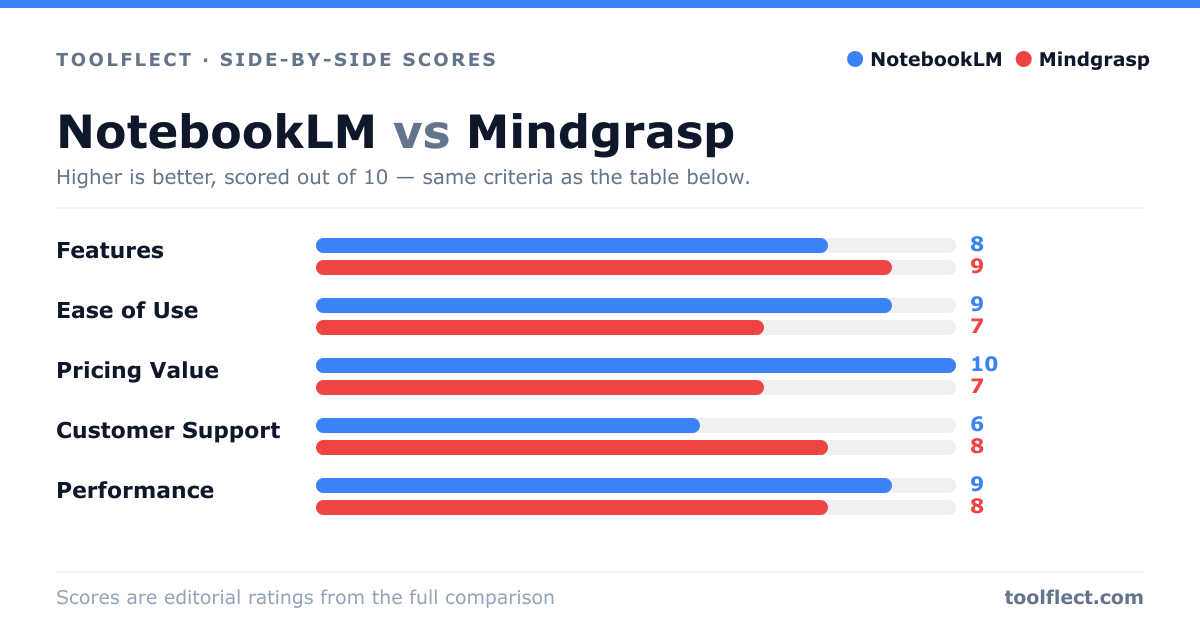
| Criterion | NotebookLM | Mindgrasp |
|---|---|---|
| Features | 8/10 – Core Q&A and summarization, but limited to Google Drive files. | 9/10 – Rich features including quizzes, flashcards, and multi-format support. |
| Ease of Use | 9/10 – Simple, clean interface integrated with Google Drive. | 7/10 – More complex due to many options, but manageable. |
| Pricing Value | 10/10 – Free with Google account. | 7/10 – Paid plans, but reasonable for the features. |
| Customer Support | 6/10 – Relies on Google support, no dedicated help for NotebookLM. | 8/10 – Responsive support via email and chat. |
| Performance | 9/10 – Fast and accurate for Google Drive documents. | 8/10 – Good performance, but can lag with large files. |