
Asana AI vs Monday AI: Which AI Tool Wins for Productivity & Automation?
Overview
Asana AI and Monday AI are two leading AI-powered productivity platforms that automate workflows, manage projects, and enhance team collaboration. Both leverage artificial intelligence to streamline task assignments, predict deadlines, and generate insights. While Asana AI integrates deeply with existing Asana features, Monday AI offers a highly customizable interface with automation recipes. This comparison helps you decide which tool fits your team’s needs.
Key Features Comparison
- AI-Powered Suggestions: Asana AI provides smart suggestions for task dependencies, workload balancing, and project timelines. Monday AI offers AI-generated status updates, formulas, and automation suggestions based on recurring patterns.
- Automation: Asana AI includes rule-based automation (e.g., auto-assign tasks, set due dates) with AI recommendations. Monday AI has an extensive automation library with “if this, then that” recipes that can be triggered by AI.
- Natural Language Processing: Asana AI allows users to create tasks, set reminders, and ask for project summaries via natural language commands. Monday AI’s AI assistant helps draft updates, answer queries, and generate reports from natural language input.
- Integration Ecosystem: Both integrate with popular tools like Slack, Microsoft Teams, Google Workspace, and Salesforce. Asana AI has deeper integration with its own portfolio and goal tracking; Monday AI excels with multi-platform automation through its API and third-party connectors.
- Dashboards & Reporting: Asana AI provides AI-driven insights on project health and team capacity. Monday AI offers customizable AI dashboards with predictive analytics and anomaly detection.
Pros & Cons
Asana AI
- Pros: Smart prioritization of tasks based on deadlines and dependencies; AI-powered workload balancing to prevent burnout; natural language commands for quick task creation; integration with Asana’s extensive project management features.
- Cons: AI features require a premium plan; limited customization of AI suggestions; may not be as intuitive for complex workflows; AI insights can be overwhelming for small teams.
Monday AI
- Pros: AI automations for repetitive tasks; predictive analytics for project timelines; user-friendly interface with drag-and-drop; strong visual dashboards for tracking progress.
- Cons: AI capabilities are less advanced than Asana’s; higher cost for advanced AI features; limited natural language processing; some users report a learning curve for advanced automations.
Asana AI
- Pros: Smart prioritization of tasks based on deadlines and dependencies; natural language input for quick task creation; AI-powered workload balancing to prevent burnout.
- Cons: Advanced AI features require premium plans; limited customization of AI suggestions; can be overwhelming for small teams.
Monday AI
- Pros: Intuitive AI automation builder for repetitive tasks; AI-generated status updates and summaries; strong visual dashboards with AI insights.
- Cons: AI features not available on basic plans; occasional inaccuracies in AI-generated content; learning curve for complex automations.
Asana AI
- Pros: Smart prioritization of tasks using AI; integrates with natural language to create tasks; provides predictive insights for project timelines.
- Cons: Advanced AI features require premium plans; can be overwhelming for simple task management; limited customization of AI workflows.
Monday AI
- Pros: AI-powered automation builder simplifies workflows; intuitive visual interface with AI suggestions; strong collaboration features with AI assistance.
- Cons: AI capabilities are less mature than Asana’s; some AI features are only available on higher tiers; occasional inaccuracies in AI-generated recommendations.
Asana AI
- Pros: Strong project structure (dependencies, milestones), excellent for large teams, robust timeline view, AI suggestions improve planning accuracy.
- Cons: Steeper learning curve, automation limited compared to Monday AI, pricing can be high for advanced features.
Monday AI
- Pros: Extremely customizable boards, intuitive drag-and-drop interface, rich automation library, visual dashboards.
- Cons: Can become cluttered with too many boards, AI features are newer and less mature, reporting may require add-ons.
Pricing Comparison
Asana AI is included in the Business tier ($30.49 per user/month) and above, which includes AI features. Monday AI’s AI capabilities are available in the Pro plan ($12 per user/month) and above, with additional costs for advanced automations. Overall, Monday AI offers a more affordable entry point for AI features, while Asana AI’s premium pricing reflects deeper project management functionality.
Best Use Cases
- Asana AI: Ideal for teams with complex project dependencies, portfolio management, and organizations needing detailed capacity planning and risk analysis.
- Monday AI: Best for creative teams, sales pipelines, and operations that require flexible workflows, quick automation, and visually intuitive boards.
Verdict
Both tools are powerful, but your choice depends on your team’s workflow. Choose Asana AI if you prioritize structured project management with AI-driven insights. Choose Monday AI if you need a customizable, automation-friendly platform with a lower cost of entry. Test both with free trials to see which AI features better augment your productivity.
Visual Comparison
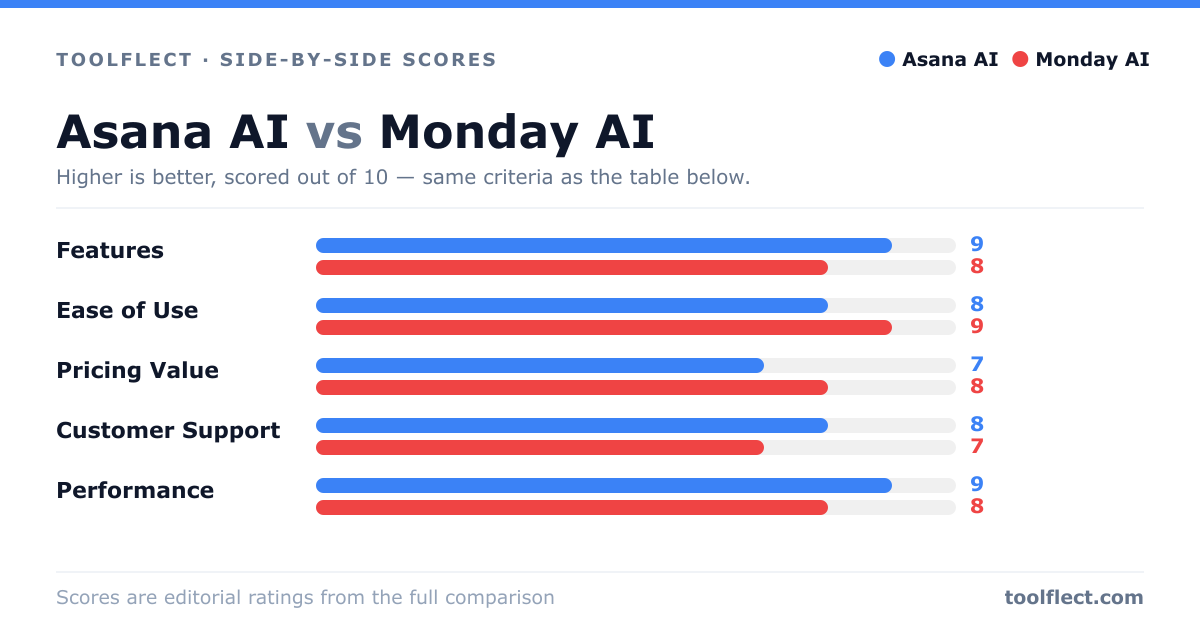
| Criterion | Asana AI | Monday AI |
|---|---|---|
| Features | 9/10 – Robust AI for task prioritization and workload management | 8/10 – Good automation and predictive analytics |
| Ease of Use | 8/10 – Intuitive but can be complex for new users | 9/10 – Very user-friendly with drag-and-drop |
| Pricing Value | 7/10 – Premium pricing for AI features | 8/10 – Competitive pricing with AI add-ons |
| Customer Support | 8/10 – Responsive support with extensive resources | 7/10 – Good support but slower response times |
| Performance | 9/10 – Fast and reliable AI processing | 8/10 – Solid performance with occasional lags |