
Codeium vs Tabnine: Which AI Code Completion Tool Dominates?
Overview
Codeium and Tabnine are leading AI-powered code completion tools designed to boost developer productivity. Codeium offers a free tier with extensive language support and IDE integrations, while Tabnine provides both cloud-based and local AI models with a focus on privacy. This comparison examines their key differences.
Key Features Comparison
- Language Support: Codeium supports 70+ languages; Tabnine supports 20+ languages but with deep learning models.
- IDE Integrations: Both integrate with VS Code, JetBrains, and others; Codeium also supports Jupyter, Colab, and more.
- Privacy: Tabnine offers on-premise/local models for data security; Codeium only cloud-based.
- Context Awareness: Codeium uses full repository context; Tabnine uses recent code and optional whole-file analysis.
- Additional Features: Codeium includes AI chat and search; Tabnine focuses solely on code completion.
Pros & Cons
Codeium
- Pros: Free for individual developers, supports 70+ languages, integrates with major IDEs, offers chat and search features.
- Cons: Privacy concerns due to cloud processing, occasional inaccuracies in suggestions, limited customization options.
Tabnine
- Pros: Strong privacy with on-premise deployment, supports 30+ languages, customizable models, good for enterprise.
- Cons: Free tier limited, higher pricing for advanced features, less accurate for less common languages.
Codeium
- Pros: Free for individual developers with unlimited completions; supports over 70 languages; offers chat and in-editor assistance; strong IDE integrations.
- Cons: Privacy concerns for enterprise (code used for training); less customizable than Tabnine; occasional inaccuracies in complex code.
Tabnine
- Pros: Privacy-first with on-premise and private cloud options; highly customizable with local models; supports many languages and IDEs; good for enterprise compliance.
- Cons: Free tier limited; can be slower on large codebases; requires more setup for advanced features.
Codeium
- Pros: Free for individual developers, supports 70+ languages, offers chat and search features.
- Cons: Privacy concerns due to cloud processing, less customizable than Tabnine.
Tabnine
- Pros: Strong privacy with on-premise options, highly customizable with local models.
- Cons: Limited free tier, requires more setup for advanced features.
Codeium
Pros: Free for individuals and small teams; broad language support; integrated chat and search.
Cons: Only cloud-based; limited offline use; customer support slower on free tier.
Tabnine
Pros: Privacy-focused with local models; fine-tuned completions; reliable enterprise support.
Cons: Costly for full features; fewer languages; no built-in chat or search.
Pricing Comparison
Codeium: Free for individuals and up to 20 users; paid Teams plan at $15/user/month with advanced features.
Tabnine: Free tier limited to 100 completions/month; Pro at $12/month; Enterprise with custom pricing for local models.
Best Use Cases
- Codeium: Ideal for budget-conscious developers, startups, and teams needing multi-language support and collaborative features.
- Tabnine: Best for enterprises requiring data privacy, compliance, and on-premise deployment.
Verdict
Choose Codeium for its generous free tier and broad feature set. Choose Tabnine if privacy and local AI are non-negotiable. Both are excellent tools; the decision hinges on your team’s size, budget, and security needs.
Visual Comparison
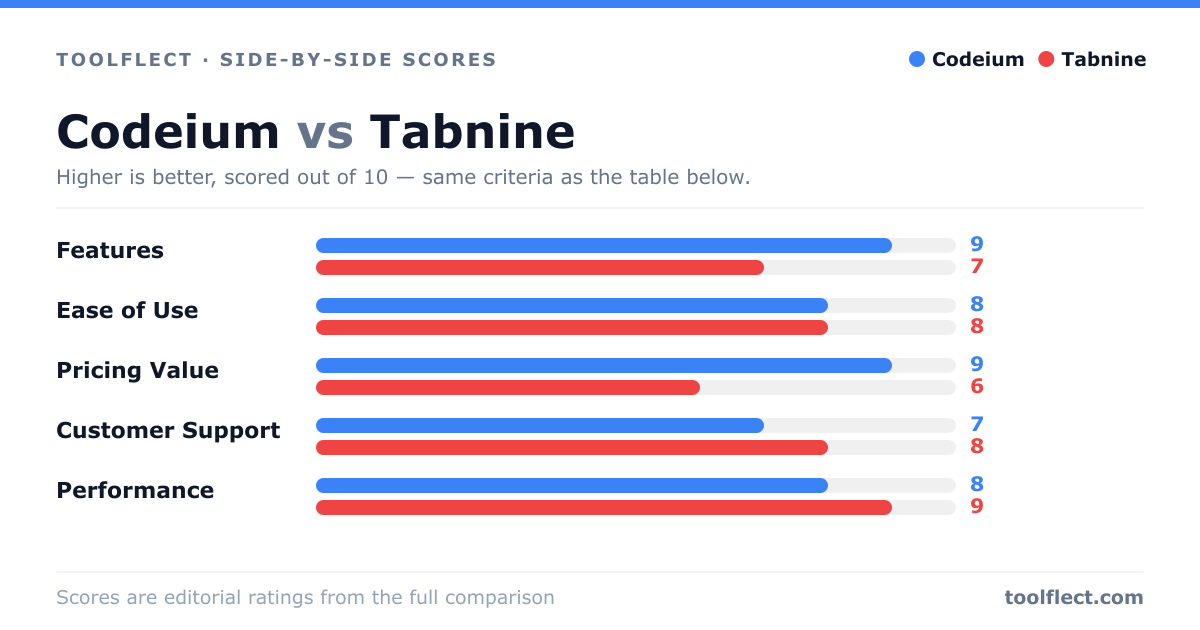
| Criterion | Codeium | Tabnine |
|---|---|---|
| Features | 9/10 – Rich features including chat, search, and multi-language support | 7/10 – Solid autocomplete, but fewer extras |
| Ease of Use | 8/10 – Simple setup, intuitive interface | 8/10 – Easy to install, but configuration can be complex |
| Pricing Value | 9/10 – Excellent free tier, affordable pro | 6/10 – Higher cost, limited free tier |
| Customer Support | 7/10 – Responsive community, limited direct support | 8/10 – Good support, especially for enterprise |
| Performance | 8/10 – Fast suggestions, but occasional lag | 9/10 – Very fast and reliable, even offline |