
Opus Clip vs Munch: Which AI Video Repurposing Tool Wins?
Overview
Opus Clip and Munch are two leading AI-powered video repurposing platforms designed to transform long-form videos into short, engaging clips for social media. Opus Clip is known for its advanced AI that identifies key moments and generates multiple clips automatically. Munch focuses on extracting highlights with customizable templates and direct publishing integrations. Both tools aim to save time and boost content reach, but they cater to slightly different workflows and user preferences.
Key Features Comparison
- AI Clip Generation: Opus Clip uses proprietary AI to analyze video content and create viral-ready clips with captions and emojis. Munch also uses AI but emphasizes manual refinement and template control.
- Customization: Munch offers more granular editing options for clip layout, text overlays, and aspect ratios. Opus Clip provides simpler customization with presets.
- Platform Integrations: Both support YouTube, TikTok, Instagram, and LinkedIn. Munch has direct publishing to some platforms; Opus Clip focuses on export and manual upload.
- Batch Processing: Opus Clip allows batch processing of multiple video segments. Munch processes one video at a time but with more detailed per-clip editing.
- Analytics: Munch includes built-in analytics for clip performance. Opus Clip relies on external platform analytics.
Pros & Cons
Opus Clip
- Pros:
- AI-powered clipping automatically identifies highlights and creates multiple clips from long videos.
- Provides a wide range of customization options for captions, styles, and branding.
- Supports multiple languages and offers a user-friendly interface.
- Offers a free tier with limited features, making it accessible for testing.
- Cons:
- Free plan includes watermarks on exported videos.
- Advanced features require a paid subscription, which may be costly for individuals.
- AI selection may sometimes miss context or produce less accurate clips.
- Limited integration with some social media platforms compared to competitors.
Munch
- Pros:
- Specializes in repurposing long-form content into short, engaging clips for social media.
- Uses AI to analyze content and generate captions, hashtags, and timestamps automatically.
- Offers a simple, intuitive interface with quick processing times.
- Provides a free trial and flexible pricing plans for different needs.
- Cons:
- Limited customization options for video styling and branding.
- Free trial has limited features and watermarks.
- AI-generated captions may require manual editing for accuracy.
- No dedicated mobile app for on-the-go editing.
Opus Clip
- Pros:
- AI-driven clipping automatically identifies key moments
- Generates multiple clips from a single video
- Built-in captioning and emoji overlay
- Supports multiple languages
- Cons:
- Limited customization for clip style
- Free plan has watermark and length limits
- No direct social media scheduling
Munch
- Pros:
- Advanced AI for content extraction and trend analysis
- Customizable templates and branding
- Auto-captioning with multiple styles
- Integration with social platforms for publishing
- Cons:
- Higher pricing tiers for full features
- Steeper learning curve
- Processing time can be longer for long videos
Opus Clip
- Pros: AI-powered clipping automatically identifies key moments, saving hours of manual editing.
- Pros: Generates multiple clips from a single video, perfect for multi-platform distribution.
- Pros: Provides automatic captions and emojis, enhancing engagement.
- Cons: Free plan has limited export options and watermarks.
- Cons: May occasionally miss context, requiring manual review.
Munch
- Pros: Advanced AI analyzes content for virality, suggesting optimal clip lengths and styles.
- Pros: Offers extensive customization options for branding and formatting.
- Pros: Integrates with popular social platforms for direct publishing.
- Cons: Higher pricing tiers may be costly for small creators.
- Cons: Steeper learning curve due to many features.
Opus Clip
Pros: Fast automated clipping, good viral scoring, supports multiple languages, affordable pricing.
Cons: Limited customization, no direct publishing, less control over output.
Munch
Pros: Extensive customization, direct publishing to social platforms, built-in analytics, brand kit features.
Cons: Steeper learning curve, higher starting price, slower batch processing.
Pricing Comparison
Opus Clip: Free tier (limited clips), Pro at $19/month for 100 clips, and higher tiers for more volume.
Munch: Free trial (15 min video), Starter at $29/month for 5 hours of video, Professional at $79/month.
Opus Clip is generally more affordable for heavy users, while Munch’s cost can add up with higher video needs.
Best Use Cases
- Opus Clip: Best for content creators who need quick, bulk generation of social clips without much editing, and prefer a budget-friendly option.
- Munch: Ideal for brands and marketers requiring polished, branded clips with direct publishing and performance tracking.
Verdict
Choose Opus Clip if you prioritize speed, volume, and cost-efficiency. Choose Munch if you need advanced customization, analytics, and integration with your social media workflow. Both are excellent tools; the decision hinges on your specific editing needs and budget.
Visual Comparison
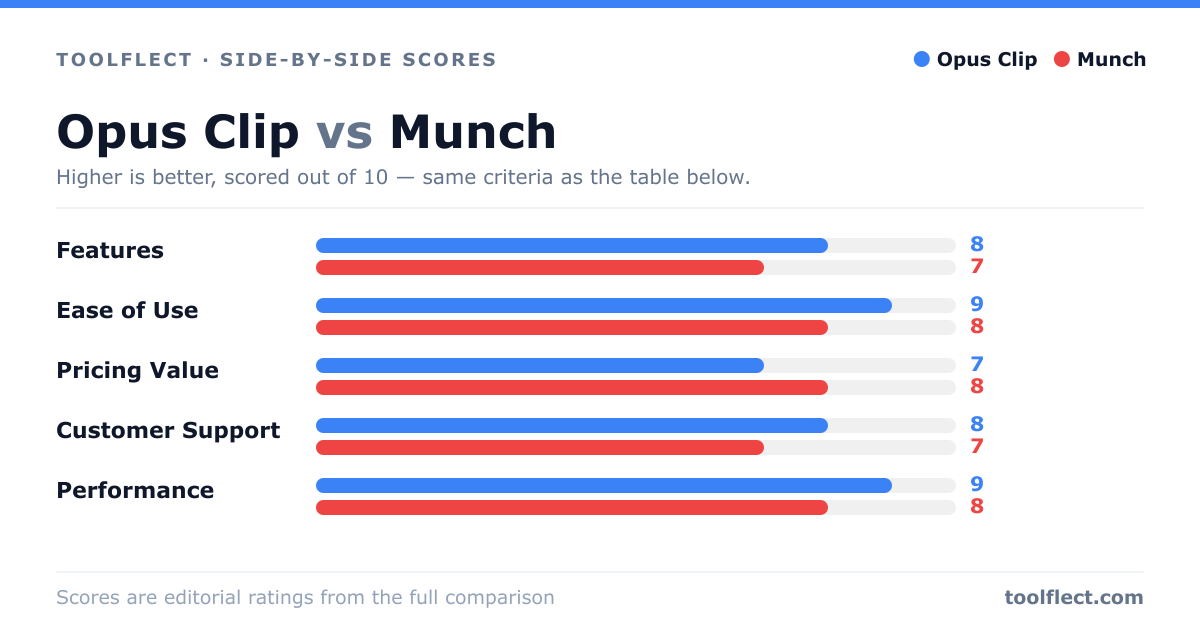
| Criterion | Opus Clip | Munch |
|---|---|---|
| Features | 8/10 – Extensive customization, multi-language support, and AI clipping. | 7/10 – Focused on social media repurposing with auto-captions and hashtags. |
| Ease of Use | 9/10 – Intuitive interface, easy navigation, and quick setup. | 8/10 – Simple workflow, but fewer advanced options. |
| Pricing Value | 7/10 – Free tier available, but paid plans are pricey for individuals. | 8/10 – Competitive pricing with a free trial and flexible plans. |
| Customer Support | 8/10 – Responsive support via email and live chat. | 7/10 – Support via email and help center, slower response times. |
| Performance | 9/10 – Fast processing, high-quality output, reliable. | 8/10 – Good performance, but occasional delays during peak times. |